Building an AI agent means giving an artificial intelligence a clear mission, reliable data, tools it can act with, channels to reach people on, and rules that keep it in check. You can build an AI agent with ChatGPT, Claude, Make, n8n, OpenClaw, Hermes, LangChain or a dedicated platform like Botnation AI. The right choice depends mostly on your goal: answering customer questions, qualifying leads, automating emails, supporting internal teams, connecting a CRM, building a smart FAQ or deploying an omnichannel AI chatbot (Facebook, Instagram, website, WhatsApp, and more)?
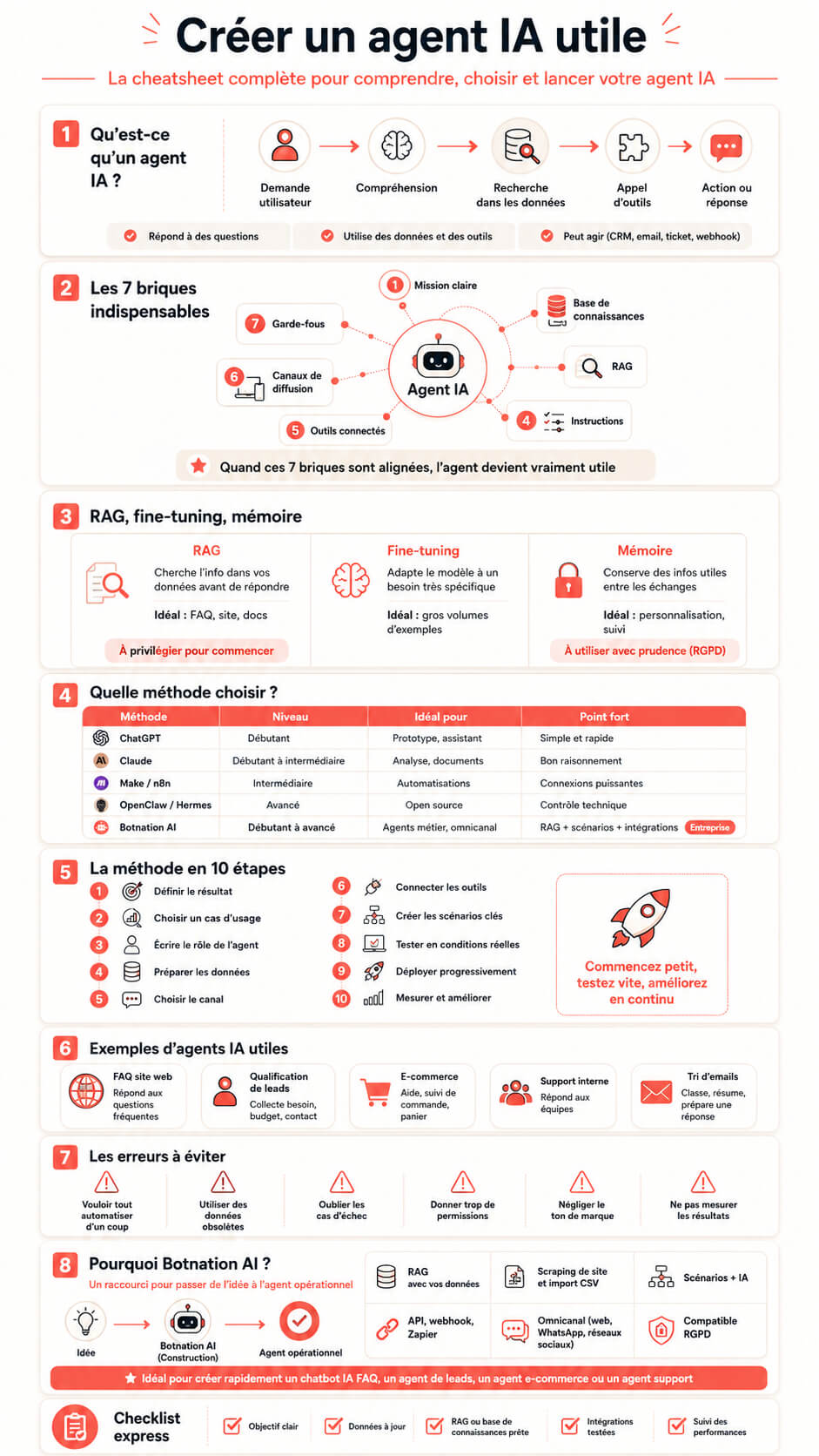
Building an AI agent has gotten much simpler. You no longer need a heavy technical project to get a first useful result. But a good AI agent is more than “plugging ChatGPT into a website.” To be reliable, it has to understand requests, use your data, follow your rules, act inside your tools and know when to hand off to a human.
This guide walks through how to build an AI agent step by step, which solutions fit your skill level, how to build an AI agent with ChatGPT, Claude, Make, n8n, OpenClaw, Hermes and Botnation AI, and above all how to end up with an agent that is genuinely useful to your business (not just an impressive demo that turns out to be useless in practice).
What is an AI agent?
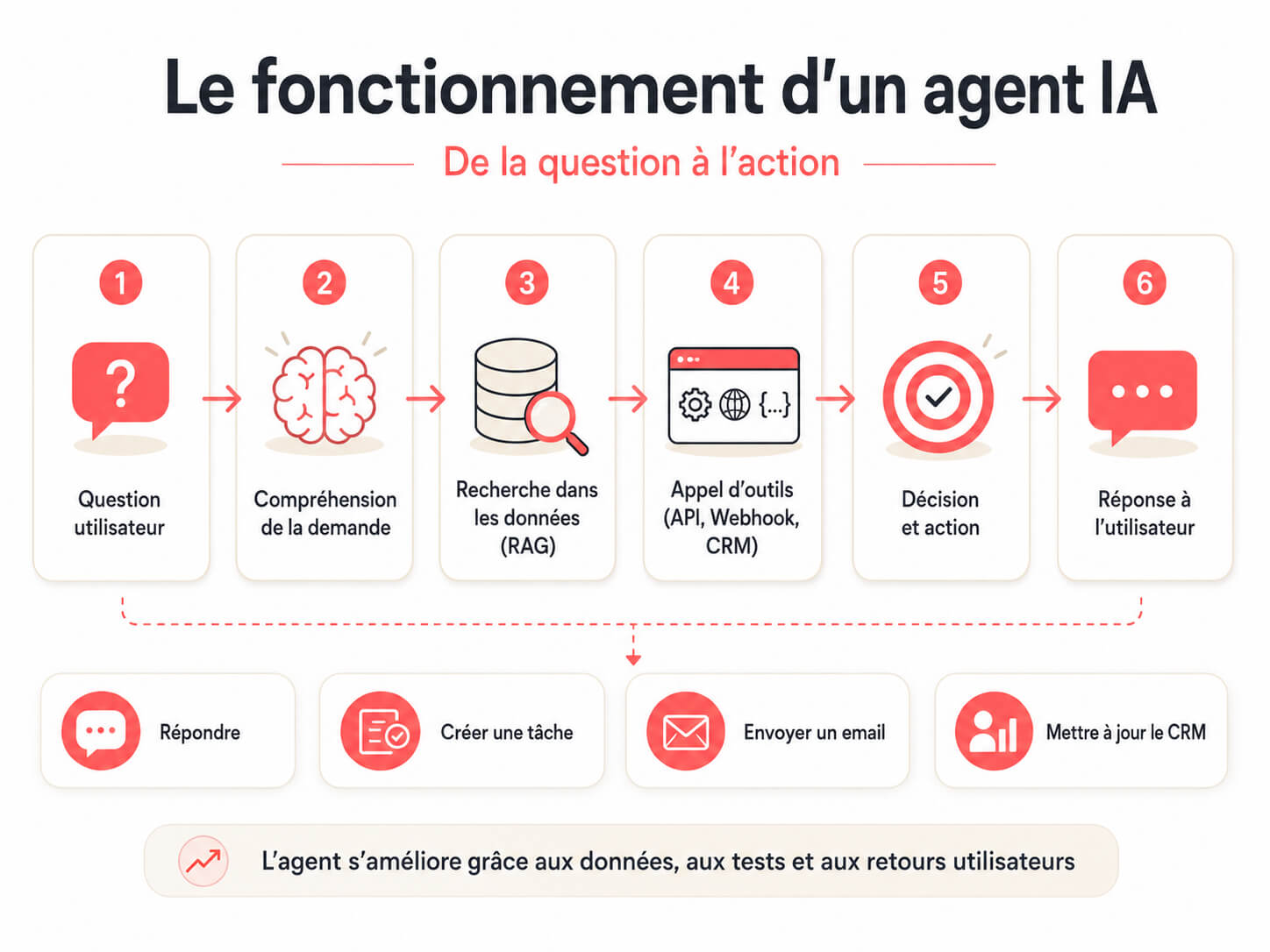
An AI agent is a smart assistant that can understand a request, reason about a goal, pick an action and carry it out through connected tools. It does not stop at answering a question. It can also look up information, query a knowledge base, qualify a prospect, create a task, send an email, update a CRM, open a ticket or hand a conversation to an advisor. In other words, it completes tasks on its own. This is what people mean by agentic AI.
An AI agent usually runs on a language model such as ChatGPT, Claude, Mistral, Gemini or another LLM. But the model alone is not enough. To become useful, the agent needs a clear framework. The model supplies the language and the reasoning. Everything that makes the agent dependable sits around it.
- a specific mission
- rules of behavior
- a reliable knowledge base
- communication channels (website, WhatsApp, social media, email, Slack, and so on)
- connected tools (CRM, calendar, customer support, spreadsheet, Zapier, API, webhook, and so on)
- safety limits
- performance indicators
- a continuous improvement process
A simple example: a FAQ chatbot answers a question about opening hours. A more advanced AI agent answers the question, checks whether the request involves an existing order, asks for the order number, creates a support ticket and alerts the right team. The whole process is handled by the AI agent.
AI agent, AI chatbot, AI assistant: what’s the difference?
The terms are close, but they do not mean exactly the same thing. Telling them apart helps you pick the right tool from the start.
| Type of tool | What it does | Real example | Level of autonomy |
|---|---|---|---|
| Rule-based chatbot | Follows a script or a decision tree | Asking for a name, an email and a need before passing the lead on | Low |
| AI chatbot | Answers from a knowledge base | Answering common questions on an ecommerce site | Medium |
| AI assistant | Helps a user in a specific context | Summarizing a document, drafting a reply or analyzing a memo | Medium |
| AI agent | Understands, decides and acts through connected tools | Qualifying a lead, creating a CRM record, sending an email and notifying a sales rep | High |
In practice, an AI agent can include an AI chatbot, a decision tree, a scripted flow, a knowledge base, connectors and automations. That combination is what makes it genuinely useful. Very few working agents are pure AI or pure scripting. Most are a mix, with the script covering the moments you cannot afford to get wrong.
Why build an AI agent for your business?
A well-designed AI agent can remove repetitive tasks, speed up customer support, improve sales conversion and free your teams to focus on high-value requests. It works 24/7, answers instantly and applies the same rules in every conversation.
The most common use cases are:
- Customer support: answer common questions, guide the user, create a ticket when needed
- Lead qualification: ask the right questions, gauge how interested someone is, push the data to the CRM
- Ecommerce: recommend a product, track an order, handle returns, cut cart abandonment
- Human resources: answer internal questions, support onboarding, explain procedures
- Real estate: qualify inquiries, suggest listings, collect search criteria, schedule a viewing
- Hospitality and travel: answer questions about availability, services, hours, bookings and add-ons
- IT and internal support: help teams solve simple incidents, point them to the right procedures
- Back office: sort emails, extract data, draft replies, categorize requests
- Marketing: personalize messages, enrich profiles, trigger campaigns
- B2B sales: identify the need, score the prospect, offer a meeting, alert a sales rep
The best AI agent is not necessarily the most complex one. It is the one that solves a real problem with a measurable result (time saved, fewer tickets, higher conversion rate, shorter response time). Pick that number before you build anything and you will know within a month whether the project worked.
The 7 building blocks every AI agent needs
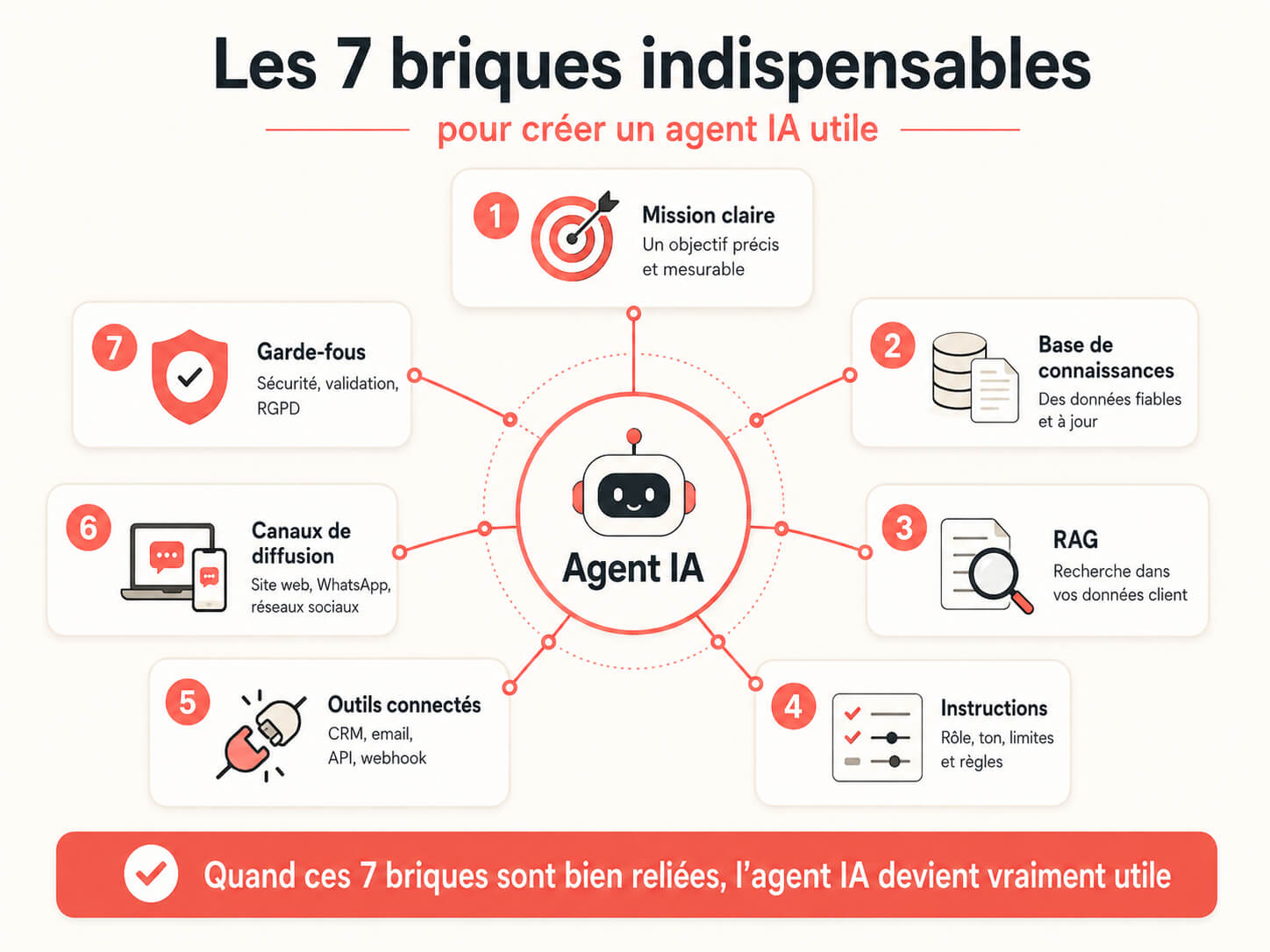
1. A clear mission
Before you pick a tool, write the agent’s mission in one sentence. Example: “Qualify website visitors and send hot prospects to the CRM.” That sentence has to be simple, concrete and measurable.
Avoid missions that are too broad, like “help customers.” Aim for something like this instead: “Answer questions about delivery times and create a ticket if the customer asks for a refund.”
2. A reliable knowledge base
An AI agent answers better when it draws on your real data. That data can come from a website, a FAQ, a product catalog, a CSV file, internal documents, a CRM database or business documentation.
With Botnation AI, you can let the AI crawl your site to pull in the useful information, or import data as CSV. That way you can quickly build an AI FAQ chatbot that answers with your company’s own data.
3. RAG on your own customer data
RAG (retrieval augmented generation) lets the AI agent search your data before it generates an answer. In plain terms, the agent does not answer from general knowledge alone. It leans on your documents, your pages, your files or your customer data to produce a more relevant answer.
Example: a visitor asks “What are your delivery times for Belgium?” The agent looks the information up in your knowledge base, retrieves the right rule, then writes a clear answer. This limits made-up answers and improves reliability.
Botnation lets you put customer data to work to produce relevant AI answers (through site crawling, CSV import and knowledge bases). This is especially useful for FAQs, customer support, ecommerce, training providers, B2B services and sales inquiries.
4. Precise instructions
Instructions define the agent’s role, tone, limits and decision rules. They should spell out what the agent must do, what it must avoid and when it should hand off to a human.
Sample instructions:
“You are a customer support AI agent for an online store. Answer only with the information available in the knowledge base. If the question is about a refund, ask for the order number. If the user is unhappy or you do not have the answer, offer to pass the request on to an advisor.”
5. Connected tools
An AI agent gets truly powerful when it can act. It can connect to a CRM, an inbox, a support tool, a calendar, a spreadsheet, an Airtable base, an ERP, a line-of-business application or a marketing platform.
With no connections, the agent stays conversational. With connections, it becomes operational (it works for you). That gap is usually the difference between a demo people enjoy and a tool people keep using.
6. Distribution channels
An AI agent has to be available where your customers or your teams already are: website, WhatsApp, Messenger, Instagram, email, Slack, Microsoft Teams, Telegram, SMS or a customer portal.
Botnation AI lets you build an omnichannel AI chatbot, in particular for a website, social media and WhatsApp. That matters if your users do not all come through the same channel.
7. Guardrails
The more an agent can do, the tighter its boundaries need to be. Define the allowed actions, the handoff cases, the sensitive data, the mandatory approvals and the limits on what it can say.
Example: an agent can draft an email but ask for human approval before sending it. It can create a CRM record, but it should not change an order without confirmation. The rule of thumb: the harder an action is to undo, the more it needs a human in the loop.
RAG, fine-tuning, memory: what’s the difference?
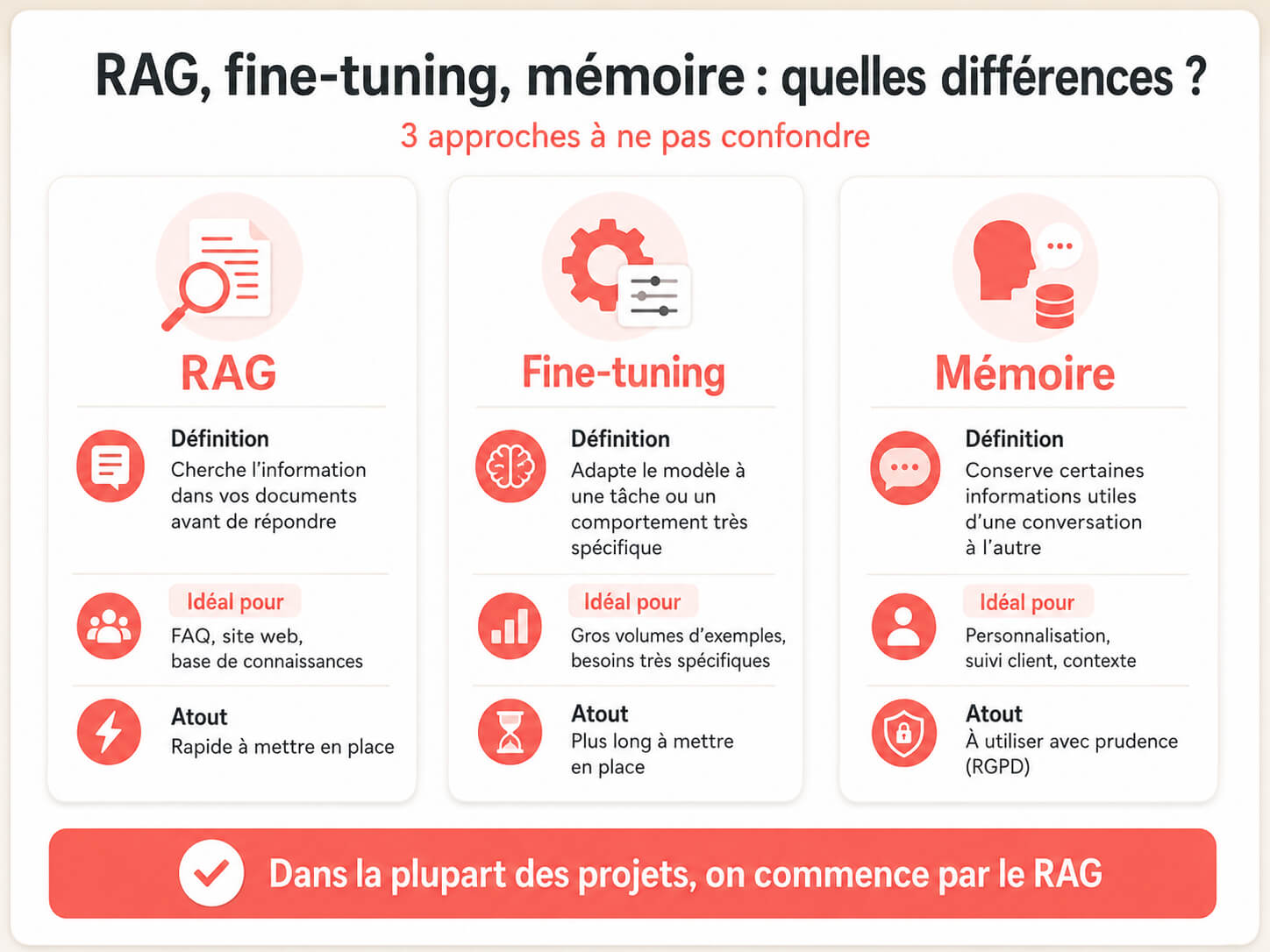
These three ideas come up constantly when you look into how to build an AI agent. They do not solve the same problem.
| Concept | Plain definition | When to use it | Example |
|---|---|---|---|
| RAG | The agent searches your data before answering | When you have a FAQ, a site, documents or a catalog | Answering from a company’s delivery terms |
| Fine-tuning | The model is retrained on specific examples | When you have many examples and a very specific need | Adapting a model to a highly specific business classification |
| Memory | The agent keeps certain information over time | When it has to personalize conversations or track history | Remembering that a customer prefers to be contacted in the morning |
In most business projects, RAG is the best first choice. It lets you use your data without retraining a model. Fine-tuning can be useful later, but it takes more data, more testing and more maintenance.
Memory also calls for caution. It can improve the experience, but it has to respect privacy rules, business relevance and the GDPR. An agent does not need to remember everything a user says. It should remember only what genuinely serves the service.
Which variables should an AI agent collect?
An AI agent should do more than answer. It can also collect structured information during the conversation. That information is called variables. Variables feed a CRM, personalize the answer, qualify a request or trigger an action.
Examples of useful variables:
- last name
- first name
- phone number
- company
- company size
- main need
- estimated budget
- urgency level
- product involved
- order number
- source of the request
- contact consent
Example: a sales qualification agent can collect the need, the budget, the decision timeline and the email. It can then create a CRM record with a priority score.
Tip: do not collect too much information at once. Ask one question at a time. The experience feels smoother and the completion rate goes up. Three well-chosen variables beat ten fields nobody fills in.
Webhooks, APIs and automations: how an AI agent takes action
A useful AI agent often has to act inside other tools. That is where webhooks, APIs, Zapier, Make, n8n and connectors become important.
A webhook lets one tool send information to another as soon as an event happens. Example: a visitor gives their email in the chatbot. The chatbot automatically sends the data to a CRM through a webhook.
Botnation supports webhook connections, which opens up a lot of possibilities. You can connect your AI agent to your internal tools, to Make or n8n scenarios, to Zapier, to your CRM, to your ticketing system or to a business API.
Examples of possible actions:
- send a lead to HubSpot, Pipedrive or Salesforce
- create a row in Google Sheets
- trigger a Make scenario
- start an n8n workflow
- open a ticket in a support tool
- send a Slack notification
- draft a confirmation email
- update a status in an internal tool
- send a request to an in-house API
The rule to follow: connect the low-risk actions first. Creating a contact record, for instance, is less risky than changing an order or sending a contract. You can add more sensitive actions once you have tested.
Which method should you choose to build an AI agent?
There are several methods. The best choice depends on your goal, your technical level, the channel you want, how much autonomy you expect and your security constraints.
| Method | Best for | Strengths | Limits | Technical level |
|---|---|---|---|---|
| Botnation AI | Omnichannel AI chatbots, FAQs, leads, ecommerce, customer support | Fast, no-code, website and social channels, AI plus scripted flows, RAG on customer data, webhooks, CRM and business tool connections | You need to prepare the data and the key flows properly | Beginner to intermediate |
| ChatGPT | Personal assistant, prototype, custom GPT, internal help | Very easy to set up, good for testing an idea and building a specialized assistant | Less suited to direct deployment on a website or WhatsApp without an extra layer | Beginner |
| Claude | Document analysis, writing, reasoning, tool-assisted agents | Very good at following long instructions and working on complex content | Actions need tight guardrails, especially with external tools | Beginner to developer |
| Make and n8n | Business automations, emails, CRM, tickets, internal workflows | Very flexible, many connectors, clear workflow logic | Requires careful thinking about flows, errors and exceptions | Intermediate |
| LangChain and developer frameworks | Custom agentic applications, tool orchestration, SaaS products | Very flexible, advanced technical control, deep integration | Needs developers, heavier maintenance | Expert |
| OpenClaw | Open source agents, local agents, technical workflows, advanced experimentation | Flexible, powerful, suited to technical profiles | Security, installation, maintenance and oversight are all on you | Advanced |
| Hermes Agent | Self-hosted agent, persistent memory, personal or technical use | Local control, open source logic, advanced customization | Less direct for a customer-facing chatbot you can ship | Advanced |
| Custom development | SaaS product, complex business agent, deep integration with your IT systems | Full control, custom architecture, advanced scalability | Longer, more expensive, needs developers and maintenance | Expert |
How to build an AI agent with Botnation AI
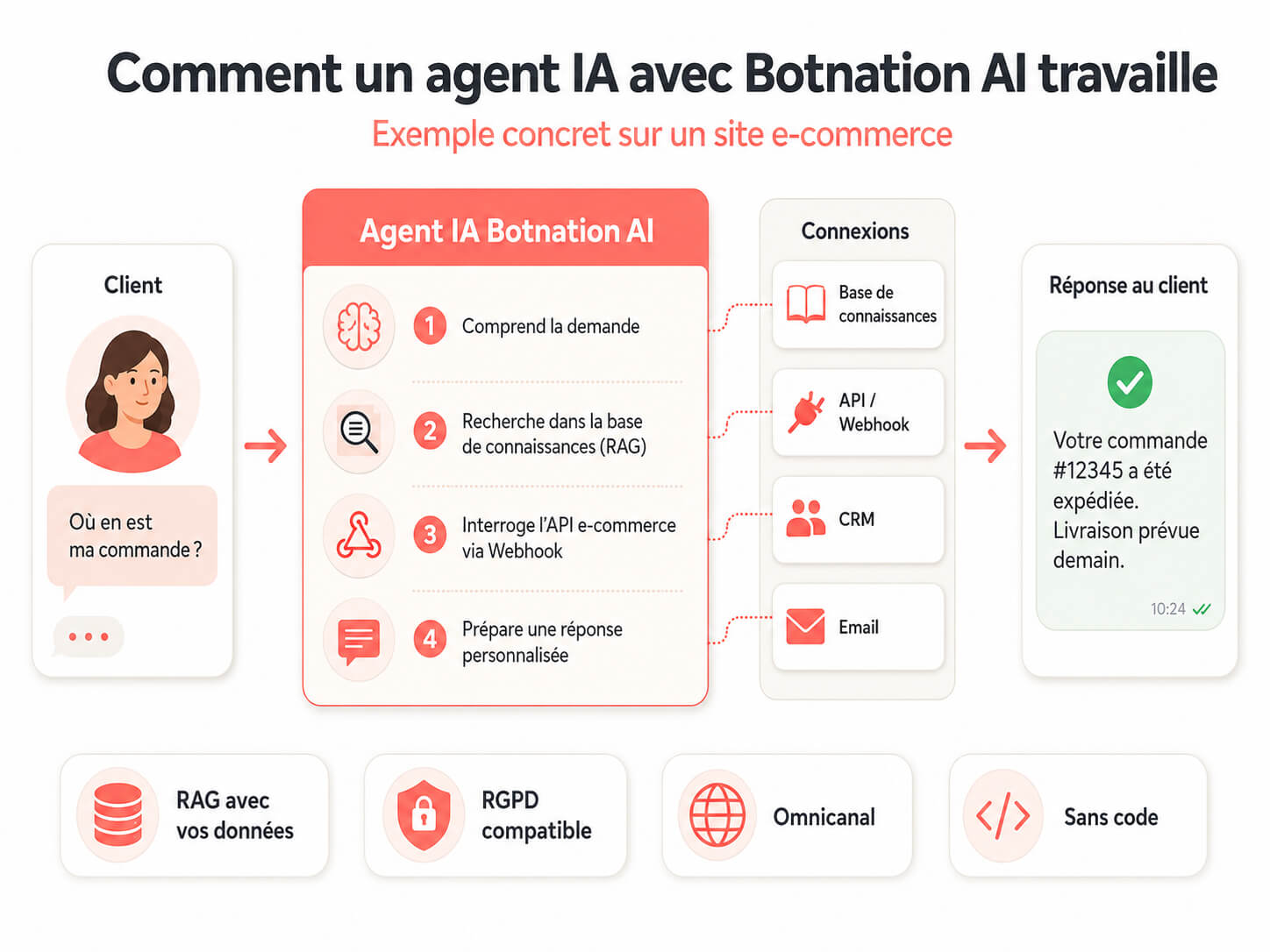
Botnation AI is often the fastest route if your goal is to deploy a chatbot or an AI agent for a business. The platform lets you build an omnichannel AI chatbot on your website, social media, WhatsApp and other channels.
You can start from one of three approaches.
Approach 1: build an AI FAQ chatbot fast
This approach works if you want to answer common questions automatically. It is ideal for a brochure site, an ecommerce store, a training provider, a franchise, an agency or a customer service team.
Steps:
- define the questions the agent has to answer
- let the AI crawl your website or import a CSV file
- set up RAG on your customer data
- define the tone of the answers
- add the human handoff rules
- test with real customer questions
- install the chatbot on your site or your channels
A concrete example: a training center can build an AI agent that answers questions about programs, pricing, funding, session dates and prerequisites. If the user asks for a quote, the agent collects the contact details and passes the lead to the sales team.
Approach 2: build an AI agent with a scripted flow
This approach takes longer but is more versatile. You build a decision tree with defined steps, conditions, questions, messages and actions. You can also plug an AI FAQ into certain parts of the flow.
It works very well for:
- lead capture
- sales qualification
- ecommerce chatbots
- diagnostic journeys
- quote requests
- customer support with human escalation
- HR and internal journeys
With Botnation AI, an AI can also help you build your scripted chatbot quickly. You save time on the structure, then adjust the messages and the conditions to fit your business.
Approach 3: build an AI agent connected through webhooks
This approach fits if you want your agent to act inside your tools. With webhook connections, the agent can pass the information it collects to an external tool or trigger an action in a workflow.
Example: a prospect chats with your chatbot on the site. The agent identifies their need, captures their email, assigns a score, then sends the data through a webhook to your CRM or to a Make scenario. Your sales rep then gets a notification with a summary of the request.
This is what turns a chatbot into an operational AI agent. It no longer just talks. It acts.
Why Botnation AI fits business needs
Botnation AI can connect chatbots to a wide range of tools through direct integrations, Zapier or webhooks: email, CRM, marketing tools, spreadsheets, business platforms and other services. Models like ChatGPT can be plugged in at different points in the flow, which lets you combine business logic with generative intelligence.
Botnation AI also suits projects that have to meet privacy and compliance requirements. The platform is GDPR-compliant, which matters for companies that collect contact details, customer requests or sales information.
The result: your chatbot becomes a real AI agent that can answer, qualify, categorize, forward, notify and trigger actions. Plans stay affordable, starting at €39 per month (so you can launch a first project without a heavy budget).
One more advantage: if you would rather not build everything yourself, Botnation’s chatbot creation experts can design your AI chatbot for you, through the Enterprise plan, on quote.
How to build an AI agent with ChatGPT
Building an AI agent with ChatGPT is a good option for testing an idea, creating an internal assistant or setting up a specialized GPT. It is also a simple way to learn the basics before moving to something more deployable.
What you can do with ChatGPT
You can build a custom GPT with:
- a name and a description
- detailed instructions
- knowledge files
- capabilities such as file analysis or web search, depending on the options available to you
- actions connected to external APIs in some cases
Example: you can build a “Product support assistant” GPT that answers questions from your documentation, rewrites the answers in your brand voice and suggests a ready-to-send reply for the customer.
One important limit
A custom GPT is very handy inside ChatGPT, but it is not always the best choice for a customer-facing agent embedded in your website, in WhatsApp or in a full sales flow. For that, you usually need a dedicated platform, an API or a tool like Botnation AI.
A starter prompt to build an AI agent with ChatGPT
You can use this prompt to frame your agent:
“Help me build an AI agent for [business]. Its mission is to [specific goal]. It is intended for [type of user]. It should answer in a [desired tone] tone. It can use the following information: [sources]. It must collect [data to collect]. It must hand off to a human if [conditions]. Give me the full instructions, sample questions, the limits to define, the variables to collect, the possible actions and the tests to run.”
This prompt turns a fuzzy idea into a usable spec. Run it once, then rewrite the output in your own words. The parts you cannot rewrite are the parts you have not decided yet.
How to build an AI agent with Claude
Claude is a strong fit for an AI agent built around reasoning, document analysis, complex writing and long instructions. You can use it as an advanced assistant or as the model inside a more technical architecture with tools.
Use cases that suit Claude
- summarizing contracts or internal documents
- analyzing complex requests
- writing long, nuanced replies
- assisting a legal, HR or support team
- interacting with tools through APIs in a developer setup
Implementation advice
Start with an assistant that advises, summarizes or prepares an action. Only then give it tools to act with. That is safer than handing it access to a full environment right away.
Example: instead of letting the agent send emails unchecked, ask it first to draft a message, explain why it is proposing that answer and request approval.
How to build an AI agent with Make or n8n
Make and n8n are very useful for turning an AI into an agent that can run a workflow. The idea is simple: the AI understands the request, then Make or n8n triggers the actions in the right tools.
A sample workflow with Make or n8n
Here is a classic scenario for an email-handling AI agent:
- a new email lands in Gmail
- the AI analyzes the message
- it categorizes the request (sales, support, invoice, urgent)
- it looks up the relevant information in a knowledge base
- it drafts a reply
- it creates a task in the CRM or the support tool
- it sends a notification to the right person
This kind of agent is very powerful for teams that want to automate internal tasks. It does require careful design of the failure cases. What happens if the AI does not understand? If the customer is angry? If the CRM data is missing? If two tools stop responding? Those exceptions have to be planned from the start.
Make or n8n: which one should you choose?
Make suits teams that want a very approachable visual interface and plenty of ready-made connections. n8n suits more technical profiles, or companies that want more control, especially with self-managed deployments.
Either way, do not start with a giant workflow. Build one simple agent first, test it, then add branches. A workflow with 40 steps and no error handling tends to break silently, and silent failures are the ones nobody catches.
Building an AI agent with LangChain or a developer framework
LangChain, LlamaIndex and other frameworks let you build custom AI agents. They are mainly useful if you want to develop a full application, orchestrate several tools, handle complex logic or embed the agent in a SaaS product.
This approach can involve:
- one or more LLMs
- a vector database for RAG
- API calls
- tool functions
- conversational memory
- an evaluation system
- logs and execution traces
This option gives you a lot of freedom, but it takes a real technical team. You have to handle security, API costs, scalability, testing, maintenance, errors and model changes.
For a company that mainly wants to launch a customer-facing agent quickly, a no-code platform like Botnation AI is generally more direct. For a custom AI product, a developer framework can make sense.
How to build a free AI agent
You can build a free or nearly free AI agent to test an idea. Several tools offer trials, free tiers or open source options. But “free” does not mean “no cost.” You will often invest time, work around usage limits, set up API keys or accept less support.
To build a free AI agent, you can:
- try a custom GPT if you have access to the features you need
- use a free or trial version of an automation tool
- prototype a workflow in n8n
- try an open source framework like OpenClaw or Hermes
- build a mini agent with a model API and a short script
For professional use, price is not the only question. Look at setup time, reliability, security, support, available channels, compliance and how easy the thing is to maintain.
A free agent that takes three weeks to configure can cost more than a simple €39 per month solution that works right away.
Building an AI agent with OpenClaw
OpenClaw is one of the open source options for advanced users who want agents that can act in a local or technical environment. This kind of approach mainly suits developers, advanced automation profiles and teams that want fine-grained control over the runtime environment.
When OpenClaw makes sense
- you want to experiment with a local agent
- you need to connect the agent to a terminal, files or internal tools
- you are willing to handle installation, permissions and security
- you have a technical team that can audit how the agent behaves
OpenClaw can be powerful, but treat it as a sensitive technical tool. An agent that can read files, run commands or use credentials has to be isolated, restricted and monitored. Avoid connecting it straight to your critical data without a sandbox, minimal permissions and logging.
Building an AI agent with Hermes Agent
Hermes Agent is another option for people looking for an open source, self-hosted agent built around persistent memory. The idea is to run an agent that keeps context and evolves with use.
When Hermes is worth a look
- you want a self-hosted personal or internal agent
- you would rather avoid full dependence on a cloud platform
- you need memory across sessions
- you are comfortable with installation and technical maintenance
For a company that mainly wants a customer-facing agent on a website, WhatsApp or social media, Hermes is often less direct than a platform like Botnation AI. For technical, experimental or self-hosted use, it can be a good fit.
Single AI agent or multi-agent system?
A single AI agent is enough for most projects. It receives a request, checks data, answers and sometimes triggers an action. That is the right choice for a FAQ, customer support, lead qualification or an ecommerce chatbot.
A multi-agent system uses several specialized agents that work together. For example:
- one agent understands the request
- one agent looks up information in the knowledge base
- one agent checks that the answer is compliant
- one agent decides which action to trigger
- one agent prepares a summary for the human team
This approach can help with complex cases, but it adds difficulty. The more agents you have, the more you have to watch costs, latency, errors and accountability. To start, build one solid agent. Move to multi-agent only if the need justifies it.
Should you use one AI model or several LLMs?
You can build an AI agent with a single model, such as ChatGPT or Claude. That is the simplest path. But some projects use several models depending on the task.
Examples:
- a fast model for simple answers
- a more powerful model for complex requests
- a specialized model for classification
- a local model for certain sensitive data
- a different model for generating summaries
A multi-LLM approach can cut costs or improve quality, but it makes the architecture more complex. For a first AI agent, start with one well-configured model. You can add other models later.
Security, GDPR and privacy: the rules to follow
An AI agent can handle customer data, emails, orders, sales inquiries or internal information. So you need to design it with security rules from day one.
What to check:
- which data is collected
- why it is collected
- how long it is kept
- who can access it
- which data is sent to external tools
- how the user is informed
- how to request deletion or correction
- which actions require human approval
Botnation AI is GDPR-compliant, which is an important point for European companies. That does not exempt you from properly defining your own usage, your forms, your consent flows, your privacy notices and your data retention policy.
Security best practices
- limit access to strictly necessary data
- avoid sending sensitive data when it serves no purpose
- require human approval for important actions
- log the actions the agent triggers
- test malicious or out-of-scope requests
- prepare a clear message for when the agent has no answer
- update the knowledge base regularly
A professional AI agent has to inspire trust. Security and compliance are not optional extras. They are part of the product.
The technical architecture of an AI agent
An AI agent can be very simple or very advanced. But the overall logic is usually the same.
Here is a classic architecture:
- User interface: web widget, WhatsApp, Messenger, Slack, email or an app
- Conversation management: history, context, variables and dialogue rules
- AI model: ChatGPT, Claude, Mistral, Gemini or another LLM
- Knowledge base: web pages, documents, CSV files, FAQ, catalog, vector database
- RAG: searching the data before generating the answer
- Connected tools: CRM, email, ticketing, calendar, spreadsheet, API, webhook
- Guardrails: business rules, compliance, human escalation, action restrictions
- Analytics: tracking conversations, errors, conversions, satisfaction and costs
On a no-code project, a platform like Botnation AI bundles most of these blocks. On a custom project, you have to assemble them yourself with development, infrastructure and maintenance.
Cloud, hosting and scalability
An AI agent has to stay fast and reliable as volume grows. If you go from 50 to 5,000 conversations a month, your system has to keep up.
Questions to ask:
- where is the data hosted?
- what is the average response time?
- what happens if the AI model does not respond?
- can the system handle several channels at once?
- do costs go up with every message?
- are the logs accessible so you can analyze errors?
For a customer-facing agent, availability is essential. If the agent replaces part of your support, it has to be monitored like a real customer relationship channel. An agent that is down for two hours on a Monday morning costs you the same conversations a closed phone line would.
Analytics, reporting and continuous improvement
An AI agent is never finished. You have to review its conversations to understand what works and what gets stuck.
Metrics to track:
- number of conversations
- automatic resolution rate
- human handoff rate
- qualified lead rate
- average response time
- unanswered questions
- recurring errors
- satisfaction rate
- revenue or opportunities generated
You can also pipe the data into reporting tools like Google Analytics 4, Looker Studio, Power BI, Tableau or a CRM. The goal is simple: prove that the AI agent delivers measurable value.
Every week, review the conversations that failed. Add the missing answers, fix the instructions, improve the flows and adjust the handoffs. That is usually where performance is won.
Voice AI agents, IoT and advanced interfaces
An AI agent is not limited to written chat. It can also be built into a voice interface, a phone system, an interactive kiosk, a connected device or a business application.
Examples:
- a voice agent that qualifies an inbound call
- an AI assistant in a reception kiosk
- an AI agent embedded in a mobile app
- an assistant connected to IoT data that flags an anomaly
- an internal agent that answers in Slack or Microsoft Teams
These use cases are more advanced. They usually require thinking through latency, speech recognition, privacy, availability and access rights. For a first project, written chat is generally easier to master.
The 10-step method for building a useful AI agent
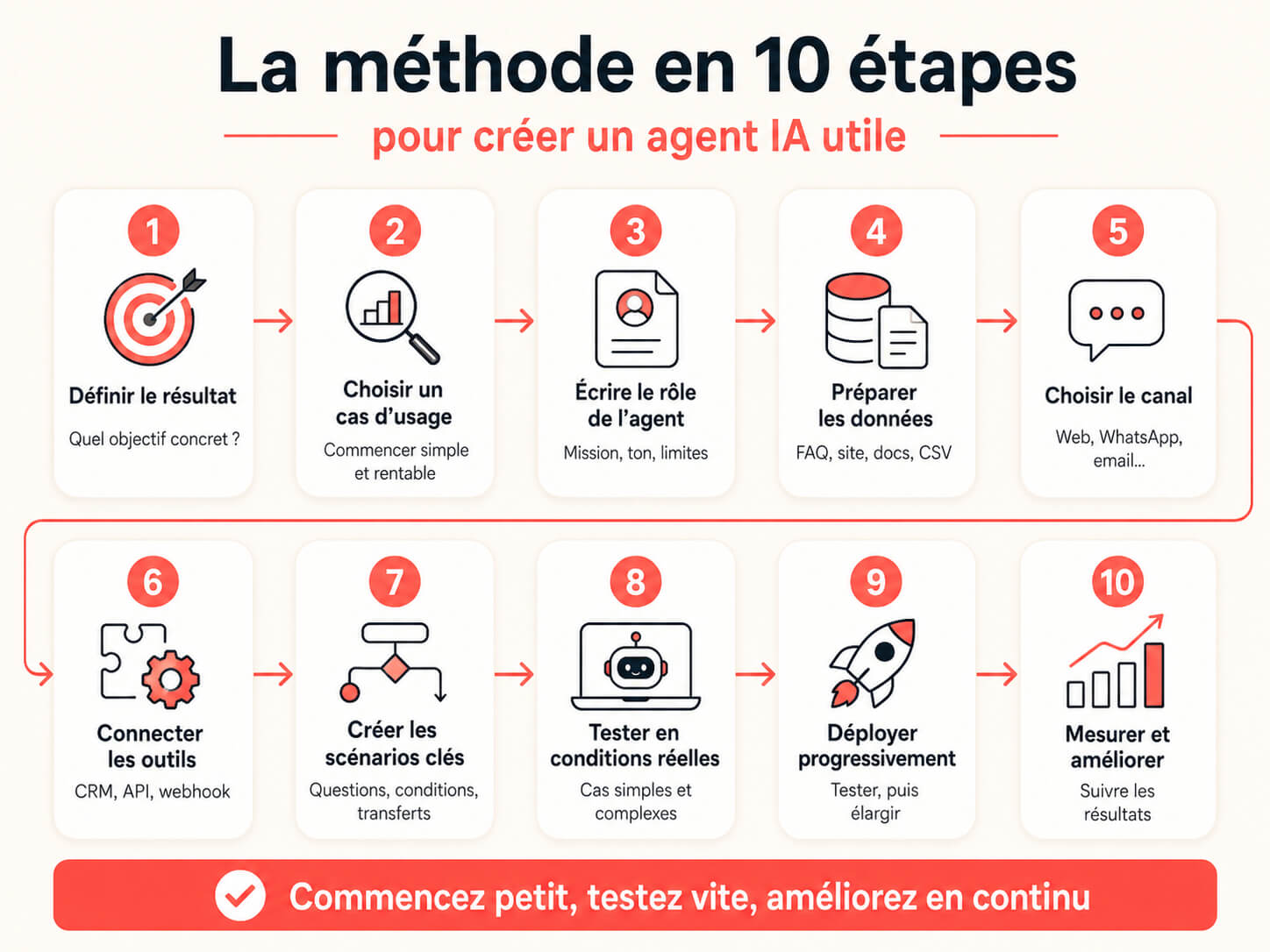
Step 1: define the outcome you want
Start at the end. What result should the agent produce? An answer? A qualified lead? A meeting? A ticket? An email? A CRM record?
A useful template:
“The AI agent should help [user] get [outcome] in under [time limit], with no human involvement unless [condition].”
Example: “The AI agent should help a visitor get an answer about shipping costs in under 30 seconds, with no human involvement unless the order is already disputed.”
Step 2: pick a simple use case
Do not build an agent that does everything from day one. Pick a use case that is both profitable and frequent. A good first project usually ticks these boxes:
- the task comes up often
- the answers are fairly standardized
- the data already exists
- the risk of error is limited
- the gain is easy to measure
A FAQ agent, a lead qualification agent or an email triage agent are often good first projects. They are also easy to explain internally, which matters when you need colleagues to feed the agent with data.
Step 3: write the agent’s role
Your agent needs a job description, like a virtual employee. Define its role, its responsibilities, its limits and its metrics.
Example:
“You are a sales qualification AI agent for a B2B agency. Your goal is to identify the prospect’s need, budget, urgency and contact details. You ask one question at a time. You never promise a business result. If the prospect qualifies, you offer to book a meeting.”
Step 4: prepare the data
Data is the agent’s fuel. Clean it before you import it. Remove duplicates, update anything out of date, clarify pricing, add the important terms and structure the answers.
Useful sources:
- pages from your website
- your existing FAQ
- product catalog
- sales scripts
- recurring emails
- internal documentation
- CSV files
- CRM database
- past support tickets
Tip: pull the last 50 customer questions. They are often worth more than a long theoretical document.
Step 5: choose the channel
An AI agent has to be reachable in the right place. For a brochure site, the web widget usually comes first. For a local or sales-driven business, WhatsApp can work better. For internal support, Slack or Teams may feel more natural.
Ask yourself one question: where does the user already ask this kind of question? That is usually where the agent should live.
Step 6: connect the tools
List the actions the agent needs to be able to take. Then connect only the tools that are required.
Example actions:
- create a contact in HubSpot or Pipedrive
- send a confirmation email
- add a row in Google Sheets
- create a Zendesk or Intercom ticket
- notify a team on Slack
- trigger a Zapier scenario
- send data through a webhook
- start a Make or n8n workflow
- offer an appointment slot
Do not grant too many rights too early. Start with reading and drafting, then add write actions once you have tested.
Step 7: build the critical flows
Even with AI, some moments should stay scripted: the welcome, data collection, consent, contact requests, human escalation, complaints, payment, quotes, cancellations.
This is where platforms like Botnation AI are very effective. You can combine structured flows with AI answers. The agent keeps the conversation smooth while still following your business logic.
Step 8: test with real requests
An AI agent should not be tested with three easy questions. Use real conversations, badly worded questions, typos, off-topic requests, urgent cases and sales objections.
In particular, test:
- the common questions
- ambiguous questions
- requests the agent should not handle
- cases where it has to hand off to a human
- data errors
- aggressive or sensitive requests
- incomplete flows
- attempts to get around the instructions
A good rule: if the agent does not know, it should say so plainly and offer an alternative. A confident wrong answer costs far more trust than an honest admission.
Step 9: roll out gradually
Do not launch your AI agent on every channel at once. Start on one channel, with a tight scope, then expand.
A sample gradual rollout:
- week 1: internal testing
- week 2: a test URL, or the widget visible only on a FAQ page
- week 3: added to the sales pages
- week 4: connected to the CRM and to email
- week 5: rolled out on WhatsApp or social media
Also tell users when they are talking to an AI. It is more transparent, it builds trust, and it sets expectations, so people tend to phrase their questions more directly.
Step 10: track performance
An AI agent is never finished. It has to be improved with usage data.
Track these metrics:
- number of conversations
- useful answer rate
- human handoff rate
- qualified lead rate
- average resolution time
- unanswered questions
- satisfaction rate
- errors detected
Every week, review the failed conversations and enrich the knowledge base. It is the simplest way to improve quality quickly, and thirty minutes a week is usually enough in the first months.
Real examples of useful AI agents
FAQ AI agent for a website
Goal: answer common questions automatically and cut support requests.
How it works: the agent reads the site pages, uses a knowledge base, answers simple questions and offers a human contact for sensitive cases.
Sample conversation:
User: “What are your delivery times?”
Agent: “Standard delivery usually takes 3 to 5 business days. For an urgent order, I can point you to the express options available at checkout.”
Lead qualification AI agent
Goal: turn an anonymous visitor into a qualified prospect.
How it works: the agent asks questions, identifies the need, captures the contact details and sends the information to the CRM.
Useful questions:
- What is your main goal?
- How big is your company?
- Do you already have a solution in place?
- What is your timeline for getting started?
- Would you like a callback?
With Botnation AI, this kind of agent can combine a decision tree, AI, conditions, RAG, variables and connections to sales tools.
Ecommerce AI agent
Goal: advise visitors, cut abandonment and improve the customer experience.
How it works: the agent recommends a product based on the need, answers delivery questions, explains returns and can follow up on an abandoned cart.
Example: “I’m looking for a gift for an 8-year-old.” The agent asks two or three questions, suggests suitable products, then guides the visitor to the product page.
Internal support AI agent
Goal: help employees find information quickly.
How it works: the agent uses internal documents, HR policies, IT procedures or onboarding guides.
Example: “How do I submit an expense report?” The agent replies with the procedure, the link to the form and the receipts to attach.
Email triage AI agent
Goal: cut the time spent in a shared inbox.
How it works: the agent reads incoming emails, categorizes the requests, drafts a reply and creates a task in the right tool.
This is a good use case for Make or n8n, especially if your team gets a lot of repetitive messages.
Real estate AI agent
Goal: qualify visitors and speed up viewing bookings.
How it works: the agent asks about the type of property, the city, the budget, the timeline, the financing method and availability. It can then pass the lead to an advisor or trigger a booking. Outside office hours, this is often where the most inquiries are lost.
HR AI agent
Goal: answer employee questions or help candidates.
How it works: the agent can explain the hiring steps, answer questions about benefits, guide a new hire or help someone find an internal procedure. It also takes the same repeated questions off the HR team’s desk.
Mistakes to avoid when you build an AI agent
Mistake 1: trying to automate everything from the start
An over-ambitious agent becomes hard to test. Start with a short mission, then add features. If you cannot describe what the agent does in one sentence, it is doing too much.
Mistake 2: using data that is out of date
If your prices, hours, terms or procedures are obsolete, the agent will give bad answers. AI quality depends on data quality.
Mistake 3: not planning for failure cases
Your agent has to know what to do when it does not understand. It can rephrase, ask a question, offer a contact or hand off to a human.
Mistake 4: granting too many permissions
An AI agent does not need access to everything. Grant the minimum permissions. It is a simple rule, but an essential one. Read access first, write access after the tests, delete access almost never.
Mistake 5: forgetting your brand voice
An AI agent represents your company. Define the register, the words to use, the words to avoid, the length of the answers and the style you expect.
Mistake 6: not measuring results
Without metrics, you will not know whether the agent works. Measure conversations, leads, handoffs, errors and satisfaction. Even a simple weekly count tells you more than a gut feeling.
Mistake 7: mistaking AI for magic
An AI agent is not magic. It follows instructions, uses data and runs actions. When it answers badly, the cause is usually the scope, the data, the instructions or the testing.
Checklist before you launch your AI agent
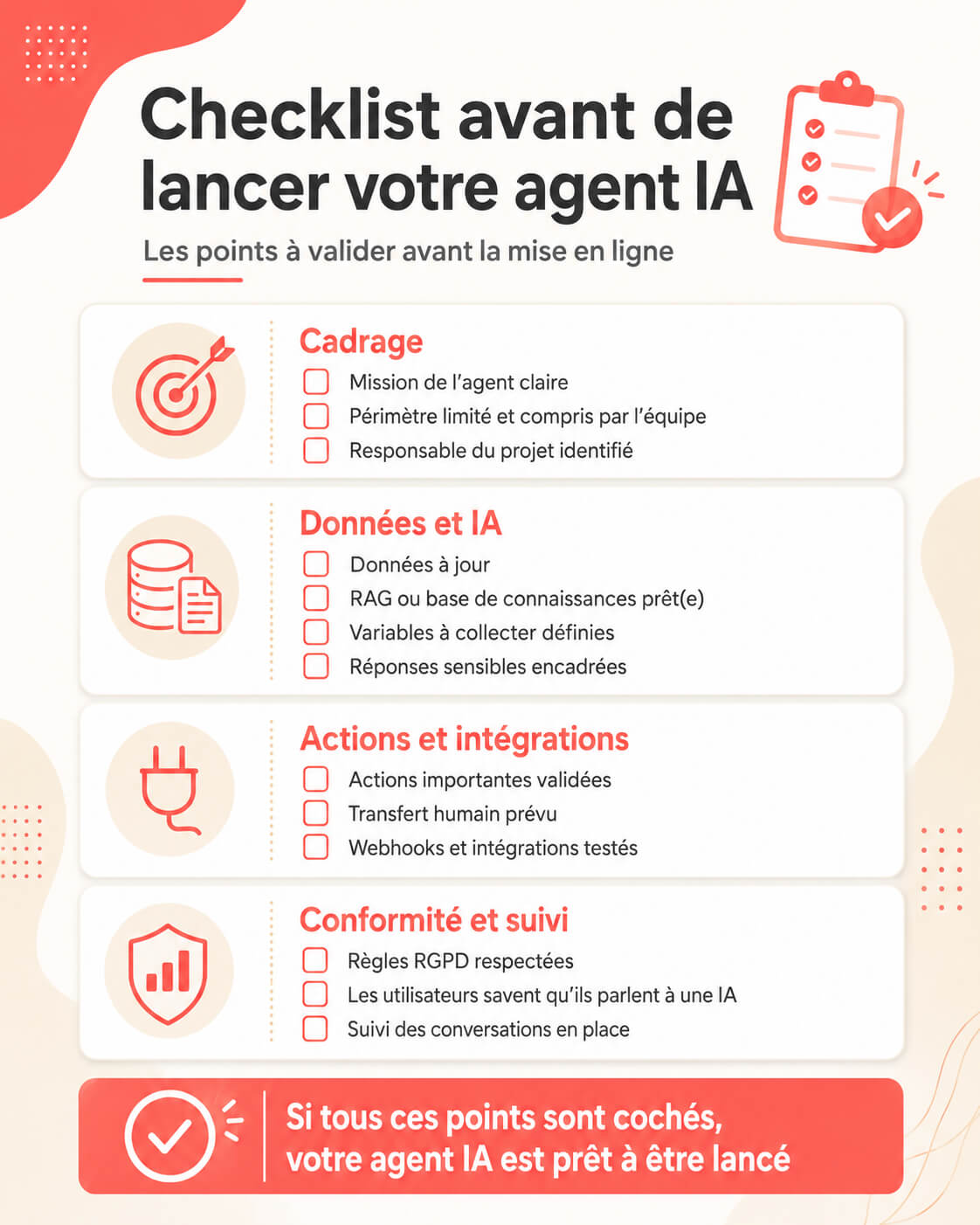
Before you publish your AI agent, check these points:
- the agent’s mission is clear
- the scope is limited and understood by the team
- the data is up to date
- RAG is set up on reliable sources
- the variables to collect are defined
- sensitive answers have guardrails
- important actions require approval where needed
- human handoff is in place
- the webhooks and integrations have been tested
- the GDPR rules are respected
- conversations are being tracked
- users know they are talking to an AI
- someone owns the job of improving the agent
What is the best tool to build an AI agent?
There is no single best tool. There is a best tool for your use case. The useful question is not which platform is the most powerful, but which one gets your agent in front of real users the fastest.
Choose ChatGPT if you want to prototype a specialized assistant quickly. Choose Claude if you work heavily with long documents, analysis or reasoning. Choose Make or n8n if your main need is automation across several tools. Choose LangChain or a developer framework if you want to build a custom agentic application. Choose OpenClaw or Hermes if you have a technical profile and want an open source or self-hosted agent. Choose Botnation AI if you want to quickly build an AI chatbot or an omnichannel AI agent for your business, with a FAQ, RAG on your customer data, scripted flows, lead capture, webhooks, CRM connections and deployment across several channels.
For most companies, the best approach is to start simple: a FAQ AI agent or a qualification agent, then add automations once you have the conversations under control.
FAQ: how to build an AI agent
How do you build an AI agent quickly?
The fastest method is to pick a simple use case, import your data, define the agent’s instructions, test the common questions and then deploy on a single channel. With Botnation AI, you can quickly build an AI FAQ chatbot by letting the AI crawl your site or by importing CSV data.
How do you build an AI agent with ChatGPT?
You can build a custom GPT with instructions, knowledge files and, in some cases, actions connected to APIs. That is very useful for an internal assistant or a prototype. For an agent deployed on a website, on WhatsApp or in a complete sales flow, use a purpose-built platform or an API integration instead.
How do you build an AI agent with Claude?
Claude can power an advanced assistant that analyzes documents, drafts replies and reasons about complex requests. To make it a true agent, you have to pair it with tools, permissions and security rules. Start with prepared actions, then add execution after approval.
Can you build a free AI agent?
Yes. You can test some solutions for free, use open source tools or prototype with free versions. But for professional use, plan on a budget for hosting, APIs, connectors, support, maintenance and security.
Do you need to know how to code to build an AI agent?
No, not necessarily. No-code platforms like Botnation AI let you build an AI agent without writing code. Make and n8n require automation logic, but not always code. Open source options like OpenClaw or Hermes, on the other hand, take more technical skill.
What is the difference between an AI agent and an automation?
An automation runs a sequence of actions defined in advance. An AI agent can understand a request, choose an action based on the context and adapt its answer. In practice, the best systems combine both: the AI decides and the automation executes.
What is RAG in an AI agent?
RAG lets the AI agent search your data before it answers. It can use your site, your documents, your CSV files or your knowledge base. It is a very useful way to build a reliable agent without retraining a model.
Is fine-tuning necessary to build an AI agent?
Not always. In many cases, RAG is enough. Fine-tuning becomes relevant if you have a large volume of examples, a very specific need or a repetitive task that plain instructions cannot solve.
Can an AI agent have memory?
Yes, an AI agent can retain certain information over time. But that memory has to be limited, useful and compliant with privacy rules. Do not store personal data without a clear reason.
What data should you give an AI agent?
Give it only the data its mission requires: FAQ, documentation, catalog, commercial terms, procedures, scripts, CSV files, CRM database or support tickets. Avoid handing it sensitive data that serves no purpose.
Can an AI agent connect to a CRM?
Yes. An AI agent can create or update contacts, qualify prospects, add notes and notify a sales team. With Botnation AI, connections can go through direct integrations, Zapier or webhooks depending on the tools involved.
What is a webhook for an AI agent?
A webhook lets the agent automatically send data to another tool when an event occurs. Example: when a visitor fills in their contact details, the agent can push that information to a CRM or to a Make scenario.
Is an AI agent GDPR-compliant?
An AI agent can be used within a GDPR-compliant setup if data collection is clear, limited, justified and secure. Botnation AI is GDPR-compliant. You also need to adapt your own notices, consent flows and retention rules to the way you use it.
How long does it take to build an AI agent?
A simple FAQ agent can be built quickly if your data is ready. An agent with scripted flows, CRM, email, advanced qualification and several channels takes more preparation. The time depends mostly on data quality and on how many actions you need to connect.
How do you stop an AI agent from making up answers?
Limit its scope, give it a reliable knowledge base, use RAG, tell it to answer only with the information available and prepare a fallback response. Example: “I don’t have the exact information, but I can pass your request to an advisor.”
Can an AI agent replace a human?
It can replace certain repetitive tasks, but it should not replace human judgment in sensitive situations. The best use is to automate the first level, speed up answers and pass complex cases to a person.
When should you build a multi-agent system?
A multi-agent system becomes useful when several specialized tasks have to be coordinated: search, checking, action, compliance, summarizing or planning. For a first project, one well-designed agent is often more effective.
Why use Botnation AI to build an AI agent?
Botnation AI lets you quickly build an AI chatbot or an omnichannel AI agent for a business. You can run AI on your customer data with RAG, build scripted flows, capture leads, connect tools through webhooks, Zapier or direct integrations, stay within a GDPR-compliant setup and deploy your agent across several channels. It is a good fit if you want to move fast from an idea to an agent your customers or your teams can actually use.
Conclusion
Building a useful AI agent is not about plugging in a model and waiting for a miracle. You define a mission, prepare the data, choose the right tools, set up RAG, collect the right variables, connect the actions, lock down permissions, test real cases and improve the agent over time.
If you want to experiment, ChatGPT and Claude are good starting points. If you want to automate workflows, Make and n8n are very effective. If you are technical, LangChain, OpenClaw and Hermes open up advanced paths. If you want to quickly build a professional, omnichannel, GDPR-compliant AI agent connected through webhooks and able to use your customer data, Botnation AI is a simple, powerful and affordable option.
The most important thing is to start with a concrete problem. An AI agent that answers 30 common questions, qualifies 20 leads a week or saves a team 2 hours a day beats a “smart” agent that does nothing useful. Start small, measure, improve, then expand.