- A webhook is an HTTP call triggered by an event: the chatbot pushes the data of a conversation to an external system (CRM, spreadsheet, ERP), without that system having to poll anything.
- In Botnation, the Webhook element automatically imports and exports data to any HTTP system: mandatory HTTPS URL, POST or GET call, custom header, parameters, test button.
- Two options change everything: synchronous processing (the chatbot waits for the answer, the order of the steps is guaranteed) and JSON response processing, which follows a precise format and automatically switches to synchronous mode.
- The most frequent mistakes: a webhook placed before data collection, a cache enabled for no reason (a cache set to one hour limits the call to once per hour), an answer beyond the documented delay (10 seconds), malformed JSON.
- No coding needed on the Botnation side: the Webhook element is configured in no-code mode on the platform. On the external side, the endpoint that receives the call, its authentication and the answer format may require technical work. Botnation also provides custom chatbot creation services with its Entreprise offer, on a quote.
Your chatbot has just collected an order, a phone number or an address. What happens next? In many projects, the honest answer is: nothing automated. An employee copies the order into the CRM, a CSV file is exported once a week, or the data sleeps in the chatbot database and never reaches the business software.
The webhook is the technical answer to that question, and its configuration on the Botnation side requires no code. It is the mechanism that lets a chatbot tell another piece of software: “something just happened, here is the data, your turn”. Connecting a chatbot to a lead generation module, to an e-commerce module or to an ERP almost always goes through it.
A successful integration is not measured by the number of webhooks connected. Start with a single flow, the one that relieves your team the most: an order to the ERP, a lead to the CRM. Make it reliable, measure its response time, then connect the next one. Botnation’s dedicated queue absorbs the calls, but each slow service adds wait to the conversation: restraint is an architecture decision too, and it pays off in minutes of conversation gained.
On Google, the “chatbot webhook” query mostly returns technical documentation from chatbot platforms and integration tutorials, often in English, rarely a decision-oriented guide that says when to use it, how to configure it and why it breaks. This article does all three, based on the official Botnation documentation and real use cases, plus a bonus flow configurator.
Webhook and chatbot: the definition that matters
A webhook is an HTTP call triggered by an event: it is also called an “HTTP callback”. Instead of regularly asking a service “do you have anything new?”, your chatbot sends it a request as soon as the event happens, with the conversation data as parameters. The service answers within a few milliseconds, or not at all. What happens then depends on the mode: with synchronous processing, the chatbot waits for the answer, and a redirect sequence can be set up if the service does not answer or returns an error; with asynchronous processing, the conversation continues while the call goes out in parallel.
Three properties distinguish the webhook from other exchange modes:
- It is event-driven. The call goes out at the exact moment the variable is collected (an email address, an order number, a location), not at a scheduled time.
- It is push-based. The external service has nothing to install and nothing to poll: it exposes a URL, and Botnation calls it.
- It is synchronous or asynchronous. The chatbot can wait for the answer (synchronous processing) or keep the conversation running while the call goes out in parallel (asynchronous processing). We will see that this choice is decisive.
| Method | How it works | When to choose it |
|---|---|---|
| API polling | A service regularly queries the chatbot to fetch its data. | Rare cases: the data must be read by a system that cannot be called. |
| Webhook | The chatbot pushes the data at the moment of the event, to an HTTPS URL. | Standard case: CRM, spreadsheet, ERP, business API, notification to a third-party service. |
| Manual export | A human copies the data or exports a file from the platform. | Low volume, or a startup phase before automating. |
A webhook is therefore nothing exotic: it is the standard channel between a chatbot and the rest of the information system. What varies is the configuration options and the pitfalls. That is what the next sections are about.
Why a chatbot needs a webhook: four real cases
An order from the chat must reach your back office
E-commerce and logistics
The customer picks a product, enters the address and validates in the chat. The chatbot records the order, then a webhook calls the order management system with the number, the customer and the address. The back office triggers the shipment and can send the delivery status back to the chatbot.
A qualified lead must land in the CRM
Lead generation
The chatbot qualifies: name, company, budget, project. At the end of the journey, a webhook sends the full file to the CRM, which creates the prospect and assigns a salesperson. Without a webhook, you have to check the chatbot from time to time or retype the records: the processing time explodes and the leads go cold.
The official Botnation documentation lists other simple yet powerful setups:
- Fetch your latest news every morning from your server, without entering it by hand in the chatbot tree.
- Send the city or GPS coordinates collected, and receive in return a message with the 7-day weather and an image generated by your system.
- Forward an order number and receive the delivery status, with an update of the user’s variables.
- Send the title of a movie asked for by the user, and receive a trailer from your video database.
These examples come from the article “API Botnation: importing and exporting data via webhook”, still the reference to read before plugging in your first flow.
The Webhook element options: what changes everything
In the Botnation platform, the webhook is an element of the tree, like a message or a question. It is placed in the scenario and configured with a few fields, without a single line of code.
The call settings
- HTTPS URL mandatory: the secure protocol is enforced by the platform.
- POST or GET method, at your choice, depending on what the external service expects.
- Parameters added directly in the URL, or through the “+ Add parameter” option, with the chatbot variables between braces.
- Custom header for services that require an authentication key.
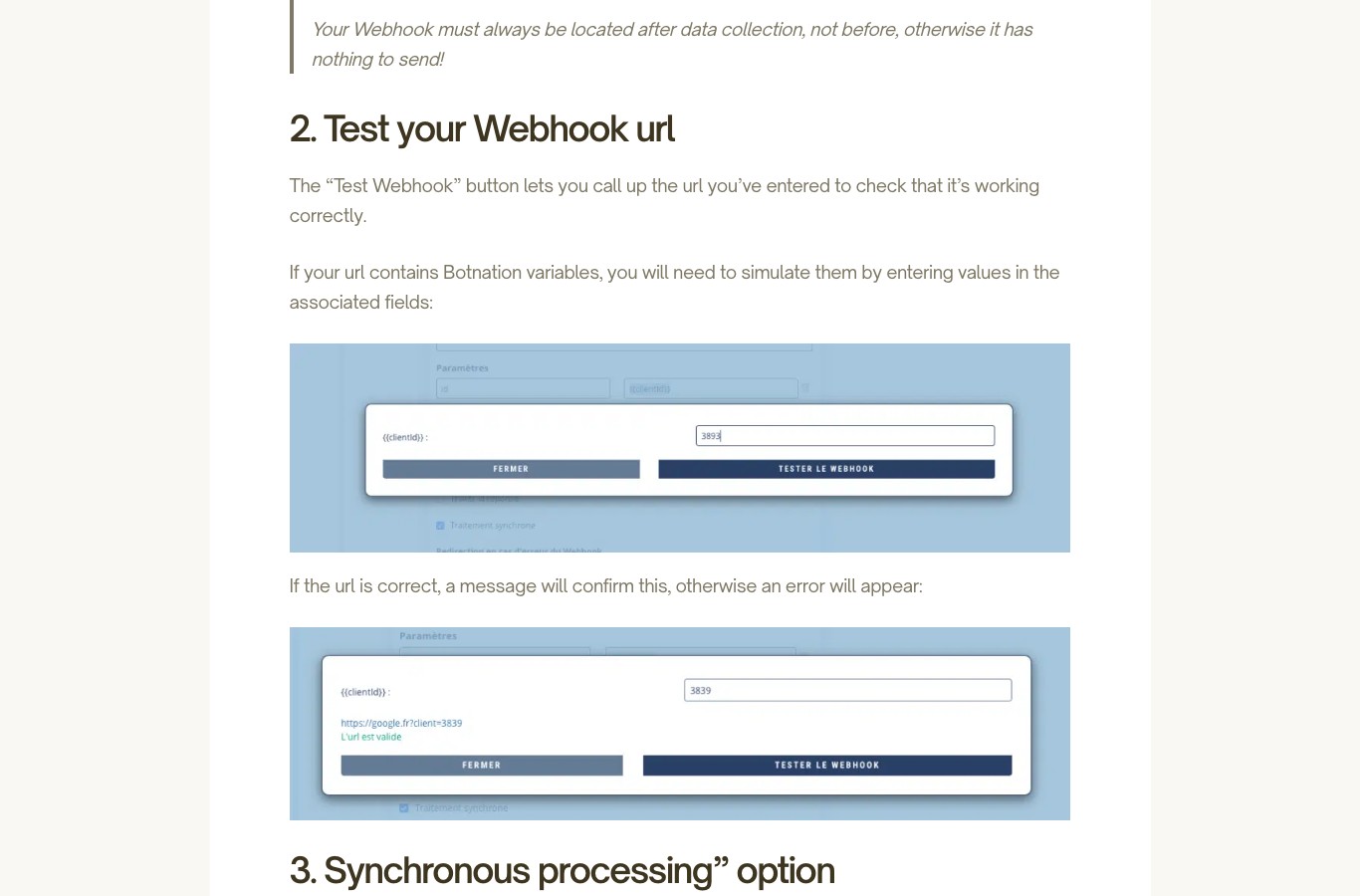
- “Test Webhook” button to check the URL before going live; if the URL contains variables, the platform lets you simulate them by entering test values.
Synchronous or asynchronous processing?
Synchronous processing puts the chatbot on hold while the webhook delivers its answer. The official documentation gives a telling example: two webhook functions in a row. Function A adds a user to a database, function B counts the total number of users and stores the value in a variable. If A has not finished when B starts, the counter is wrong. Synchronous processing on A enforces the order of execution.
If the option is not checked, the chatbot performs the request in parallel and continues its conversation: this is asynchronous processing. It suits collection only, when no result is used later in the scenario.
In synchronous mode, a redirect sequence on error can be selected: if the webhook does not answer or returns an error, the user is sent to the chosen scenario instead of being stuck.
Process the JSON response
For advanced use, the Webhook element can read and process the response returned by the HTTP call. This is what makes it possible to generate custom answers from data on your own servers: text messages, images, videos, audio, variables or buttons. When this option is enabled, synchronous processing is activated automatically. The documentation then expects an answer within 10 seconds: beyond that, the connection is interrupted and the answer cancelled. This limit is a documented behavior of the option, not a guarantee of platform performance. For reusable content (news, the weather of the same city), the answer can be cached for a few minutes up to several days, with JSON encoded in UTF-8, and application/json as the content-type header recommended by the documentation.
| Option | Role | What to remember |
|---|---|---|
| URL + method | Defines the target of the call | HTTPS mandatory, POST or GET depending on the service |
| Parameters | Carries the chatbot variables | Add them to the URL or through the dedicated option |
| Custom header | Authenticates the call | Essential for most APIs |
| Test Webhook | Checks the URL before production | Simulate the variables with test values |
| Synchronous processing | Makes the chatbot wait for the answer | Enable it if the next step depends on the call |
| Redirect on error | Fallback sequence | Prevents a user stuck in the middle of a scenario |
| Process the JSON response | Uses the service answer | Activates synchronous mode; answer expected in under 10 seconds (documentation) |
| Cache | Reuses an identical answer | Reserve it for reusable data only |
Your webhook must always be placed after data collection, never before: otherwise it has nothing to send. And avoid overloading your chatbot with webhook calls: Botnation puts the calls in a queue dedicated to your chatbot, and a long wait on a slow external service can severely slow down performance. Only connect services with instant response times through a webhook.
To be sure that a variable actually contains information before it is sent, display it temporarily in a message just before the webhook: if the message is empty, the webhook is the one to move.
The JSON response format, decoded
When response processing is enabled, the external service must answer in pure JSON encoded in UTF-8; the documentation recommends the application/json content-type header. The format expected by the platform fits in a very short schema:
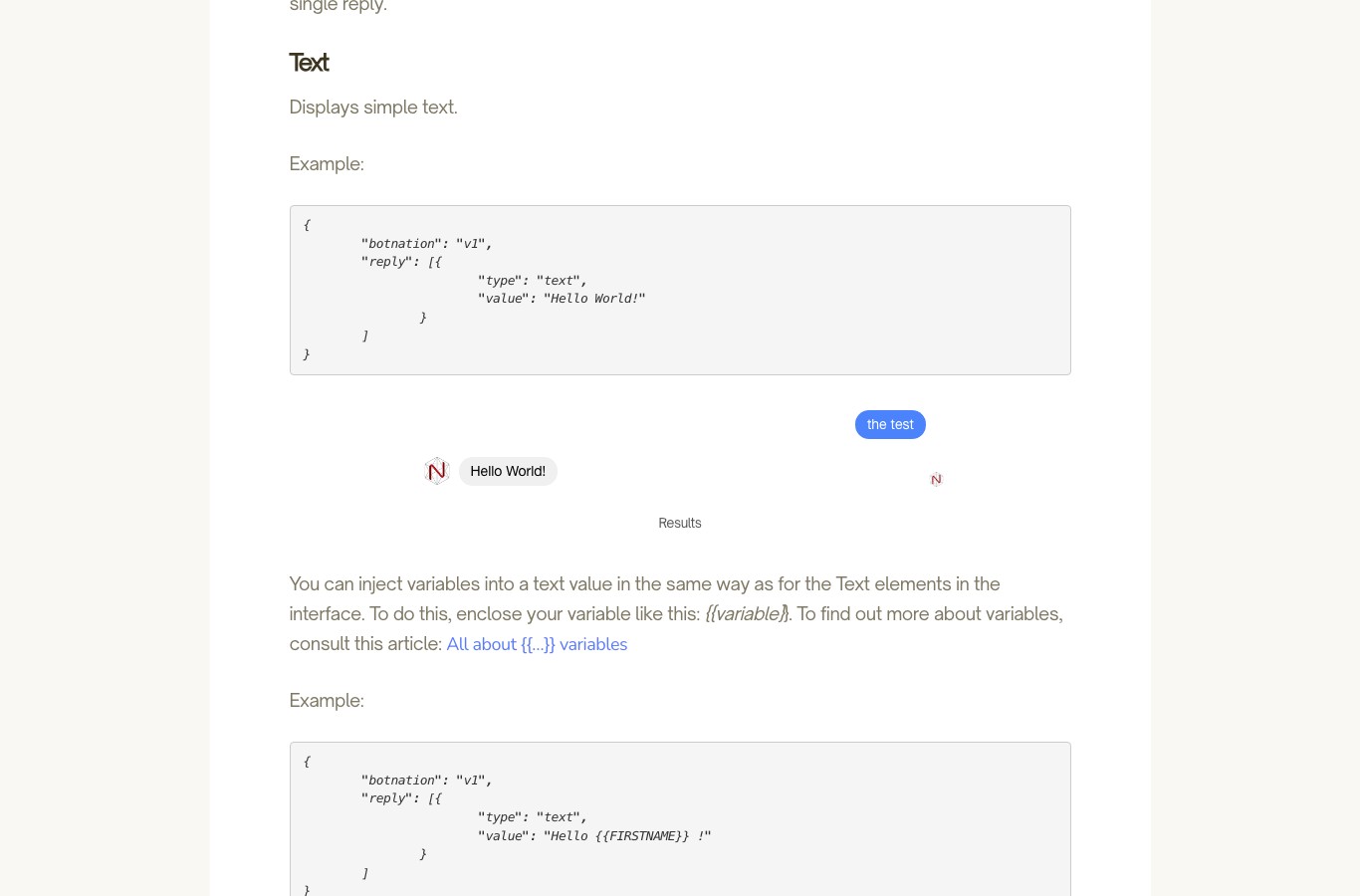
“botnation”: “v1”,
“reply”: [
{ “type”: “text”, “value”: “Hello” }
]
}
The botnation key with the value v1 is mandatory for the answer to be taken into account. The reply array then contains one or more elements, each with a type and a value. The answer must contain only the JSON: nothing before, nothing after, not even a log line.
| Type | Role | Usage example |
|---|---|---|
| text | Displays a text | Confirmation message, variable injected with {{variable}} |
| delay | Inserts a delay between two elements | A few seconds pause before a second message |
| image, video, audio | Display a media | JPEG, MP4 or MP3 hosted on your server |
| set | Sets a user variable | Stores a value, reused with {{name}} |
| set_gobal | Sets a global variable | Reusable across the whole chatbot with {{%%name%%}} |
| button | Displays buttons | 3 buttons maximum, with redirect to a keyword |
| quickreply | Displays quick replies | 11 buttons maximum, with optional icon |
| web_url | Opens a website | Ratio compact, tall, full or current |
| phone_call | Starts a phone call | Number with the country code |
| location | Asks for geolocation | Facebook Messenger only |
| carousel | Displays a carousel of pages | Horizontal or square ratio, several pages and buttons |
| redirect | Redirects to a sequence | By keyword or by block identifier |
A missing comma or a doubled brace is enough to cancel the answer. Use an online JSON validator before publishing your service: it is the most common case of “webhooks that do not work”, and it is fixed in one second.
Your turn: configure your webhook flow
Four answers are enough to get a recommended configuration, adapted to the answer format expected by Botnation and to the pitfalls of this section.
What triggers the call?
Where should the data go?
Which execution mode?
Should the answer be processed?
Choose your four answers above: the recommended configuration will appear here, with the settings to verify before publishing your flow.
No-code or developer: who connects your webhook?
The Botnation webhook is configured in the editor, through fields and checkboxes: no code, no server to maintain. This is the result of a no-code platform, and it suits most marketing, support or e-commerce teams.
But there is the other side of the coin: the service that receives the call. A CRM API is not always simple to document, an internal ERP can require engineering work, and the JSON answer format must be respected to the letter. This is where Botnation’s second trade comes in. On top of publishing the platform, Botnation builds custom chatbots through its Entreprise offer, with its chatbot creation experts: bot configuration, integrations, scenarios, delivery. Price and timing go through a quote, contact the sales team.
The advantage that makes the difference: the team that builds your chatbot is the one that publishes the platform. For a very specific business, an on-site team or an integrator already in place, a third-party agency remains a legitimate option: it is worth discussing, and it is even a point of trust for a high-stakes project.
On the Botnation platform side
- Webhook element in no-code mode, with fields and checkboxes
- Test button and variable simulation
- Official documentation in French and English
- Support and chatbot creation experts on a quote
On the external service side
- An exposed and documented HTTPS URL
- A valid JSON answer in under 10 seconds (documented recommendation)
- An authentication header if the API requires it
- Engineering time, sometimes with a provider
For a mainstream CRM or spreadsheet, the Botnation-side setup requires no code: most common services expose their own webhook URL, you just paste it into the element and test. Exposing the URL, authentication or a specific answer format may however require technical work. If your business software is a closed box, that is where Botnation’s Entreprise offer takes over, on a quote.
The six mistakes that break a webhook
The documentation about failures is short, and that is telling: almost everything comes down to six cases, three of which are settings.
- Enabling the cache for no reason. If the call does not go out every time, it is certainly the “cache” box that is checked wrongly. If you enable a cache set to one hour, the call is only sent once per hour at most, while you want every event. The cache is made for reusable information, like the weather.
- Placing the webhook before collection. In that spot, the webhook has no data to send. The simple test: display the variable in a message just before the call, and check that it is not empty.
- Exceeding the answer delay. For JSON response processing, the documentation expects an answer in under 10 seconds; beyond that, the connection is interrupted and the answer cancelled. A slow server or a heavy database is a textbook case.
- Answering with anything but pure JSON. A log line, a blank space or a misplaced apostrophe before or after the JSON is enough to cancel the answer. The application/json content-type header is recommended by the documentation, and the encoding must be UTF-8.
- Forgetting synchronous mode when order matters. Two chained functions without waiting produce wrong results, like a user counter started before the end of the addition.
- Not planning the redirect sequence. On error, without a configured redirect, the user stays in place and the journey stops dead. A redirect to a confirmation message or to an advisor fixes the problem.
And if any doubt remains, the “Why my webhook doesn’t always work” help page covers the question, cache case included.
What it costs
Webhooks are among the features included in Botnation’s paid plans: the Pricing page lists them among what “your chatbot plan includes” (consulted on 26/08/2026). The Webhook element is a standard component of the editor, not an option to buy separately. The free account is mainly for creating and testing before going live. What changes with the plan is usage limits (users, credits, advanced features):
| Offer | Price | What matters for a webhook project |
|---|---|---|
| FOR FREE | €0 | Create and test a first flow before publication; going live starts at €39/month (Pricing page, consulted on 26/08/2026) |
| BASIC | €39 / month | 500 users and 500 AI credits offered once |
| PRO | €59 / month | 1,000 users and 1,000 AI credits offered once |
| ENTREPRISE | On demand | Chatbot creation management, dedicated account manager, premium support |
As a market reference: for a chatbot developed by your own means, outside the SaaS platform, Botnation’s Pricing page states “it will generally cost between €5,000 and €30,000, or even more, depending on the features you need”, and adds that these ranges are indicative (consulted on 26/08/2026). On the Botnation side, the exact range depends on the scope, and the Entreprise offer is negotiated on a quote, like any custom service: the right reflex is to describe the target flow and ask for the estimate.
Frequently asked questions
Is a webhook an API?
A webhook uses HTTP, like an API, but the direction of the communication is reversed. With a classic API, it is your system that queries the service on demand. With a webhook, it is the service that notifies you at the moment of the event: the chatbot calls the URL, and the service answers. In other words, an API lets you read data, a webhook pushes data at the right moment.
Do I need to know how to code to connect a webhook on Botnation?
No. In Botnation, the Webhook element is configured through fields: URL, method, parameters, header, checkboxes for synchronous mode and response processing. No line of code in the platform. On the external side, the URL must be exposed and able to answer in the expected format: this may require technical work, and that is where Botnation’s Entreprise offer can step in.
Does synchronous processing slow down my chatbot?
In synchronous mode, the chatbot waits for the service answer before continuing: the response time is therefore added to the journey. For JSON response processing, the documentation describes a 10-second delay: beyond that, the connection is interrupted and the answer cancelled. The documentation recommends connecting only services with instant response times through a webhook, and using the cache for reusable content. For a simple collection, asynchronous mode lets the conversation continue.
Can I use a webhook to send a proactive WhatsApp message?
Yes, this is a typical use case. The webhook triggers the send from your service (for example a status change), and Botnation delivers the message on the WhatsApp channel of your choice. The best practices for proactive messages are detailed in the WhatsApp Notifications help page, and channel selection happens on the Channels page.
Why does my webhook only work sometimes?
The most common case is the cache enabled on the Webhook element: if the cache is enabled with a one-hour duration, the call is only sent once per hour, which feels like random failure. Also check that the webhook is placed after data collection, that the service answers within the documented delay (under 10 seconds) and that the answer is pure JSON, with nothing before or after.
Which plan should I start with?
A FOR FREE account lets you create and test your first webhook flow (no credit card, Pricing page consulted on 26/08/2026); launching your chatbot starts at €39/month and webhooks are among the included features. For a project that grows and needs advanced features, the BASIC and PRO offers cover a team’s needs. And if you want the flow to be designed and configured by experts, the ENTREPRISE offer includes chatbot creation services, on a quote.
What to remember
A webhook is not a technology reserved for developers: it is the standard connection between a chatbot and an information system, and its configuration on the Botnation side requires no code. Three basic rules avoid most failures: place the webhook after collection, enable synchronous mode when the order of steps matters, and do not enable the cache for data that must flow at every event.
And when the answer format or the ERP gets complicated, you have a choice: configure it yourself in the editor, or hand the flow to the Botnation team that publishes the platform. In both cases, the use cases are already documented, tested and illustrated in the official support.
Connect your chatbot to your ecosystem
Create your free account, build your first webhook flow to your CRM or your spreadsheet and test it before launching your chatbot. For a custom project, ask for a quote: our chatbot creation experts answer online.