In short: a “chatbot template” is a pre-built chatbot that you install and then adapt, instead of building everything from scratch. Behind this English word lie two very different realities: ready-to-use conversational templates (a complete scenario: questions, branches, answers, connectors) and code templates (HTML, React or Git repository skeletons intended for developers). Botnation offers 8 free conversational templates that can be installed without code from its interface (recorded on September 17, 2026), and its Enterprise offer also lets you have a custom chatbot built by its experts (on demand). This guide explains what a good template contains, how to tell the two families apart, and how to start from the right one for your project.
The query “chatbot template” is typed in French by many users, yet the pages that answer it are almost all English-language, and they do not all talk about the same thing: alongside the conversational templates offered by no-code platforms, you will find design mockups, code repositories and interface components. This page sorts it all out. It has one field advantage: the templates described here are real, listed and playable in demo, and their record is dated September 17, 2026.
Template, gabarit or model: three words, one single reality
A chatbot template is a pre-built working base: a conversation scenario already written, already wired, already tested, which you duplicate into your own account to adapt it to your business. The idea is the same as a document template or a sewing pattern: you start from a structure that works, and you replace the content.
The vocabulary varies from one vendor to another, with no difference in substance:
- Template: the English word, the most common in searches;
- Gabarit: its French translation, the one Botnation uses on its templates page;
- Model: the third variant, used by Botnation’s official support page (“ChatBot Templates”).
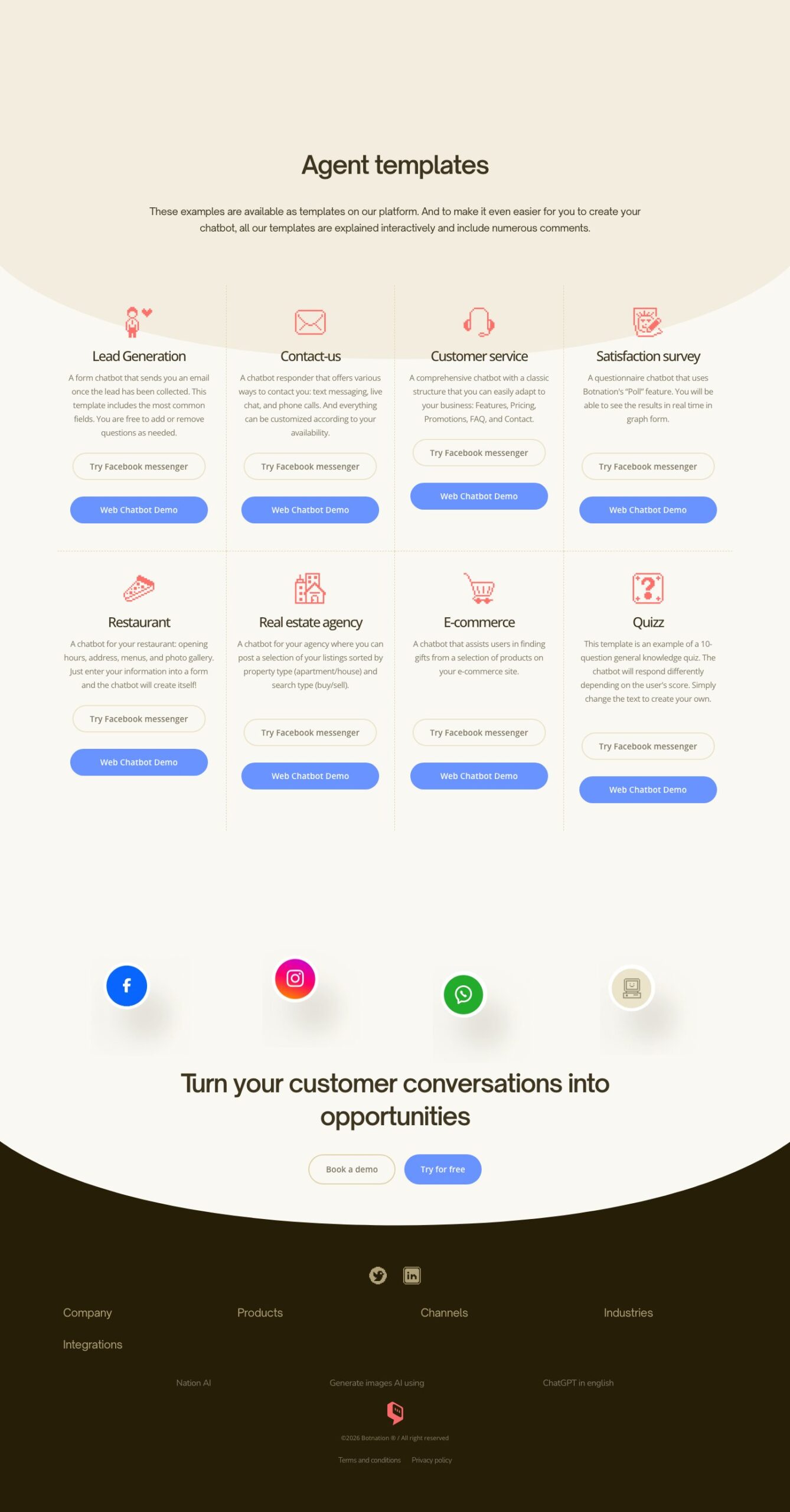
On Botnation, all three terms mean exactly the same thing: the title of the templates page says “Agent templates” and states that “These examples are available as templates on our platform” (recorded on September 17, 2026). Whether you look for a “chatbot model”, a “chatbot template” or a “chatbot template” in French, you are looking for the same resource. The distinction that really matters lies elsewhere: in the family of template you are looking at.
The two families of chatbot templates (and how not to pick the wrong one)
When a results page lists chatbot templates, two very different worlds often get mixed together. Telling them apart saves you from wasting an evening with the wrong one.
| Conversational template (no-code) | Code template (HTML, React, Git repository) | |
|---|---|---|
| What it is | A complete, living scenario: questions, branches, default answers, connectors, channels | An interface or program skeleton: file structure, chat component, API call to complete |
| Who it is for | Marketing, support, HR, sales teams; project owners without a developer | Developers and product teams embedding a chat inside an application |
| What you get | A live chatbot, testable, editable by hand in a visual editor | A development base: still to code, host, maintain and test |
| Channels | Web, Messenger, WhatsApp, Instagram and others, depending on the platform | Whatever you code; each channel is extra work |
| Hosting | Included with the platform vendor | Your responsibility (server, API key, security, updates) |
| Changes | Made in the editor, without code, continuously | Made in the code, for every scenario change |
How to choose? If the goal is a chatbot that really answers your visitors this week (collecting leads, answering frequently asked questions, taking bookings), the conversational template is the most direct path: everything tedious (dialogue mechanics, branching, channel connections) is already in place. If the goal is a component inside a software product (a chat bubble in your application, with your own backend), then that is the realm of the code template, and you need a developer.
The two families are not mutually exclusive either: a product team can prototype its scenario in a no-code template to validate dialogues with real users, before reproducing it in its code. Conversely, a marketing team handed a code template will get nothing out of it without development skills.
What a good conversational chatbot template contains
Templates are not all equal. A useful template is one that really saves you work, not just a good-looking one. Here are the elements that make the difference:
- A single, readable goal: collect a lead, answer an FAQ, take contact requests. A template that tries to do everything adapts poorly;
- The complete dialogue tree: questions, answer branches, follow-ups when the user does not reply, and a clean exit when the need is not covered;
- Comments inside the scenario: the most underestimated criterion. Botnation’s templates page states that “all our templates are explained interactively and include numerous comments” (recorded on September 17, 2026): you understand why each block exists before changing it;
- Connectors already wired: email to the team, saving answers, redirecting to the right page. All that is left is to plug in your addresses and tools;
- Clearly named fields: name, email, request; to be replaced with your own labels without breaking the logic;
- A playable demo: being able to test the template BEFORE installing it, on the target channel (web or Messenger), avoids unpleasant surprises.

Always play the demo before installing. Every template on Botnation’s templates page comes with two demos: one on a web chatbot, one on Facebook Messenger. Play the one for your channel: it is exactly the starting point you will customize.
Botnation’s 8 chatbot templates (recorded on September 17, 2026)
Botnation’s chatbot templates page lists 8 chatbot demos, each playable on the web and on Facebook Messenger, and each available as a template in the platform. Here is the full list as published on September 17, 2026, with what each template does:
| Template | What it is for | What is already inside |
|---|---|---|
| Lead Generation | A form chatbot that sends you an email as soon as a lead is collected | The most common fields, ready to adjust (add or remove questions) |
| Contact-us | A multi-channel responder: text message, live chat, call request | Configurable according to your availability |
| Customer service | A classic assistance structure to adapt to your business | Features, Pricing, Promotions, FAQ and Contact pages already organized |
| Satisfaction survey | A questionnaire built on Botnation’s “Poll” feature | Results viewable in real time as graphs |
| Restaurant | Opening hours, address, menus and photo gallery for a venue | Fills in “like a form”: enter your information and the chatbot creates itself |
| Real estate agency | Present a selection of listings sorted by property type and search type | The apartment/house and buy/sell sorting already in place |
| E-commerce | Help a visitor find the right product (example: a gift search) | Guided assistance towards the products of your e-commerce site |
| Quizz | A 10-question quiz that reacts to the user’s score | The complete scoring mechanics: replace the texts, the logic stays |
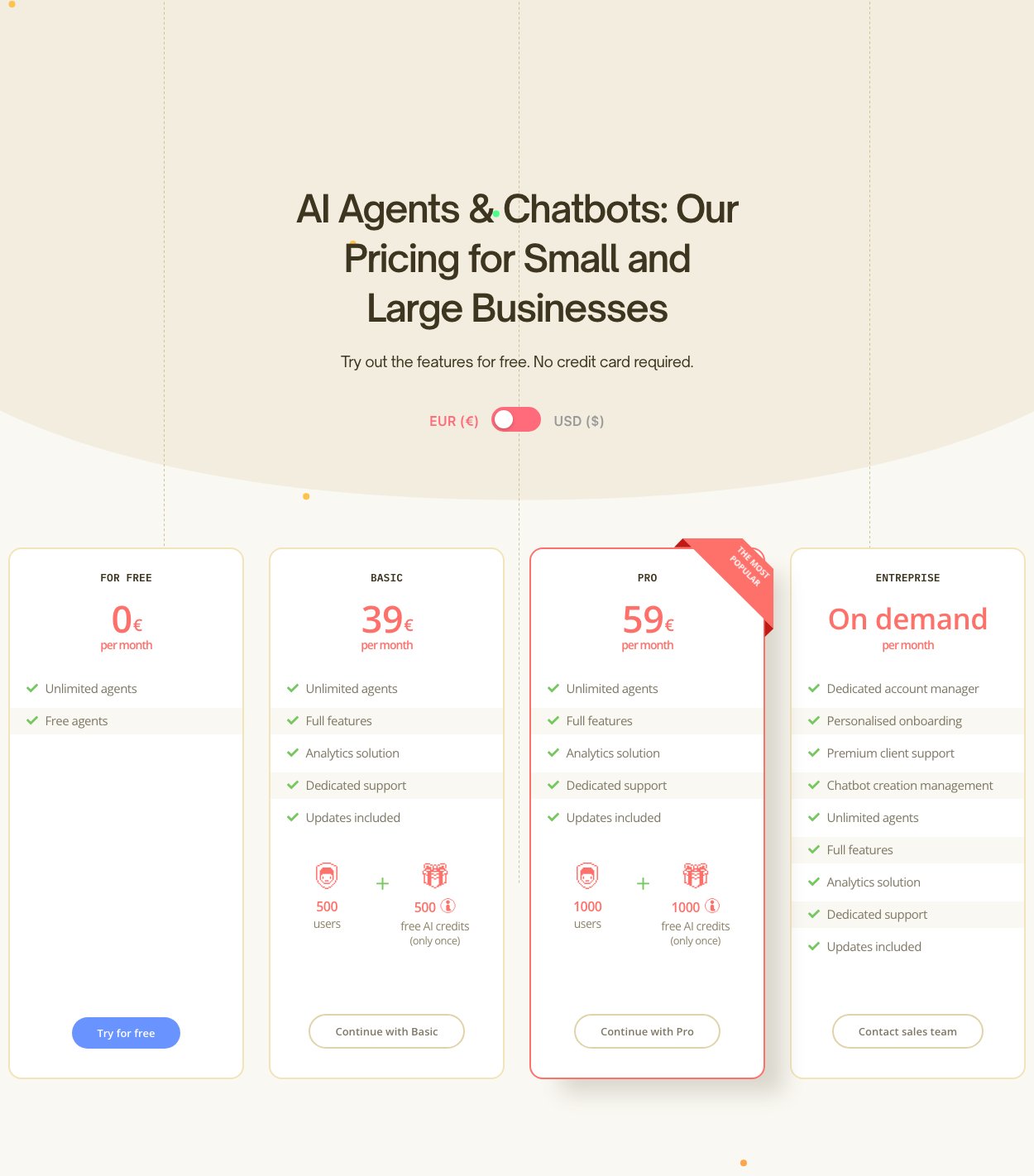
This templates page is not a static showcase: Botnation’s “ChatBot Templates” support page presents them as installable bases, customizable for a website or Facebook Messenger, and states that they install for free from the Botnation interface (recorded on September 17, 2026). As for pricing, the grid published on September 17, 2026 (prices shown in euros) confirms a FOR FREE plan at 0 € per month to try the platform, no credit card required, with paid plans starting at 39 € per month. The templates themselves are not charged: what can consume credits are advanced AI uses, billed in separate packs (1,000 credits at 25 €, recorded on September 17, 2026).
HTML, React or Git template: what code templates are really worth
The other family highlighted by the “chatbot template” search comes from the development world: chat interfaces ready to style, React components, repositories to clone or design mockups. These resources are real and useful, provided you know what they are: technical starting points, not working chatbots.
What a code template does not do for you:
- Write the conversations: the scenario, the branches, the default answers, the odd cases; that is the longest part of a chatbot project, and it remains entirely;
- Host and secure: server, domain name, certificates, protection of the data exchanged;
- Connect the channels: each messaging channel has its own rules, limits and approval procedures;
- Maintain: every scenario change goes back through the code, through a developer, and through a release.
For a development team building a product, this choice makes sense: the chat component integrates with the rest of the application, with the team’s own tools. For a business that wants a working chatbot quickly, editable by the business team, a conversational template on a no-code platform saves all of the above: the mechanics are already there, and changes happen in a visual editor. If IT is not your core business, this is almost always the right trade-off. To see what such a chatbot covers depending on its type (scripted, smart, hybrid or generative), the guide on types of chatbots details the four families and their uses.
Starting from a template on your own or having it custom built: Botnation’s two paths
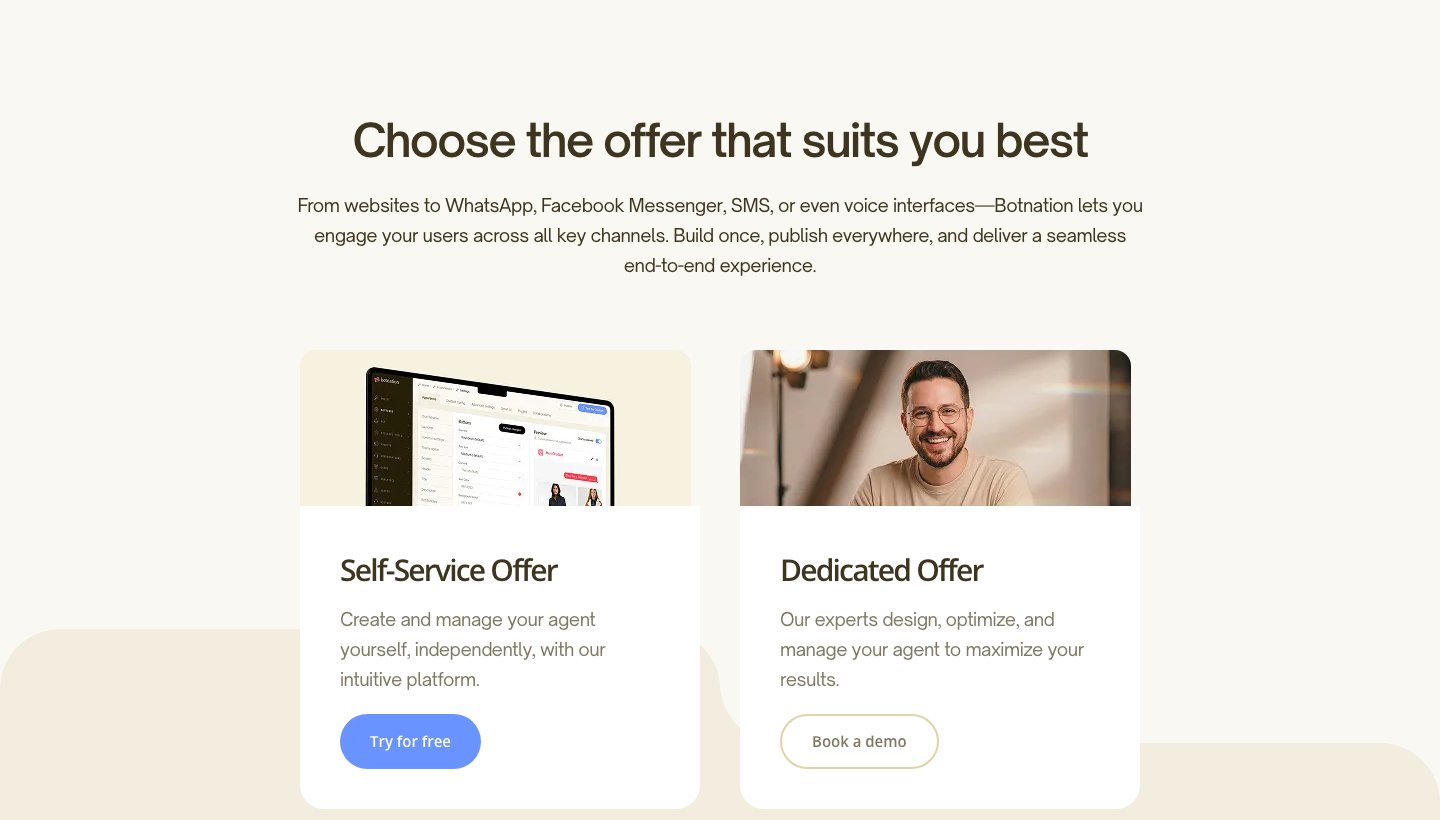
Botnation covers both situations, and its homepage states them explicitly (capture recorded on September 17, 2026): a “Self-Service Offer” to “create and manage your agent yourself, independently, with our intuitive platform”, and a “Dedicated Offer” where “our experts design, optimize, and manage your agent to maximize your results”.
The self-service path. You install a template, you replace the texts, you connect your tools, you publish. The templates and the visual editor are built for that: no code, and the ability to change everything later without going through a third party. It is the right choice for a first chatbot, to test a use case, or for a team that wants to keep control day to day.
The assisted path. If the project outgrows the template (a complex business journey, an integration with your information system, a precise specification), Botnation’s Enterprise offer literally includes “Chatbot creation management”, a “Dedicated account manager” and “Personalised onboarding” (pricing page, recorded on September 17, 2026). The price of this custom construction is not public: it is quoted on demand, depending on the scope. The team that builds is the one that edits the platform: no middleman between you and the tool, and the account, the scenarios and the database stay under your name in the editor, so you keep control once delivery is done.
Conversely, a third-party agency remains legitimate in some cases: a very specific industry that requires domain expertise, an on-site team at the client’s premises, or a system integrator already in place who knows your information system. The right provider is the one who covers your real scope, not the one who promises the most.
Which template for your project? The selector
Answer three questions: the selector points to the starting template that fits your case, or to the path (self-service or assisted) that matches your situation.
1. What is the main goal of your chatbot?
2. On which main channel?
3. How do you want to carry the project out?
Waiting for your answers
Answer the three questions above, then click the button: the selector displays the matching starting template, or the recommended path. Nothing is selected until you click.
Your starting point: the “Lead Generation” template
This template plays exactly your scenario: it asks the questions useful to your business, then sends an email to your team as soon as a contact is captured. The most common fields are already in place; you adjust the questions and the notification address. If your need is rather to guide visitors towards your product pages, also look at the “E-commerce” template.
Channel note: play the template’s “Web Chatbot Demo”, it is the closest starting point to your case.
Channel note: play the template’s “Try Facebook messenger” demo, it is the closest starting point to your case.
Channel note: the template exists in web and Messenger versions; install it once, publish it on both channels.
To go further on this use case: the lead generation chatbot page details the full mechanics.
Your starting point: the “Customer service” template
This template brings a complete structure (Features, Pricing, FAQ, Contact) that you adapt to your business: it is an organized customer-answer base. Fill it in with your real frequently asked questions and your availability hours. For an IT support or helpdesk need, the method is detailed in the helpdesk chatbot guide.
Channel note: start from the template’s “Web Chatbot Demo”.
Channel note: start from the template’s “Try Facebook messenger” demo.
Channel note: the template is playable on web and Messenger; one template, two publications.
Your starting point: the “Satisfaction survey” or “Quizz” templates
Measuring or getting reactions are both covered: “Satisfaction survey” builds a questionnaire on the “Poll” feature (results as real-time graphs), “Quizz” brings the scoring mechanics over 10 questions. Pick one, replace the texts, the logic is already there.
Channel note: both templates play on web; test the web demo before installing.
Channel note: both templates play on Messenger; test the Messenger demo before installing.
Channel note: each template has a web demo and a Messenger demo; compare the two renditions.
Your starting point: a sector template “Restaurant”, “Real estate agency” or “E-commerce”
Guiding towards a place or a product is the core of these three templates: “Restaurant” handles opening hours, menus and address; “Real estate agency” sorts listings by property type and search type; “E-commerce” helps the visitor find the right product. The one closest to your business already gives you 80% of the structure; you replace the content. The “Contact-us” template usefully completes the set if phone appointment booking is part of your journey.
Channel note: play the “Web Chatbot Demo” of the template that looks most like you.
Channel note: play the “Try Facebook messenger” demo of the template that looks most like you.
Channel note: test both demos of the template, then publish on your two channels.
Your path: the Dedicated Offer (custom construction)
You chose the assisted construction: the right move is to describe your need to the team rather than twist a template. Botnation’s Enterprise offer includes “Chatbot creation management”, a “Dedicated account manager” and “Personalised onboarding”; the price is quoted on demand, depending on your scope. The team that builds is the one that edits the platform: once your chatbot is delivered, the scenarios remain editable in your account. Describe your project via the contact page or browse Botnation’s pricing to compare the two paths.
How to install a chatbot template in Botnation (5 steps)
Botnation’s “ChatBot Templates” support page promises a working chatbot “in minutes” thanks to its customizable models. Here is the typical flow, from account to publishing channel:
- Create your account and your first chatbot Registration is free and without a credit card (FOR FREE plan at 0 € per month, recorded on September 17, 2026). You access the platform’s visual editor.
- Choose your template First play the playable demos to pick the template closest to your case, then install the corresponding model from the interface (the official chatbot templates support page lists the installable templates).
- Replace the content, block by block Questions, answers, hours, products: every scenario block carries comments (that is a deliberate choice for Botnation’s templates), so you understand what you change before changing it.
- Connect your tools Depending on the template: notification email address, spreadsheet, CRM or support tool. The connectors are already wired; all that is left is your credentials.
- Test then publish on your channel Test the conversation internally, then publish on the target channel (website, Messenger, and other channels depending on your plan). The editor remains your control point for any later change.
If you start from a blank page rather than a template, the full method is detailed in the designing a chatbot guide in 7 steps.
Frequently asked questions about chatbot templates
Is a chatbot template free?
On Botnation, yes: the 8 templates listed above install for free from the interface, and the FOR FREE plan lets you use the platform at 0 € per month with no credit card (recorded on September 17, 2026). Advanced AI uses consume credits, sold in separate packs (for example 1,000 credits at 25 €, recorded on September 17, 2026). Code templates are usually published under a free or commercial license depending on the repository: the code is free, your development time is not.
What is the difference between template, gabarit and model?
No real difference: the three words mean the same reality, a pre-built chatbot base to duplicate and adapt. Botnation uses “templates” on its templates page and “models” on its support page. The only distinction that counts is the one between conversational template (no-code) and code template, detailed earlier in this article.
Can you modify a template after installing it?
Yes, and that is the very point of a template: everything is editable in the visual editor (texts, questions, branches, connectors), without code. Botnation’s templates page notes that its models include numerous interactive comments to guide those changes (recorded on September 17, 2026). An installed template becomes your chatbot: nothing is locked.
Does a code template replace a no-code platform?
No, they are two tools for two jobs. A code template gives you a technical base to develop, host and maintain; it provides neither the visual editor, nor the connectors, nor the hosting, nor access to messaging channels. A no-code platform provides all of that, but does not embed a chat component at the heart of a custom application. The right choice depends on who will carry the project after it is created.
How long does it take to customize a template?
It depends on the scope you add to the base: replacing the texts of a “Restaurant” template is close to filling in a form; building a complex business logic obviously takes longer. No serious vendor can promise a duration without knowing your case: that is precisely why the Enterprise offer’s custom construction is quoted on demand, after analyzing the need.
Can Botnation build my custom chatbot from scratch?
Yes. Beyond the no-code platform, Botnation offers an Enterprise plan that includes “Chatbot creation management” delivered by its experts, with a dedicated account manager and personalised onboarding (pricing page, recorded on September 17, 2026). This construction is quoted on demand, depending on the project scope; the conversation starts on the contact page.
The right template is the one that gets you started, not the one that shines
A chatbot template has only one reason to exist: to spare you the blank page. Botnation’s 8 conversational templates cover the most requested cases (leads, customer service, surveys, commerce, local businesses) and remain fully editable; code templates serve another audience, the one building a product. In both cases, the starting point is not what matters most: the quality of what you put into the conversations will make the difference. Start simple, test with real users, and enrich.
Your chatbot templates are ready
Play the demos, install the template that matches your project, or ask our experts to build your custom chatbot (on demand).
Sources and records: Botnation templates page, “ChatBot Templates” support page, pricing grid and homepage, all recorded online on September 17, 2026. The screenshots in this article come from those pages on the same date. Prices are shown in euros.