To deliver a more interactive customer experience, online businesses are turning to chatbots. Chatbots are the trendy conversation tool in the digital world these days. Chatbots are increasingly present on the web, especially on social networks, to create more effective customer relations. This web marketing tool makes it possible to share messages with users, manage online orders and virtually assist customers. Some platforms, such as Botnation, offer a chatbot creation service, plus you’ll be able to configure your Instagram chatbot. Find out all about chatbot with Botnation and how to create a high-performance Instagram chatbot on the platform in this article.
Botnation, a web tool for creating chatbots
Among digital commerce players and online businesses, Botnation is the most popular chatbot creation platform. This web tool offers numerous possibilities for better communication with customers and users.
Botnation is essential for creating conversational bots or Instagram chatbots. With this platform, companies on the web can create a more interactive customer relationship.
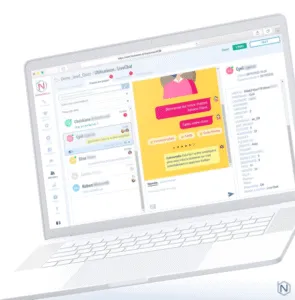
No need for in-depth knowledge of computer language, Botnation makes it easy to create your own chatbot. Manipulating the interface is child’s play, with a wide range of chatbot templates. A great way to personalize your own chat bot.
The first advantage of Botnation is its ability to centralize all your bots on a single platform. This centralized system makes it easy to use your conversation tools. What’s more, you can create the free chatbot that meets your company’s needs.
Whether you’re a small business, a micro-business or a large corporation, Botnation offers intuitive support and assistance. You can choose the chatbot model that suits your digital marketing needs. From questionnaires to online assistance, appointment booking, online ordering or product presentation, the platform offers it all.
How do I create a chatbot on Botnation?
Want to create a Botnation chatbot to take advantage of all the templates on Botnation? Start by creating your own user account.
What’s more, registration allows you to create a Messenger chatbot, Instagram chatbot, WordPress, WhatsApp, and more. As you scroll through each section, you’ll discover all the tools and features available.
- These options let you customize your enterprise chatbot to suit your customer needs. The bonus is that you can share your account with your customers. This makes it possible to multi-use your user account. It’s also ideal for those who like to work as part of a team on a project.
- On the other hand, at Botnation, you have access to other additional web services on various points. Add a map to better locate your address, share videos and photos to launch your products, integrate a game on your Instagram bot, Messenger, WhatsApp, WordPress…
- During this phase of sculpin creation, it’s also about inserting quick answers to immediately satisfy your customers. All you have to do is identify the questions most frequently asked by your customers, and write the right message for each context.
- What’s more, you’ll be able to rely on artificial intelligence for a versatile chatbot that can adapt to any question.
Chatbots for online businesses
Using a chatbot for an online business offers several advantages. Indeed, this tool makes it possible to offer local digital customer service, whether on social networks, Facebook, Messenger, WhatsApp, Instagram or via commercial sites.
Many organizations on the Internet use chatbots to boost their customer relations. Implementing a Messenger chatbot makes it possible to answer customers’ questions and reduce repetitive tasks within the company.
What’s more, the chatbot makes it possible to establish contact with customers, even if it doesn’t answer every question. The tool offers a better customer experience thanks to artificial intelligence, such as messaging, guides and tips and tricks.
An Instagram bot for your company

As a conversational computer program, chatbots can be used to inform, share and discuss with prospects and customers.
After success with big companies like Google, Apple with Siri, Samsung with Alexa, Windows with Cortana, the chatbot has become a business essential. This creates a unique and practical user experience.
The ideal tool for an online service, it can be linked to an account on social networks like Instagram. To create an Instagram chatbot account, simply adopt the appropriate settings on your account.
Set up your Instagram pro account
You don’t need any special skills to do this – it’s quite simple. As a first step, consider creating or opening a business account for your company. All you have to do is go to the platform and follow the steps indicated.
If you already have a personal account, switch to pro account mode, via your Instagram account settings. Once on your page, click on the “Account” tab, then select the “Switch to a professional account” option. When validated by the platform, your account is immediately in professional mode.
Setting up the Instagram chatbot
To improve your customer relationship, you need to activate Instagram chatbot. Here are the steps to configure the Instagram chatbot:
- Go to the settings menu on your Instagram page.
- Click first on the “Company” tab, then select “Frequently Asked Questions”.
- Then press “Configure” and write down the answers to the 4 most frequently asked questions about your account.
Use Botnation for more possibilities
Since questions are limited on Instagram, Botnation offers more possibilities with its digital conversation services.
On the platform, simply add your company’s chabot to your Instagram account. By connecting your Botnation account to it, you’ll have access to a wide range of tools to optimize and energize your customer relations.
In fact, you’ll be able to provide your subscribers with satisfactory answers in record time. What’s more, you can use other features to improve your service. By boosting the customer experience, the number of subscribers to your account will increase.