- A chatbot platform is the complete environment for designing, publishing and running a chatbot: a scenario builder, channels (website, WhatsApp, Messenger, Instagram), artificial intelligence, integrations and analytics in a single tool.
- There are four families: no-code SaaS platforms, self-hosted open-source solutions, add-ons embedded in customer-relations suites, and custom builds delivered by a service provider.
- The choice comes down to seven concrete criteria (channels, AI, hosting, integrations, ease of use, real cost, support), not to an editor’s name. An interactive selector in the middle of this article applies them to your case.
- On pricing: a SaaS platform like Botnation starts at 0 € and its paid plans top out at 59 € per month (grid checked on 15 September 2026), while a custom build generally costs between €5,000 and €30,000 according to the indicative range published in the FAQ of Botnation’s pricing page, consulted the same day.
Looking for a chatbot platform and landing on dozens of vendors, comparisons and directories that contradict one another? That is normal: the word “platform” covers very different realities, and every vendor benefits from blurring the line. This guide does the opposite: it defines precisely what a chatbot platform is, how it works from the inside, which four families share the market, what truly separates them, and how much each option really costs, with figures and their date of collection.
A word about our position, for transparency: Botnation, which publishes the site you are reading, offers precisely a no-code chatbot platform, and also builds custom chatbots for its clients. We therefore openly wear both hats in this article. Our bias: give you the criteria that let you judge any platform, including ours, with public prices verified the same day, and without ever hiding the limits of each approach.
What is a chatbot platform, really?
A chatbot platform is a software environment that gathers everything needed to bring a chatbot to life, from design to measurement: an editor to build the conversations, connectors to expose it on your users’ channels, an AI engine to understand their messages, integrations to plug it into your tools, and a dashboard to track what it does. That is what sets it apart from a mere development framework, which provides code bricks but leaves you to assemble the building, and from an agency, which delivers a finished product but does not always give you the means to make it evolve.
Chatbot platform: a complete software solution covering the design (scenario builder), multichannel publishing, conversational AI, business integrations and the monitoring (analytics, quality, human handover) of one or several chatbots, usually through a subscription, without having to code every component.
Concretely, a platform worthy of the name covers five functions. First, design: building the dialogues, frequently asked questions, forms and conditions. Second, multichannel distribution: the same chatbot served on your website, on WhatsApp, Messenger or Instagram. Third, understanding: from simple keywords to generative AI grounded in your own documents. Fourth, integration: sending a lead to the CRM, triggering a webhook, querying a database. Finally, monitoring: resolution rates, missing content, handover to a human when the bot reaches its limits. If a tool only offers the builder without the channels, or the channels without measurement, it is a component, not a platform.
How a chatbot platform works, from the inside
Making a purchase decision requires understanding the mechanics. Here are the four gears every platform turns, in the order you will meet them.
The scenario builder
The control room
This is the heart of the tool: a canvas where you draw the dialogue, block by block (message, question, choice, condition, external action). On no-code platforms the builder is visual: you drag blocks and connect them, much like a flowchart. On open-source solutions the same logic often exists, but as configuration files or code. The right evaluation reflex: check who can change a scenario once the bot is in production. If only a technical person can do it, the business team will stay dependent for every rewording.
The publishing channels
Where your users live
A chatbot is useless if it is not where people write to you. The platform manages the connections to each channel: website widget, WhatsApp, Messenger, Instagram, and sometimes SMS or internal apps. This point is more technical than it looks: every channel has its own rules (reply windows, message formats, account validations). On WhatsApp for example, sending goes through Meta’s official API, with message templates that need approval. A serious platform absorbs that complexity: you connect the channel, it handles the plumbing. That is exactly the role of the channels supported by Botnation, from the website to the messaging apps.
The AI engine
Keywords, NLP, RAG, LLM
Language understanding has changed scale in a few years. Platforms now offer a continuum of three approaches. Keywords, rustic but readable: the bot reacts to precise terms. NLP (natural language processing), which recognises intents and entities: “I want to cancel my order” becomes a “cancellation” intent with an order number extracted. Finally LLMs combined with your documents (the RAG approach): the chatbot answers based on your FAQ, your product sheets or your internal documentation. On Botnation these three levels coexist, and using the models consumes AI credits, a billing mechanism we detail below, because it changes the real cost of a bot.
Integrations, measurement and human handover
What turns a gadget into a tool
A chatbot that connects to nothing remains a demo. The platform exposes connectors: CRM, spreadsheets, email, webhooks, payment. It then measures: conversation volume, unanswered questions, satisfaction, human takeover rate. This measurement loop is what separates a bot that improves from a bot that silently degrades: every unanswered question is content to create. Good news for the sceptics: a well-designed scenario makes the bot useful in its first week, and AI then improves understanding as conversations accumulate.

To picture the whole thing, imagine the workspace of someone building a scenario: visual blocks connected on screen, a chat preview on a phone next to it, and one-click publishing to the channels. That is the flow a platform industrialises: the same gesture (editing a scenario) automatically translates into updates on the website, on WhatsApp and on Messenger, with no technical intervention.
The 4 families of chatbot platforms
The market is not divided between “the best tools” in the abstract, but between four families that do not answer the same needs. Confusing them is the first cause of disappointment at purchase time.
No-code SaaS platforms
Monthly subscription, visual builder, launch in days. Botnation, Chatfuel or Tidio belong to this family. It is the option for teams that want to build and evolve on their own, without an IT project.
Self-hosted open source
Rasa or Botpress give you access to the code and to the hosting of your choice. Maximum control, but you need developers for setup, connectors, security and upgrades. The cost shifts from the licence to engineering time.
Add-ons of customer-relations suites
Zendesk, Freshworks or the big CRMs embed a chatbot in their suite. Convenient if you already live in the tool, but the conversation often remains subservient to the ticket, and the building part stays more limited than a dedicated editor.
Custom builds
A provider, a specialised agency or an editor’s creation service designs the bot for you. The result is tuned to your business, but the budget is a project budget, and maintenance must be anticipated from the quote onwards.
| Criterion | No-code SaaS | Open source | Suite add-on | Custom build |
|---|---|---|---|---|
| Time to launch | Days | Weeks to months | Days to weeks | Weeks to months |
| Skills required | None to low | Developers | Low | Delegated to the provider |
| Entry cost | Subscription, sometimes 0 € | No licence, but infrastructure and engineering time to budget | Included or an option of the suite | Project, often several thousand euros |
| Technical control | What the platform exposes | Total | Limited to the module | Variable, to be contractualised |
| Evolution after delivery | By the business team, in autonomy | By the developers | By the suite administrator | Depends on the contract (successor or service) |
| Best for | Business teams, SMEs, fast launch | Technical teams, strong requirements | Companies already running the suite | Complex business cases, guidance |
Two honest remarks about this table. First, the families blend: a no-code vendor can host open-source models, a customer-relations suite can ship a generative assistant, and the same editor can sell SaaS and custom builds (that is our case, more below). Second, “open source” does not mean “free”: the licence costs nothing, but engineering time, hosting and maintenance almost always make the difference over a two-year horizon.
The 7 criteria that really make the difference

Rankings order tools; a criteria grid helps you choose yours. Here are the seven we apply, ordered by how often they sink projects when neglected.
- The channels you actually need. First list where your users ask their questions (website, WhatsApp, Messenger, Instagram, internal app), then check that the platform covers those channels natively, not through a mere link to a web page. A WhatsApp bot is not deployed like a website widget: Meta’s official API imposes its own framework.
- The maturity of the AI, from keywords to RAG. Ask how the platform handles the three levels (keywords, NLP intents, generative answers grounded in your documents) and how you move from one to the other. A good sign: being able to keep a deterministic scenario for sensitive cases (pricing, refunds) while generative AI handles the long tail.
- Hosting and compliance. Where are conversations stored? Who can access them? For a company subject to the GDPR, data hosting and the ability to host in Europe are elimination criteria, not comfort options. Self-hosted open-source answers that need radically; serious SaaS vendors document their data policy.
- Integrations with your tools. CRM, email, spreadsheets, webhooks, payment: list your three must-have integrations and check them in a demo, not in a brochure. A simple webhook opens up almost everything else, but better to see it live.
- Ease of use for the team that will live with it. The person who will edit scenarios in six months: a developer or a support manager? Have that person open the builder during the trial. If they dare not click, the project will stay stuck on a scarce resource.
- The real cost, not the entry price. Subscription, plus AI credits, plus out-of-plan users, plus channels that consume credits (SMS sending for example), plus maintenance. Honest pricing pages detail these lines; the others will bill them along the way.
- Support when you need to go further. One day you will want a use case beyond the templates: check that the vendor offers support (training, creation services, account manager) and under which conditions. It is the criterion comparisons forget, because it fits no table.
In a demo, ask the vendor’s bot three things: a question outside its intended scope, a question with a typo, and a request for a human callback. How the bot handles the unexpected, the noise and the human handover says more than any sales sheet.
These criteria also connect with the taxonomy of the bots themselves: depending on the use case (support, leads, FAQ, e-commerce), the weights change. If you start from the nature of the project rather than from the tool, our article on the types of chatbots and how to pick one completes this grid.
Selector: which family of chatbot platform should you start from?
Answer the 4 questions: each answer spreads 3 points across the three families (12 points in total) and the scores are recomputed at every click. The dominant profile appears with its cost implications.
1. Your top priority?
2. Who will build and run the chatbot?
3. Which target channels?
4. Your data and compliance constraints?
Dominant profile: No-code SaaS platform : 11 points out of 12
It is the fastest path: visual builder, connected channels, launch in days. On Botnation, the FOR FREE plan costs 0 € per month, BASIC 39 € and PRO 59 € (grid checked on 15 September 2026, prices shown in euros and quoted excluding VAT), with unlimited chatbots in all three cases. Check before committing: how AI credits are billed, the cost of out-of-plan users (0.05 € per month on Botnation) and the channels included in each plan. You stay in control: scenarios remain editable in the builder, with no code to maintain.
The code is yours, and so is the hosting. The main cost item is not the licence (there is none) but engineering time: setup, connectors, security, upgrades, plus the ongoing load of keeping those skills in-house. It is the right choice when data policies require hosting under your control, or when the chatbot must integrate deeply with internal systems. Budget the whole life cycle, not just the first deployment.
A provider designs the chatbot around your business, your data and your tools. To size up the order of magnitude: the FAQ of Botnation’s pricing page states that building a chatbot by your own means, without a SaaS subscription, “will generally cost between €5,000 and €30,000, or even more, depending on the features you need”, a range the page itself calls indicative (checked on 15 September 2026). It is a market landmark, not a quote. Botnation also offers this mode through its Entreprise plan: a dedicated team of builders designs the chatbot, on demand, while the platform remains available for evolutions.
Editorial weighting: each answer spreads 3 points across the three families, out of 12 points in total. This selector orients the choice; it replaces neither a demonstration nor a quote.
How much does a chatbot platform cost?
Let us talk numbers, with their sources and their date. The cost of a chatbot platform splits into very unequal items depending on the family you pick, and the displayed subscription price is never the full cost.
| Cost item | Where it applies | Order of magnitude | Source and date |
|---|---|---|---|
| Platform subscription | SaaS platforms | From 0 € (free plan) to 59 € per month in the Botnation grid | botnation.ai pricing page, checked 15/09/2026 |
| AI credits as you go | SaaS platforms, beyond included credits | Packs from 25 € (1,000 credits) to 900 € (60,000 credits); out-of-plan user 0.05 € per month | botnation.ai pricing page, checked 15/09/2026 |
| Custom development | Service build, outside a SaaS subscription | Between €5,000 and €30,000, or even more, an indicative range depending on the features | FAQ of the botnation.ai pricing page, checked 15/09/2026 |
| Infrastructure and engineering | Self-hosted open source | No licence, but hosting, setup and maintenance to budget (no published market price: depends on your context) | Qualitative estimate, with no external figure |
| Content work and continuous improvement | All families | Internal time: enriching content, analysing unanswered questions, testing | Domain practice, constant across vendors |
The public Botnation grid, as checked on 15 September 2026 (prices excluding VAT; the page notes that a legal entity located in the European Economic Area is subject to VAT):
| Plan | Price | What is included |
|---|---|---|
| FOR FREE | 0 € per month | Unlimited agents, free agents |
| BASIC | 39 € per month | Unlimited agents, full features, analytics solution, dedicated support, updates included; 500 users and 500 AI credits offered (only once) |
| PRO | 59 € per month | The same foundations; 1,000 users and 1,000 AI credits offered (only once) |
| ENTREPRISE | On demand | Dedicated account manager, personalised onboarding, premium client support, chatbot creation management, unlimited agents; contact sales team |
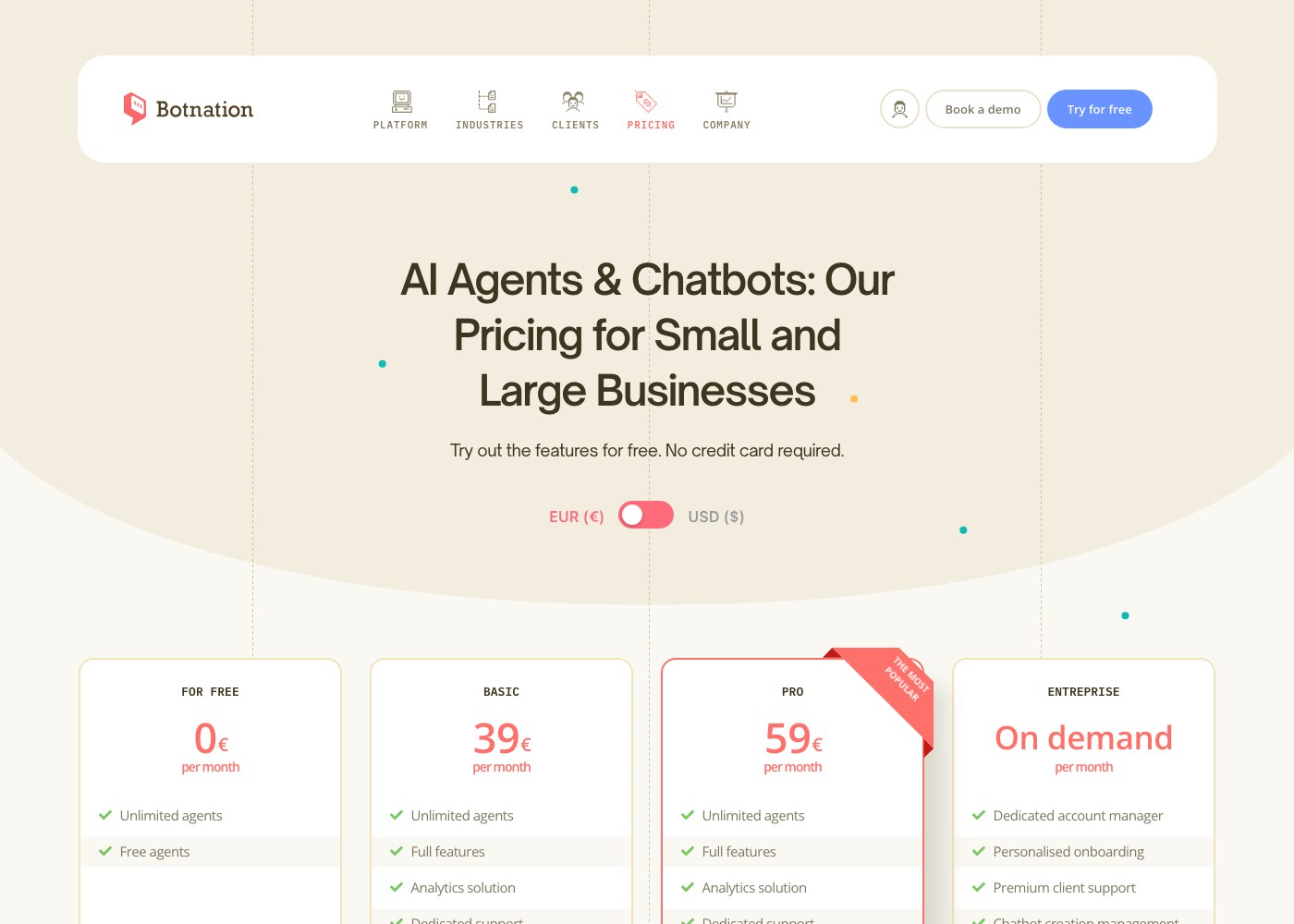
For the detail of the credits, a concrete example from the same page: with the 500 credits offered in the BASIC plan, you can run 500 requests on GPT-3.5 or on a customised AI, or 250 advanced requests, or 50 requests on GPT-4.0, or 25 generated images. The PRO plan doubles those volumes (1,000 users and 1,000 credits). Extra credits are sold in packs: 1,000 credits for 25 € (minus 10 %), 5,000 for 100 € (minus 15 %), 15,000 for 250 € (minus 20 %) and 60,000 for 900 €. The same mechanism exists across the market: other vendors also bill generative AI on usage, as credits, “seats” or per-resolution fees. The reflex is the same everywhere: estimate your volume (conversations per month, the share that triggers AI) and simulate the full bill, subscription included.
One: what happens to AI credits (offered only once on Botnation, then sold in packs). Two: the count of out-of-plan users (0.05 € per month per user on Botnation), which adds up on large workforces. Three: the channels that consume credits, SMS sending for example, explicitly flagged on the pricing page. Three lines to read before signing, whatever the platform.
And for custom builds, let us keep the honest frame: the €5,000 to €30,000 range quoted above describes a development carried out by your own means, without a SaaS subscription, and the page that publishes it states itself that these amounts are indicative and hard to estimate. For the record, it also appears on the English version of the page as of 15 September 2026: “it will generally cost between €5,000 and €30,000, or even more, depending on the features you need. These price ranges are indicative”. We quote it as a market order of magnitude, never as a commitment: a quote depends on the scope, the integrations and the data.
Building your chatbot on a platform: a 5-step method
Whatever platform you choose, successful projects follow roughly the same path. Here it is, in the order that avoids going backwards.
- Frame one single first use case. Support on a FAQ, lead qualification, order tracking: a bot that does one useful thing beats a bot that pretends to do everything. Fix a success metric (share of conversations resolved, forms completed) before writing the first message.
- Gather the content before the scenarios. FAQ, product sheets, internal procedures: generative AI grounded in your documents (the RAG approach) is only as good as your documents. It is the most profitable step, and the most often skipped. Our guide on training a chatbot on your own data details this work.
- Build a short pilot scenario. Welcome, three main paths, human handover at the end of the loop. Test it with real colleagues, fix, repeat: one hour of early iteration saves weeks of rework.
- Connect one channel, then widen. The website first, where fixing is easy; then WhatsApp or Messenger, where every mistake costs unsubscribes. The platform should make that extension mechanical, not another project.
- Measure, enrich, industrialise. Every week: unanswered questions, unexpected wordings, human takeover rate. Every month: new content, new scenarios. That loop, more than the initial choice, makes a chatbot good six months later.
If you want to push the method further, our article on designing a chatbot in 7 steps details each phase, from framing to launch.
And Botnation in all this: a no-code platform AND custom creation
We have left this question aside until now, because it deserves to be asked clearly: Botnation sells a no-code platform, and at the same time builds custom chatbots for its clients. Both activities are public and reinforce each other. On one side, the self-service offer: the platform, its plans from 0 € to 59 € per month (grid checked on 15 September 2026), the visual builder, the channels, the AI and the integrations, for teams that build themselves. On the other, the Entreprise plan, labelled “On demand” in the English pricing grid, which explicitly includes “Chatbot creation management”, a dedicated account manager and personalised onboarding; the pricing FAQ puts it plainly: “our team of specialized developers is available to take care of designing your Botnation chatbot if needed” (text checked on 15 September 2026).
Why does a single vendor play both sides? Because the question a company faces is never “no-code or custom” in the abstract, but “who builds, and with what”. When it applies, the team that builds your chatbot is the one that edits the platform: when the provider delivers, the client recovers an account, scenarios and a knowledge base directly in the builder, and can then evolve the bot in autonomy or keep working with the team. It is a structural difference, not a sales promise: to be compared, in both directions, with an agency that builds on a technology it does not control, or with a tool nobody helps you adopt.
An independent agency remains legitimate for a very specific trade, an on-site team, or when an integrator already works inside your systems. The 7-criteria grid applies to it too: channels, AI, data, integrations, ease of use, real cost, support. The right provider is the one who makes you autonomous in the end, not the one who makes succession impossible.
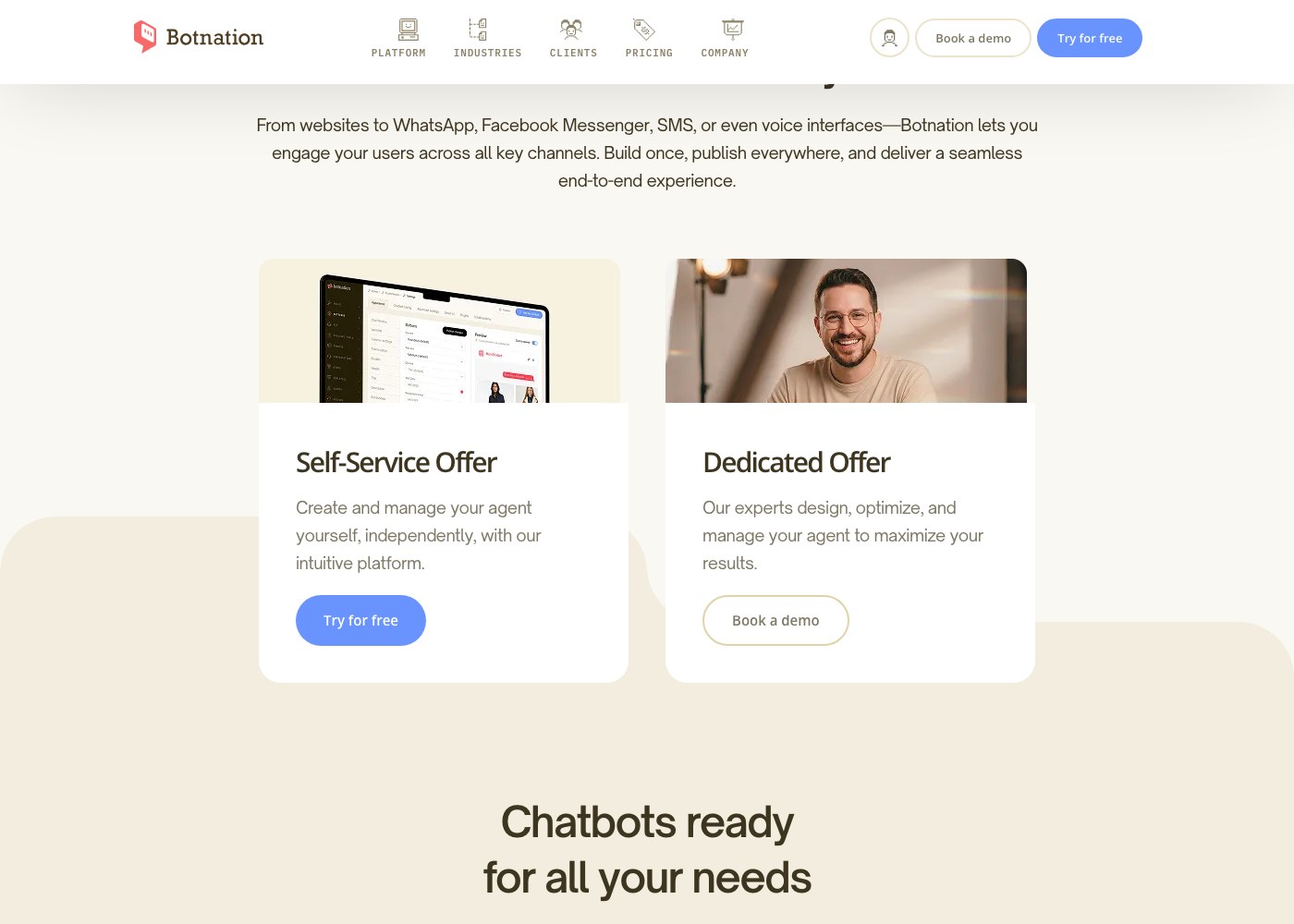
On the ground, this dual offer shows up in the use cases: a support team builds a front-line bot in autonomy on the client support use cases, while a marketing team gets guidance for a multichannel lead qualification device. The platform is the same; what changes is the share that is taken care of.
Frequently asked questions
What is the best chatbot platform?
There is no “best platform” in the abstract, only a better fit for your case: required channels, technical constraints, available team and budget. Apply the 7-criteria grid (channels, AI, hosting, integrations, ease of use, real cost, support) to three platforms from different families and let the demos decide. Published rankings often reflect their authors’ partnerships, not your context.
How much does a chatbot platform cost?
For a SaaS platform, from 0 € to a few dozen euros per month: the Botnation grid checked on 15 September 2026 shows FOR FREE at 0 €, BASIC at 39 € and PRO at 59 € per month, excluding VAT. AI credits beyond the included allowance are added (packs from 25 € to 900 € on Botnation), plus out-of-plan users (0.05 € per month). For a custom build outside a subscription, the FAQ of the same page quotes an indicative range of €5,000 to €30,000, or even more. For open source, the licence is free but infrastructure and engineering time must be budgeted.
Can you create a chatbot for free?
Yes. Botnation offers a FOR FREE plan at 0 € per month with unlimited agents, with no credit card required according to the pricing page (checked on 15 September 2026). Most mainstream vendors also offer a free tier or a trial. The usual limits: conversation volume, access to advanced AI models, removal of the vendor’s branding, support. For testing a real use case it is usually enough; for a production rollout, plan for a paid tier.
What is the difference between a chatbot platform and a framework?
A framework provides code bricks (NLP libraries, connectors) that your developers assemble: Rasa works that way. A platform provides the whole building, visual builder, channels, AI, measurement, ready to use and maintained by the vendor. The framework maximises control; the platform maximises speed of delivery and business-team autonomy. Many organisations use both: a platform for 90 % of the use cases, custom development for the remaining 10 %.
Do you need to know how to code to use a chatbot platform?
Not on a no-code platform: the visual builder replaces code, and integrations go through ready-made connectors. Yes on an open-source solution, where configuration and development happen in code. Botnation covers both needs: the platform to build without code, and the creation services of the Entreprise plan for those who prefer to delegate the build, on demand.
How does a chatbot platform use generative AI?
Two uses coexist. Understanding: the engine interprets messages, whether keywords, NLP intents or free questions handled by a large language model. Generation: the chatbot writes its answers based on your documents (FAQ, documentation, product sheets), the RAG approach, which strongly reduces made-up answers. Since model calls cost the vendor computation, they are often billed as credits: on Botnation, 1,000 credits cover 1,000 GPT-3.5 requests or 100 GPT-4.0 requests, as an example checked on the pricing page on 15 September 2026.
Can the same chatbot run on a website and on WhatsApp?
Yes, and that is precisely the role of a platform: the scenario is built once, then served on each channel with its specifics (reply windows, formats, the requirements of WhatsApp’s official API). Check in a demo that the blocks used on the website work the same way on the messaging apps, and that the platform handles each channel’s constraints. Our page on the available channels (website, WhatsApp, Messenger, Instagram) details these deployments.
How do I know if my current platform is still good enough?
Three warning signs: your team no longer touches the scenarios without going through a provider (lost autonomy); unanswered questions pile up because enriching content is too painful (a broken measurement loop); and the need for generative AI or new channels requires developments outside the tool (a closed platform). If two of these signals are present, run the 7-criteria grid on your current tool, as if it were a candidate.
The bottom line
Choosing a chatbot platform is not a feature contest, it is an organisational choice: who builds, who runs it, with how much control and what real budget. The four families of the market answer four different balances, and the 7-criteria grid above settles them better than any ranking. Pick one single use case, test two or three platforms from different families during their free tiers, and let the demonstration, not the brochure, make the decision.
Try the platform, or have your chatbot built for you
Create your first chatbot for free on the Botnation platform, or entrust its design to our team: two paths, the same platform, and the same data that stays yours.
Need a custom chatbot: contact our chatbot creation experts. For a first look at the use cases, explore lead generation or the chatbot examples.