In short. “Chatbot app” means two very different things: the app you install to chat with an AI (ChatGPT, Gemini, Claude, Vibe, Lumo…), and the chatbot you put on your own website to answer your customers. Both are useful, and neither replaces the other.
Below: a filterable comparison of 12 apps, the real prices recorded on July 28, 2026 on the official pages, what the free tiers actually allow, where your data goes, and a selector that settles it in 5 questions.
Type “chatbot app” into Google and you get a mix: Play Store listings, roundups of mobile apps, and comparisons of professional platforms. That’s no accident. Two opposite needs hide behind those two words, and most pages only handle one of them.
This article handles both, in order: first the apps you use to chat with an AI, then the chatbot app you can have speak for you to your customers. Every figure quoted here was recorded on July 28, 2026 on the vendors’ official pages, screenshots included.
Three different things behind the same two words
A chatbot app is software whose main interface is a conversation: you type, a program answers. The word “app” can mean the app you install on your phone, the program running on a server, or the business job you put it to. Hence the confusion.
1. The app you chat with
You download it, you ask your questions. That’s ChatGPT, Gemini, Claude, Copilot, Vibe. A general-purpose assistant, trained on the web, that knows neither your catalog nor your opening hours.
2. Your brand’s chatbot
The one that answers your visitors on your site, your online store or WhatsApp. It speaks in your name, knows your products, and belongs to you. That’s a project, not a download.
3. Business use cases
The “what is it for” meaning: customer support, pre-sales, HR, appointment booking, order tracking. That’s what our chatbot examples cover.
One reader in two lands here for meaning 1, the other for meaning 2. Both sections are below. Let’s start with the consumer apps, since that’s what Google puts forward on this query.
Comparison: 12 chatbot apps worth knowing in 2026
The table below is filterable and sortable. Search for a name, or filter on what matters to you: a European vendor, access without signing up, a specialized app.
Find the app that matches how you’ll use it
12 apps for chatting with an AI, each listed with what it does best.
| App | Vendor (country) | Where to use it | What it does best |
|---|---|---|---|
| ChatGPT | OpenAI (United States) | iOS, Android, web, desktop | The most versatile: writing, summarizing, coding, analyzing a document |
| Gemini | Google (United States) | iOS, Android, web | Integration with Android, Gmail and the Google services |
| Claude | Anthropic (United States) | iOS, Android, web, desktop | Long-form writing and document analysis |
| Copilot | Microsoft (United States) | iOS, Android, web, Windows | Working inside Windows and Microsoft 365 |
| Vibe (formerly Le Chat) | Mistral AI (France) | iOS, Android, web | The French alternative, running its own models |
| Lumo | Proton (Switzerland) | iOS, Android, web | Privacy: encrypted conversations, no training on them |
| Perplexity | Perplexity AI (United States) | iOS, Android, web | Looking things up with the sources shown |
| Grok | xAI (United States) | iOS, Android, web, X network | Following the news and the conversations on X |
| DeepSeek | DeepSeek (China) | iOS, Android, web | Reasoning and code, on openly released models |
| Meta AI | Meta (United States) | WhatsApp, Instagram, Messenger, standalone app | AI where you already chat, with nothing to install |
| Character.AI | Character Technologies (United States) | iOS, Android, web | Characters and conversational role-play |
| Nation AI | Nation (France) | Browser, nothing to install | Chatting straight away, with no account to create |
No app matches that search. Clear the field or go back to the “All” filter.
Table compiled on July 28, 2026 from the vendors’ official pages. These apps move fast: check the features and the quotas before you commit.
General-purpose apps: when you want one app for everything
ChatGPT, Gemini, Claude and Copilot do roughly the same things: answer, write, summarize, translate, analyze a file. The choice rarely comes down to raw quality, it comes down to where you already work. On Android with a Gmail inbox, Gemini is a thumb away. In a Windows and Microsoft 365 environment, Copilot is already installed. For long text and documents, Claude is often more comfortable. ChatGPT remains the Swiss army knife, and the richest in side features.
Don’t go looking for “the best” chatbot app in the abstract. Ask two free apps the same question for a week, on your real topics. The ranking that counts is the one your own answers produce, not the one in a comparison table.
The European ones: when the data question comes up
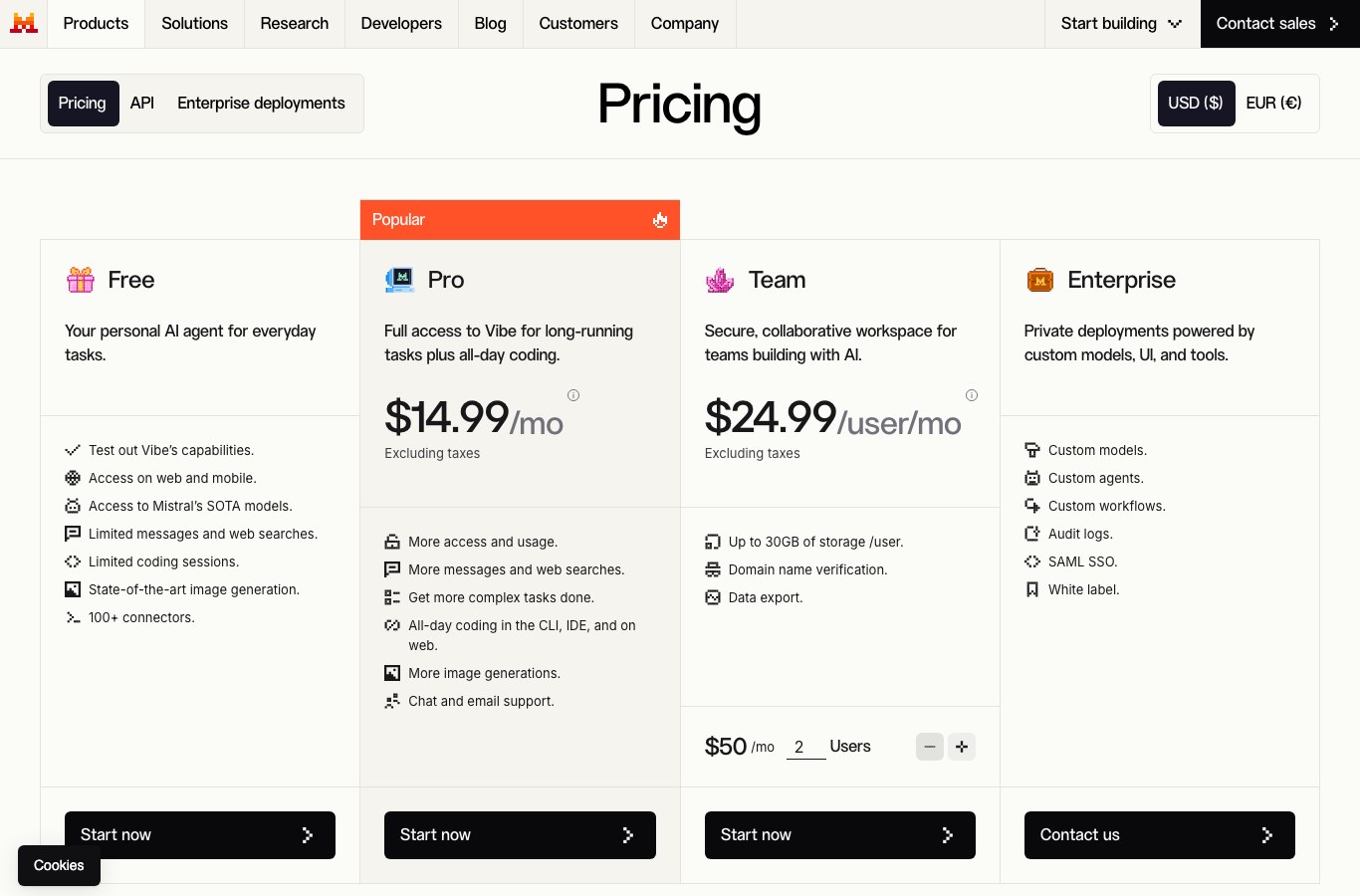
Two names stand out. Vibe, the app from French vendor Mistral AI: it’s the former Le Chat, renamed in 2026 when Mistral merged its assistant, its work mode and its coding tool under a single brand (source: Mistral help center). Accounts, subscriptions and conversations were carried over. Lumo, launched by Proton in July 2025, takes the opposite angle: few spectacular features, but encrypted conversations, no training on your exchanges, and access without an account. Proton announced in 2025 that it was moving the Lumo infrastructure to Germany.
The specialized ones: when you already know what you need
- Perplexity answers like a search engine, with the sources under every claim. It’s the app to open when you need to check something, not when you need to write.
- Grok, the app from xAI, gets its value from being plugged into the X network. We gave it a full guide to Grok.
- DeepSeek built its reputation on reasoning and code, with models published in open access.
- Character.AI plays a different game: characters, role-play and conversation for its own sake.
Want to see how these models actually rank, and who decides? The Chatbot Arena leaderboard has users vote blind on head-to-head answers. It’s the most quoted measure in the field, with its limits.
How much does a chatbot app cost in 2026?
Here are the official prices recorded on July 28, 2026, not estimates. They change regularly: the date matters as much as the figure.
| What you are after | Monthly budget | Example recorded on July 28, 2026 |
|---|---|---|
| Chatting, without paying | €0 | ChatGPT Free, Vibe Free, Lumo, Nation AI |
| Chatting a lot, as an individual | €8 to €25 per month | ChatGPT Go at €8, ChatGPT Plus at €23, Vibe Pro at €14.99 excluding tax |
| Heavy or advanced professional use | over €100 per month | ChatGPT Pro from €103 per month |
| Your own chatbot, built by you | €0 to €59 per month | Botnation: For Free €0, Basic €39, Pro €59 per month |
| Your own chatbot, built for you | on quote | Botnation Enterprise plan, chatbot creation services included |
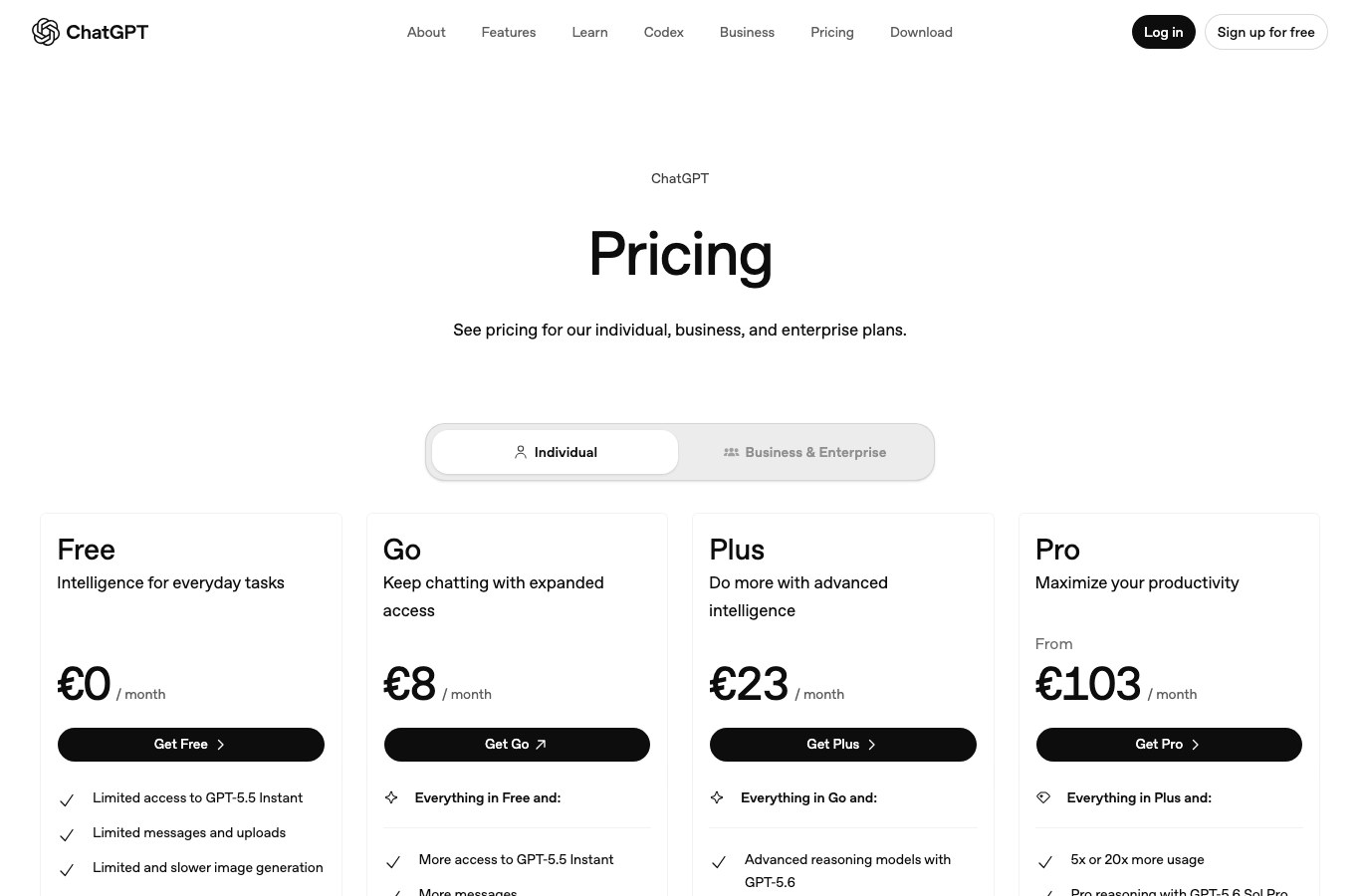
For the other consumer apps, an individual subscription sits around €20 per month. That’s a market ballpark, not an official price: check the figure on the vendor page before you subscribe, and watch the “excluding tax” line in particular, which adds 20% to the final bill in France.
How far does the free version really go?
Every app in the table has a free version. That’s true, and it’s incomplete. Here is what free costs you in practice.
- Quotas, often invisibleA number of messages per day or per window of a few hours. You only find out the moment you go over, usually in the middle of something.
- A weaker modelThe free version often drops to a lighter model once the quota is hit. Answers stay decent, they lose their edge.
- Capped featuresWeb search, image generation, analysis of large files, memory between conversations: that’s where the gap between free and paid shows up.
- Your exchanges, sometimes used for trainingSeveral vendors reuse free-account conversations by default to improve their models. The opt-out almost always exists, you just have to go find it in the settings.
A consumer chatbot app isn’t a professional tool by default. Pasting a customer file, a contract or a medical record into one hands that data to a third party, outside your control. For regular professional use, take an enterprise plan with a contract behind it, or a tool you host and configure yourself.
Your data: where does it actually go?
This is the question app comparisons skip most often. Three criteria are enough to see clearly.
What to check
- Where the servers sit, and under which jurisdiction
- Whether your conversations train the model, and how to opt out
- How long the history is kept, and whether you can delete it
What it changes
- A European vendor makes compliance simpler, it doesn’t deliver it alone
- Opting out of training takes 30 seconds in the settings
- Access without an account leaves fewer traces tied to your identity
The two most serious options on this front remain Vibe for a French vendor, and Lumo for encrypted conversations. Watch the shortcut, though: “European vendor” isn’t a synonym for “GDPR-compliant in your context”. What binds you is how you use the tool and what you feed into it.
Which chatbot app do you need? The 5-question test
Answer the 5 questions below. The selector isn’t selling you anything: on a tie, it recommends the least committing option, meaning a free general-purpose app.
The selector
5 questions, one recommendation. No data is sent anywhere, everything is worked out in your browser.
1. What will this app be used for day to day?
2. Who will be asking the questions?
3. What happens if the answer is wrong?
4. What should the answer be based on?
5. Where should the conversation happen?
Answer the 5 questions, then click the button.
A free general-purpose app is enough
Your need is the one most people have: a versatile assistant, to write and understand faster. Take the one already sitting in your environment (Gemini on Android, Copilot on Windows) or ChatGPT if you’re starting from scratch. Stay on the free tier as long as you’re not hitting the quotas. Paying is a decision you make when the limit gets in your way, not before.
Go with a European app, and set the privacy options
Your answers point to a data issue. Look at Vibe, the app from French vendor Mistral AI, or Lumo from Proton for encrypted conversations. Either way, turn off training on your exchanges in the settings, and never paste a customer file into a consumer app without a contract covering it.
Take an app built for search
You’re not looking for a writer, you’re looking for a verifiable answer. Perplexity shows its sources under every claim, which saves you the cross-checking step. Keep a general-purpose app alongside it for writing: the two jobs don’t overlap.
What you need isn’t a consumer app, it’s your own chatbot
You want to answer people who aren’t you, on topics only your company knows. No app in the table will do it: they know nothing about your catalog, your prices or your procedures. What you need is a chatbot fed with your content and placed on your channels. The next section explains how it gets built, and what it costs.

The other meaning: building your own chatbot app
You run a shop, a trade business, a local government office, an HR department or an online store, and you’re searching for “chatbot app” to equip your business. The reasoning changes completely.
What a consumer app will never do for you
ChatGPT knows nothing about your opening hours, your return policy, or the stock level of the item a customer is asking about. It’s not on your site at 10 p.m. either, when a visitor hesitates. A business chatbot does three things no downloaded app does:
- it answers from your content, not from the general knowledge of the web;
- it lives on your channels: website, online store, WhatsApp, Messenger, Instagram;
- it does something at the end: capture a contact, book an appointment, hand over to a human.
On that last point, the numbers against the old contact form are worth a look: we documented them in chatbot versus form.
The 5 steps to build a chatbot app that earns its place
- Pick one problem to solveNot “answer everything”. A measurable goal: absorb the delivery questions, qualify the quote requests, take pressure off the front desk. The chatbots that fail are almost always the ones that tried to do it all.
- Gather the raw materialExisting FAQ, product pages, terms of sale, the standard emails your support team sends. That material drives answer quality far more than the model you pick. We lay out the method in our guide to training a chatbot on your own data.
- Write down the 20 questions that keep coming backUse your real conversations, not questions you imagined. Twenty well-handled questions often cover most of the incoming volume.
- Choose the right type of chatbotGuided script, AI chatbot fed with your documents, or a mix of the two. The choice depends on how varied the requests are: see our comparison of chatbot types.
- Publish on the right channels, then fixA chatbot gets tuned by reading the real conversations of the first two weeks. That’s where performance is won, not in the initial setup.

How much does your own chatbot app cost?
Two paths, two budgets. The first: you build it yourself on a no-code platform. At Botnation, the For Free plan is €0 per month and already lets you publish a chatbot, with no credit card. The Basic and Pro plans are €39 and €59 per month. The second path: you have the chatbot built by the team behind the platform, under the Enterprise plan, which explicitly includes chatbot creation services, a dedicated account manager and personalized onboarding. That plan is on quote: we publish neither a price nor a lead time, because both depend on the real scope.
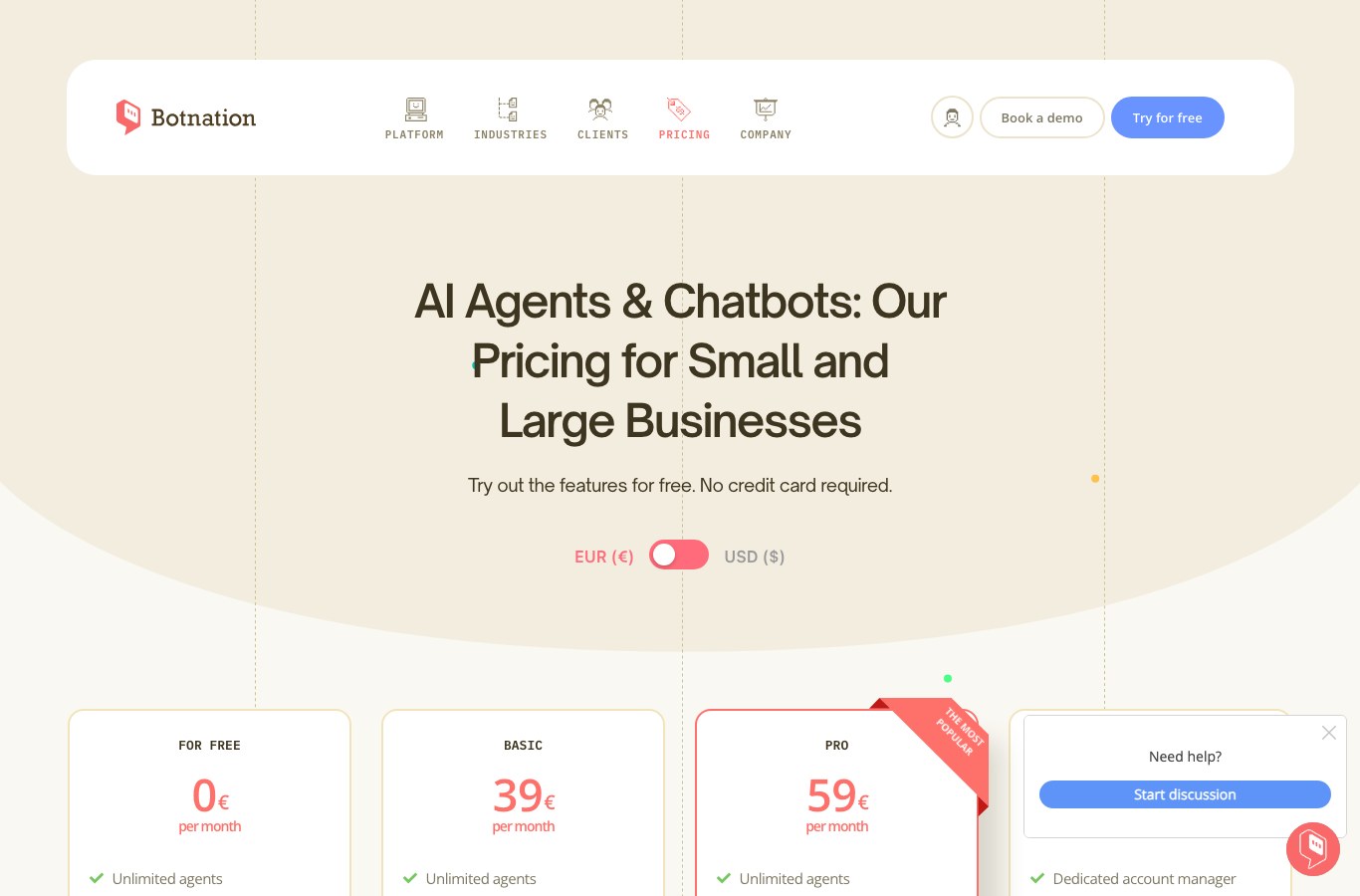
Botnation edits a no-code chatbot creation platform and builds custom chatbots for its clients, through its Enterprise plan. So we’re judge and jury on the second half of this article. Better to say so up front. The consumer app prices quoted above come from the official pages of their vendors.
A legal obligation kicks in on August 2, 2026
If you’re putting a chatbot online for your business, note that date. Article 50 of the European artificial intelligence regulation (Regulation EU 2024/1689, known as the AI Act) becomes applicable from August 2, 2026. It requires AI systems designed to interact directly with people to be built so that those people know they are talking to an AI, unless it is obvious to a reasonably attentive user.
Check that your chatbot states clearly what it is from the very first message, and that handover to a human is possible. Failing the transparency obligations of Article 50 carries a fine of up to €15 million or 3% of total worldwide annual turnover, whichever is higher. General information, which does not replace legal advice tailored to your situation.
In practice, it’s one line of text to add to the welcome message. Well-designed chatbots were already doing it: announcing that you’re an automated assistant raises satisfaction rather than lowering it, because the user adjusts their expectations.
Frequently asked questions
What is the best chatbot app?
There’s no universal winner, and be wary of rankings that name one. ChatGPT is the most versatile, Gemini the best integrated with Android, Claude the most comfortable with long documents, Perplexity the best for looking things up, Vibe and Lumo the most interesting on the data question. The selector above points you in the right direction in 5 questions.
What exactly is a chatbot app?
It’s software whose interface is a conversation: you write a message, a program answers you in plain language. The term covers the mobile app you install to chat with an AI just as much as the chatbot a company puts on its website. Our FAQ chatbot page shows what that second version looks like in practice.
What is the best free chatbot?
The free versions of ChatGPT, Gemini, Claude, Copilot, Vibe, Perplexity and Lumo cover personal use comfortably. For daily use without an account, Lumo, Perplexity and Nation AI open straight in the browser. To build your own chatbot without paying, most no-code platforms offer a free plan, Botnation included at €0 per month.
Is there a 100% free chatbot app?
Yes, with limits. Every app in the comparison has a permanently free version. In exchange: message quotas, a lighter model at times, advanced features reserved for subscribers, and conversations often reused to train the models if you don’t turn the option off. Free works very well for personal use, much less so for regular professional use.
Which chatbot apps come from a European vendor?
Every app in the table handles English, and most major European languages, without trouble. If you want a European vendor rather than an American one, the list narrows to Vibe (Mistral AI, France), Lumo (Proton, Switzerland) and Nation AI (France). Filter on “European vendor” in the comparison table to isolate them.
Can you use a chatbot app without creating an account?
Yes, on several of them. ChatGPT has offered a guest mode since 2024, Perplexity answers without a login, Lumo doesn’t ask for a Proton account and Nation AI opens straight in the browser. The limits are real: no history, no memory between conversations, and tighter quotas than with a free account.
Can you put a chatbot inside your own mobile app?
Yes. A chatbot built on a no-code platform publishes to a website, but also to a messaging app such as WhatsApp or Messenger, which often removes the need to develop an app at all. Our publishing channels lay out the options, and our WhatsApp chatbot guide covers the most requested case.
Does a chatbot have to say it’s an AI?
From August 2, 2026, yes, in the European Union. Article 50 of Regulation EU 2024/1689 requires informing a person that they are interacting with an AI system, except where it is obvious. In concrete terms, a clear line in the welcome message is enough in most cases. This information is general and does not replace legal advice.
Your chatbot app, the one that’s actually yours
The apps in the comparison answer your questions. A Botnation chatbot answers the questions your customers ask, with your content, on your site and on WhatsApp. The free plan lets you publish a first bot with no credit card.
Sources for the figures quoted: official pricing pages of ChatGPT and Mistral AI, Mistral help center for the move from Le Chat to Vibe, Proton product page for Lumo, and Article 50 of Regulation EU 2024/1689 for the transparency obligation. Recorded on July 28, 2026.