In short. A chatbot does not understand your sentence, it scores it. It cleans the sentence, compares it to examples it was given, and gives every intent a confidence score between 0 and 1. One single setting then decides everything: the threshold above which it answers, and below which it hands over.
That number explains the two behaviours you already know: the bot that answers beside the point, and the bot that keeps repeating “I did not understand”. This page opens the box, with an intent engine that really runs in your browser and whose formula is published.
Every page that explains how a chatbot works tells the same story in four steps: it receives, it understands, it searches, it answers. That is accurate, and it explains nothing. It does not say why a bot answers perfectly to “where is my order” and derails on “when do you send my money back”. It does not say which setting would have avoided the mistake.
The real mechanism is one very simple piece of arithmetic, run dozens of times per message: a comparison that returns a number. Understanding that number is understanding a chatbot, and above all knowing how to tune it. This article follows a message from the keyboard to the reply, shows the real artefacts that exist at each step, and lets you drive the engine yourself.
The journey of a message, step by step
Between the moment you press Enter and the moment the reply appears, rarely more than two seconds go by. Here is what happens in that window, in order, for a classic business chatbot.
- ReceptionThe widget picks up your text, or your click on a button, and sends it to the bot server with a session identifier. That identifier is what ties your message to the previous ones.
- NormalisationThe text is lowercased, stripped of its accents and punctuation, and cut into words. Function words (articles, pronouns, prepositions) are usually discarded. “Where is my order?” becomes a handful of tokens, sometimes a single one.
- ScoringWhat is left is compared with the training phrases of every intent. Each intent walks away with a score. This is the step the rest of this article dissects.
- The decisionThe engine looks at the best score. If it reaches the threshold, the winning intent is selected. If not, the fallback fires: a request to rephrase, a menu of options, or a handover to a human.
- Entity extractionIf the intent is selected, the engine pulls the useful values out of it: an order reference, a date, a postcode, an amount. Those values are stored in session variables.
- The actionMany replies are not canned sentences. The bot calls an API (the carrier tracking service, the CRM, the calendar), waits for the result, and slips it into its answer.
- DeliveryThe text goes back to the widget, sometimes with follow-up buttons, an image, a link. And the loop starts again on the next message, this time with a context.
Every step has a setting that drives it, and a symptom that gives it away when it fails. This is the table you will not find anywhere else, and the one that helps most when you have to diagnose a disappointing bot.
| Step | What drives it | What you see when it fails |
|---|---|---|
| Normalisation | Stop word list, typo tolerance, handling of accents | The bot ignores a perfectly clear sentence because of one typo |
| Scoring | Number and quality of the training phrases of each intent | Two neighbouring intents constantly fight over the same messages |
| Decision | The confidence threshold, and the minimum gap required with the runner-up | Too low: the bot answers beside the point. Too high: it keeps saying it did not understand |
| Extraction | Declared data types (date, reference, email, city) | The bot asks the same question three times when the answer was in the message |
| Action | Connectors, timeout, behaviour when the API fails | The bot goes silent, or promises information it never received |
| Delivery | Reply templates, follow-up buttons, escalation rules | A good answer in a dead end, with no way through to a human |
A button-based chatbot only runs steps 1, 6 and 7. It has nothing to understand: every button points to a predefined branch. That is why it never gets it wrong, and why it never surprises anyone either.
A chatbot does not understand, it scores
This is the most useful sentence in the whole article, and it is the Botnation documentation that puts it most honestly: “The chatbot does not understand a sentence in its entirety but it will recognize some words. It is by comparing these words with those configured in the rules of its AI that it will be able to associate the right answer.“
Google’s documentation says the same thing, with a number. On Dialogflow, every candidate intent is given a score: “When searching for a matching intent, Dialogflow scores potential matches with an intent detection confidence, also known as the confidence score. These values range from 0.0 (completely uncertain) to 1.0 (completely certain)” (Dialogflow ES documentation, “Intent matching”, page last updated 29 July 2026).
Confidence score. A number between 0 and 1 that measures how much the message resembles the examples of one intent. It is neither a probability of being right nor a measure of understanding: it is a distance. A score of 0.9 means “very similar”, not “I understood”.
Three families of engines compute that score differently, but all of them compute it.
- Keyword engines compare the words present. That is the case of the basic AI in Botnation, with its keywords, its expressions and its rules.
- Classifier engines (Dialogflow, Rasa, watsonx Assistant) learn a statistical model on your example phrases and output a probability distribution over the intents.
- Vector engines, the ones behind recent chatbots, turn the sentence into a list of numbers and look for the passages of your documentation that sit closest in that space. The score becomes a vector distance, but it is still a score.
The engine below belongs to the first family, the most readable one. Its intent base is published in plain sight, its formula too, and it runs in your browser: nothing you type leaves your machine.
| Intent | The four training phrases |
|---|---|
| Track my order | where is my order · track my parcel · my delivery is late · when will i receive my parcel |
| Return an item | i want to return an item · how do i make a return · send a product back · the item does not suit me |
| Get a refund | i want a refund · when will i be refunded · you have not refunded me · get a refund for my order |
| Shipping costs and times | how much does delivery cost · what are the delivery times · do you deliver to belgium · is delivery free |
| Change my order | change my order · change the delivery address · cancel my order · add an item to my order |
| Login problem | i cannot log in · forgotten password · my account is locked · reset my password |
| Talk to an agent | i want to talk to someone · put me through to an agent · i want a real agent · talk to a person in customer service |
| Opening hours and contact | what are your opening hours · are you open on saturdays · how can i reach you · your phone number |
The test bench: run an intent engine yourself
This engine really runs in your browser, on the intent base published just above. Type a sentence or pick an example, then move the threshold and watch the verdict change.
1. The visitor’s message
2. The confidence threshold
3. The minimum gap required between the top two intents
4. Ignore stop words (articles, pronouns, prepositions)
Words kept after cleaningorder
The best score reaches the threshold, and the gap with the runner-up is wide enough. The bot fires the reply attached to that intent.
Score = number of shared words divided by the square root of the product of the two lengths, best of the four phrases of each intent. No data leaves your browser.
Give it three minutes. Three things are worth the detour.
- Type “when do you send my money back”. The engine answers “Return an item” at 0.58, when the customer is asking about money. The word “refund” appears nowhere in the winning intent: the shared words are “send” and “back”. That, in one line, is how a bot answers beside the point.
- Push the threshold from 0.35 to 0.70 on that same sentence. The bot stops answering and hands over. The sentence has not changed, the bot has not changed: one cursor moved.
- Try “i cannot log in and i want a refund”. Two intents land on exactly the same score, 0.71. With no gap rule, the engine picks one on alphabetical order alone. With the gap rule, it refuses to decide.
Switch “ignore stop words” to no and watch what happens to “Where is my order?”. “Login problem”, which scored a flat zero, climbs to 0.50 on the strength of “is” and “my” alone. Signal drowns in empty words, which is why the Botnation documentation recommends “Do not include pronouns, conjunctions, prepositions, definite articles or contractions“.
The confidence threshold, the setting that decides everything
Once the scores are computed, one binary decision is left: answer, or do not answer. The threshold is what settles it, and Google’s documentation states the exact rule: “If the highest scoring intent has a confidence score greater than or equal to the ML Classification Threshold setting, it is returned as a match. If no intents meet the threshold, a fallback intent is matched. If no intents meet the threshold and no fallback intent is defined, no intent is matched” (Dialogflow ES documentation, section “Intent detection confidence”).

At Rasa, the other big open platform, the mechanism has a component name: “To handle incoming messages with low NLU confidence, use the FallbackClassifier. Using this configuration, the intent nlu_fallback will be predicted when all other intent predictions fall below the configured confidence threshold” (Rasa documentation, “Fallback and Human Handoff”).
Two default values are worth knowing, because they set the behaviour of thousands of bots whose configuration nobody ever touched. In the Rasa source code, the file rasa/core/constants.py sets DEFAULT_NLU_FALLBACK_THRESHOLD = 0.3 and DEFAULT_NLU_FALLBACK_AMBIGUITY_THRESHOLD = 0.1. The documentation, for its part, shows an example at 0.7. In other words: the shipped setting is permissive, the one the docs suggest is cautious, and the distance between the two changes the character of the bot completely.
The second number is the more interesting one, and it is almost always ignored. The Rasa classifier does not switch to fallback only when the best score is too low: it also switches when the top two scores are too close. The code compares the difference between first and second, and if it comes out under 0.1 it predicts the fallback anyway. The logic is excellent: a bot very confident about two contradictory things is a bot that will be wrong half the time. Better to ask a question.
A low threshold (0.2 to 0.3)
- The bot attempts an answer on almost every message
- Few “I did not understand” replies, so less visible frustration
- But off-topic answers, which cost you trust
- Fine when a wrong answer is harmless: opening hours, general FAQ
A high threshold (0.6 to 0.8)
- The bot only answers when it is sure
- Very few mistakes, so trust that holds
- But plenty of fallbacks, which make the bot feel narrow-minded
- Essential when a mistake is expensive: health, money, contracts, legal
There is no good threshold in the absolute. There is a good threshold for a given cost of error. The right question to ask before setting it is not “what is the best value”, but “what happens if the bot answers this particular question wrongly“. On parcel tracking, not much. On a refund or an insurance cover question, quite a lot.
Raising the threshold to fix a bot that answers badly only treats the symptom. The cause is almost always elsewhere: two intents that sit too close, or training phrases that look alike. The threshold is a plaster, the intent base is the cure.
Three engines under the bonnet, and how to spot the one answering you
The word “chatbot” covers three very different machines. You cannot tell them apart by the look of the chat window, which is identical in all three cases, but by how they behave when they meet an unexpected sentence.

| Engine | How it decides | What it does with an unknown sentence | What it costs to run |
|---|---|---|---|
| Button script | You click, it follows the edge of the graph. No computation. | Nothing, there is no free text field. It offers its menu again. | The time it takes to draw the tree. Nothing per use. |
| Intents and keywords | It scores every rule and keeps the best one above the threshold. | Fallback: rephrase, menu, or handover. The message lands in the not-understood statistics. | Continuous work adding training phrases. |
| LLM on your content | It searches your documentation for close passages, then writes from them. | It answers anyway, with the closest thing it found. That is its strength and its danger. | A cost per question asked, in credits or tokens. |
The table reads fast, but it leaves out what matters most day to day: the three engines almost always live together in the same bot. A button menu on arrival, intents for recurring requests, a generative engine as a safety net for everything else. If you want to dig into that classification and its voice variants, the article on the types of chatbot breaks it down by interface, by channel and by goal.
The three message test, on any bot
You can identify the engine of an unknown chatbot in under a minute, without knowing anything about its technology. Send it these three messages, in order.
- “hello” with three typosType “helo” or “hllo”. A keyword engine often tolerates the typo and greets you. A button engine ignores the text. A generative engine answers normally, and often comments kindly on the typo.
- A question off topic but well writtenAsk a banking bot for a yoghurt cake recipe. An intent engine drops to its fallback. A poorly fenced generative engine gives you the recipe, which proves it answers with no guard rails.
- A question that depends on the previous oneAsk something, then follow up with “and for the other one?”. Only an engine that keeps a context can handle it. The other two start from scratch.
That small protocol is also worth running when you evaluate a supplier during a demo: it reveals in three messages what a sales pitch takes an hour to talk around.
What it looks like inside a real editor
Everything above exists as concrete screens. Here are the real artefacts of one platform, in this case the public Botnation documentation, which has the merit of describing its basic engine without romanticising it.
An AI rule ties an intent to keywords and to expressions. Keywords are synonyms that trigger the rule on their own. An expression is a combination of words: the documentation states that “the AI triggers a rule only if all the words of an Expression are contained in the user’s sentence“, in any order and even separated by other words.
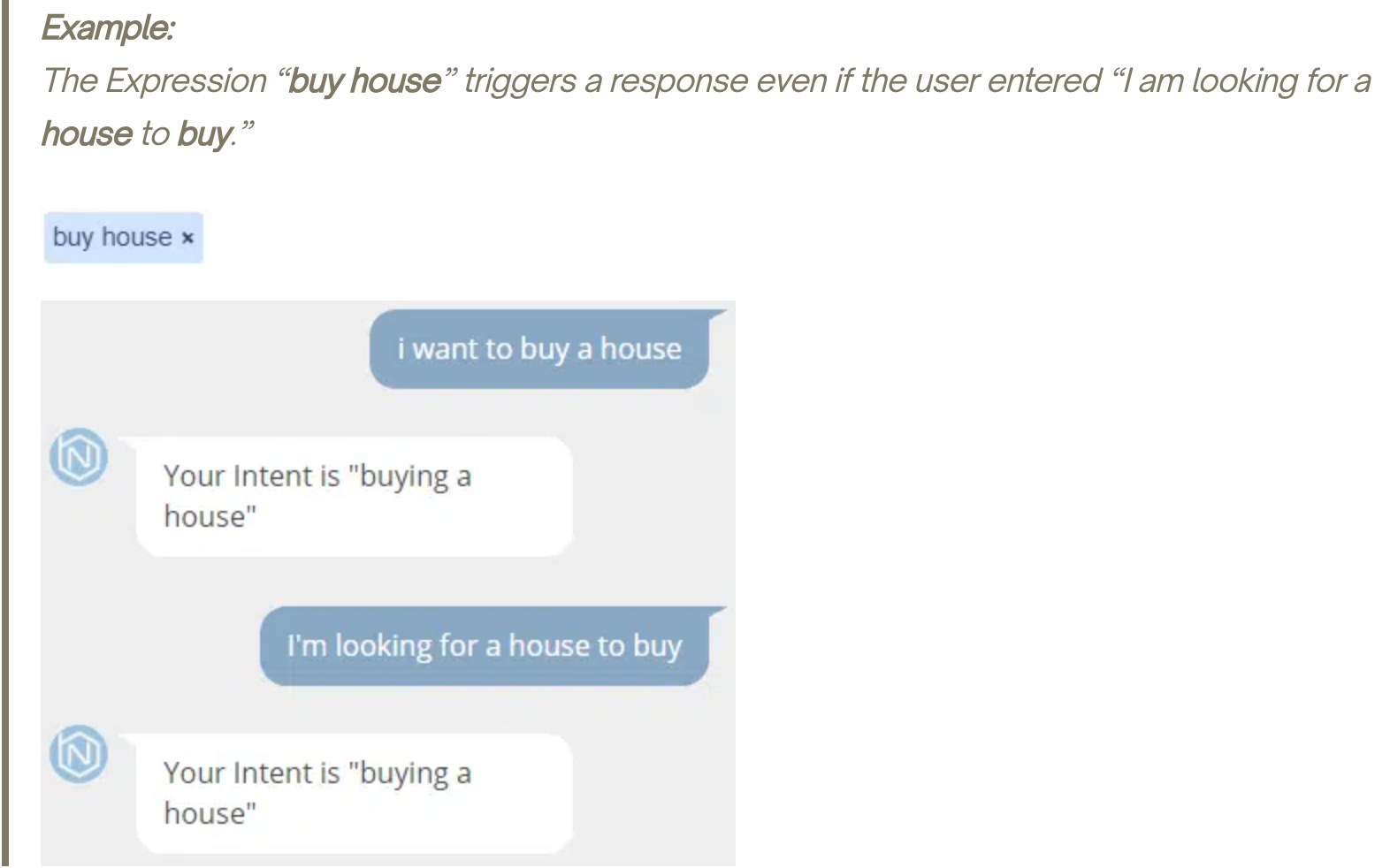
Under the bonnet, an intent is therefore nothing more than a list. Two neighbouring intents are told apart by the words that appear in only one of them: that is exactly what the right-hand column of the test bench above does, and it is what the next screenshot shows, with synonyms of “house” on one side and of “apartment” on the other.
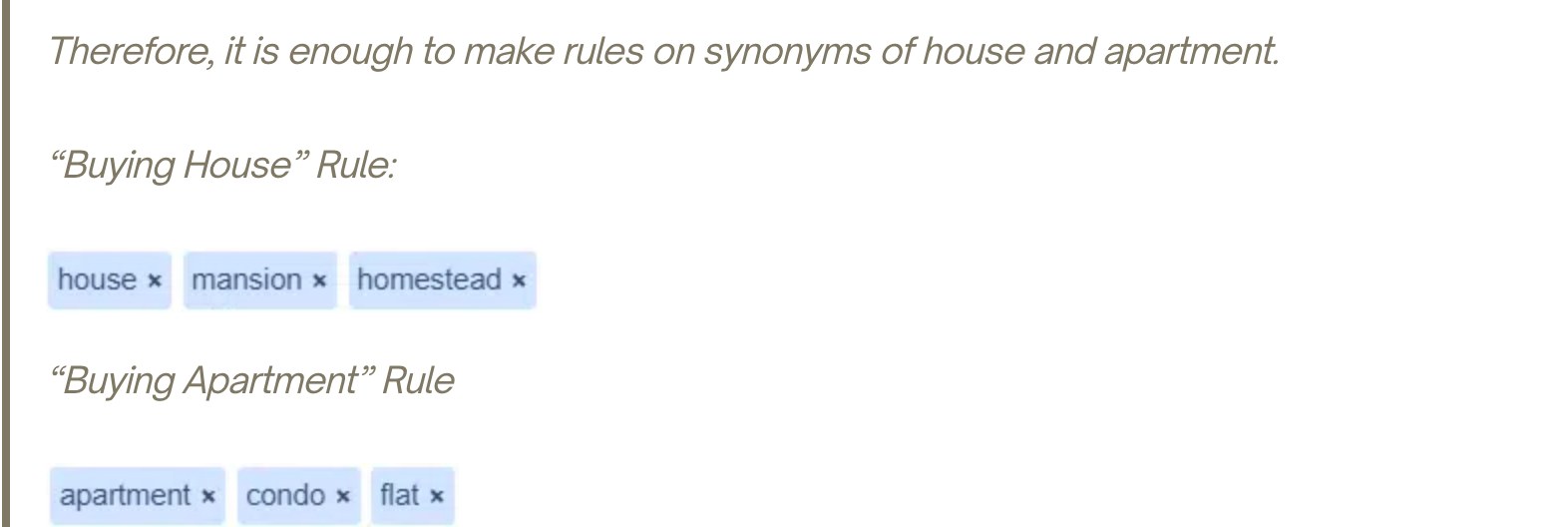
Three finer settings complete the toolbox, and each of them fixes a problem you will run into.
- Negative expressions exclude a word: you write a minus sign in front of the term to rule out, and the rule only fires if that word is absent.
- Priority keywords, prefixed with an underscore, fire their rule even when the sentence contains other keywords that could have fired another one. It is a manual arbitration of ambiguity.
- The default response sequence is the fallback. The documentation is frank about what triggers it: “when the user makes too many mistakes in the same word, the chatbot may not be able to understand and will return to the Default Response Sequence“. Misunderstood words then flow into a recommendation algorithm, which is to say into the list of what needs adding to the rules.
That loop is the real operating work on a chatbot: reading what people wrote and the bot did not understand, then adding it. A chatbot is not installed, it is cultivated. It is also what separates a project run by an internal team from one entrusted to chatbot creation experts: somebody has to open that list every week.
How AI chatbots work: what the large language model changes to the journey
Since 2023, a fourth layer has slipped into the journey of a message. The principle stays the same, but two steps change nature.
Comparison becomes vector based. Instead of comparing words, the engine turns your sentence into a list of several hundred numbers, called a vector, and looks in your documentation for the passages whose vector sits closest. Practical consequence: the bot recognises “I can no longer get into my account area” as close to “forgotten password” without a single shared word. The confidence score still exists, in the shape of a distance.
The answer is no longer written in advance. It is composed on the fly from the retrieved passages. That is the mechanism known as RAG, detailed in our article on how a RAG chatbot works and on what each question costs. Two effects follow immediately.
The same question can give two answers
A generative engine is not deterministic. Two visitors asking the same question get two different phrasings, sometimes two different levels of detail. An intent bot always returns the same sentence.
It has no reason to keep quiet any more
Where a threshold engine hands over when it does not know, a generative engine always produces something. The fallback has to be rebuilt differently: by requiring the answer to cite a retrieved passage, and by refusing to answer when there is none.
How that family works in detail, what it costs and how it is fenced are covered in our guide to the generative AI chatbot. What matters most is the reversal: on a classic engine, the risk is that the bot does not answer; on a generative engine, the risk is that it always does.
Since 2 August 2026, the European regulation on artificial intelligence requires you to tell visitors they are talking to a machine, unless it is obvious. In practice that is settled in the first message of the bot. The detail of the obligation is covered in our guide to the generative AI chatbot.
Memory: what the bot keeps, and for how long
“And what about the other order?” is the message that separates chatbots. Answering it means knowing which order was being discussed, so keeping something between two messages. Three memories live side by side, with three very different lifespans.
| Memory | What it holds | For how long |
|---|---|---|
| The session | The conversation identifier, the thread of messages, the current step of the script | From a few minutes to a few hours of inactivity, then it expires |
| Variables | The values extracted or typed: first name, order number, email, language choice | The session, or longer if they are written into a CRM |
| The model context | The last exchanges sent back to the language model with every question | A sliding window, limited in size, often a few dozen messages |
Two practical consequences, rarely explained and often experienced.
- A bot that “forgets” has no memory failure, it has an expired session. Coming back to a tab left open overnight almost always starts from scratch, and that is normal.
- The model context has a price. On a generative engine, sending the whole history back with every question makes the bill grow message after message. That is why platforms truncate or summarise the history instead of passing it in full.
Anything stored in a variable is personal data as soon as it identifies somebody. An order number, an email address, a phone number fall under the GDPR, with a retention period to define and people to inform. That point is settled when the script is designed, not after it goes live.
Understanding is not enough: what the bot does with its answer
A chatbot that only recites paragraphs is a FAQ with a blinking cursor. It gets interesting when the recognised intent triggers something other than a sentence.

- An API call. The bot queries the carrier with the order number extracted at step 5 and displays the real status. Without that call, all it can do is point at a page.
- A write. Creating a ticket, booking an appointment, adding a contact to the CRM, sending a confirmation email.
- A handover. Passing the conversation to an agent, with the history, when the score is too low, when the visitor asks for it, or when the subject is sensitive.
- A trace. Logging the message that was not understood so it climbs into the statistics, the only raw material of improvement.
Handover deserves special attention, because that is where perceived quality is decided. A fallback that repeats “I did not understand” three times running is a dead end. A fallback that offers, on the second failure, to talk to somebody while keeping the thread of the conversation turns a failure into a case being handled. How a bot splits what it absorbs and what it passes on is detailed in the article on the call center chatbot.
Frequently asked questions
What is the difference between ChatGPT and a chatbot?
ChatGPT is a chatbot, but a general purpose one, trained on public content and with no link to your company. A business chatbot is plugged into your data: your catalogue, your orders, your documentation. The first knows a lot about the world, the second knows where order number 84512 has got to. Many business chatbots do use a model from the same family as ChatGPT as their writing engine, which explains the confusion.
Does a chatbot learn on its own?
No, and that is the most widespread misunderstanding. An intent chatbot learns nothing from your conversations: somebody has to read the messages that were not understood and add training phrases. A chatbot plugged into a document base improves when the documentation improves, which is still human work. Neither of them corrects itself spontaneously.
Why does the chatbot answer beside the question?
Almost always for one of three reasons. A shared word tipped the score towards the wrong intent, as in the “when do you send my money back” example on the test bench. Two intents sit too close and the engine decided by a hair. Or the threshold is set too low, which forces the bot to answer when it should be handing over.
How many example phrases are needed per intent?
There is no magic number, but there is a useful rule: add phrases until the real questions of your customers stop falling into the fallback. Start from what your teams actually receive by email and by phone, not from what you imagine people will ask. And watch the opposite effect: too many generic phrases in one intent make it greedy and let it capture the messages of the others.
What are the drawbacks of a chatbot?
Three, mainly. It only handles well what was planned for, which means regular upkeep. It can answer wrongly with great assurance, above all in its generative form. And it exasperates people when it offers no way out to a human. Those three flaws share one cure: an intent base fed by real questions, a threshold set on the cost of error, and an escalation that is always available.
Can a chatbot work without artificial intelligence?
Yes, and that is the case for a great many of them. A button chatbot follows a decision tree: no understanding, no score, no model. It renders excellent service for qualifying a request or booking an appointment, with perfectly predictable behaviour. The first chatbot in history, ELIZA in 1966, already worked without anything resembling today’s AI.
What is another word for “chatbot”?
The word comes from “chat”, to talk, and “bot”, short for robot. The common alternatives are “conversational agent”, “virtual assistant” and “dialogue system”. In professional use you mostly hear “conversational agent”, and increasingly “AI agent” for versions able to carry out actions. The full definition and concrete examples are set out in our page on what a chatbot is.
What to remember
How a chatbot works fits in one sentence: it cleans your message, compares it to examples, draws a score from that, and compares the score to a threshold. Everything else, the intents, the variables, the connectors, the language models, either serves that mechanism or follows from it.
What comes next will serve you the day you run a chatbot project, your own or a supplier’s.
- Ask to see the list of messages that were not understood. It is the only indicator that tells the truth about a bot in production.
- Ask what the threshold is, and why that value. An embarrassed answer signals a setting left at its default.
- Check that a way out to a human exists, and after how many failures it fires.
- On a generative engine, insist that it refuses to answer when it found nothing in your content.
See the mechanism from the inside
Create a chatbot for free, add three intents, and watch the engine work on your own sentences. It is the fastest way to understand what this article describes.
Sources: Google Cloud Dialogflow ES documentation, “Intent matching” page, last updated 29 July 2026; Rasa documentation, “Fallback and Human Handoff” page, and the file rasa/core/constants.py in the RasaHQ/rasa repository, main branch, consulted on 7 August 2026; public Botnation documentation, “All you need to know about Artificial Intelligence on Botnation: Basic Features”, consulted on 7 August 2026. Every quotation is reproduced from the English text published by its source.