In short. An internal chatbot is a conversational agent reserved for your own staff. It answers the questions whose answer already exists somewhere in the organisation: a forgotten password, a leave balance, an expense claim, a quality procedure, the right person to ask. It replaces neither the intranet, nor HR, nor IT: it takes level 1 off their hands.
This guide gives the use cases that work, a calculator to put a figure on the time freed up with your own data, the prices charged in 2026, two real deployments with their numbers, the seven step method, and the legal obligations, including telling employees they are talking to an AI, which becomes mandatory from 2 August 2026.
Almost every page written about the internal chatbot promises the same thing: productivity, lower costs, happier employees. None of them says what it costs, which scope to start with, what the law requires, or when the project fails. Yet those are the only questions an HR or IT director actually has.
We publish a no-code chatbot platform and we also build chatbots for our customers, through our Enterprise plan and our chatbot creation experts. So we have a stake in this answer: better to say so, and to give verifiable numbers and the limits of the exercise in return.
What exactly is an internal chatbot?
An internal chatbot is a conversational agent built for the staff of an organisation, and for them alone. It lives behind the login, inside the intranet, an HR portal or a work tool, and answers working life questions: admin, IT, human resources, business procedures. It is not measured in sales but in requests avoided and time given back to teams.
The difference with a public bot is not technical, it is organisational. An internal chatbot always talks to the same people, who know the in-house jargon, can tell when it is wrong, and drop it for good after two bad answers. A demanding and captive audience: quality matters more than the number of topics covered.
Another particularity: the answers already exist, in a collective agreement, an internal memo, a welcome booklet, a ticket solved last year. The work is not to invent content but to find it, sort it and make it searchable. That is why an internal chatbot project almost always exposes a documentation problem.
The three families of internal chatbot
| Family | What it can do | What it needs | What you measure |
|---|---|---|---|
| Scripted bot | Guide someone through a path written in advance, with buttons: booking leave, reporting an accident, ordering equipment | A decision tree signed off by the department concerned | Completed paths, correctly filled forms |
| Smart FAQ bot | Understand a freely worded question and serve the official answer, even when it is misspelled | A set of questions and answers, or your existing help content | Useful answer rate, requests avoided |
| AI bot on your documents | Answer in natural language from your procedures and documentation, using a language model | Clean, up to date documents and fine grained access rights | Questions solved without a human, accuracy checked by sampling |
None is better than the others, and most deployments that last mix all three: a script for procedures, a smart FAQ for recurring questions, AI on documents for the long tail. We go into these distinctions in our guide to the types of chatbot.
Internal chatbot or customer chatbot: what really changes
Many companies reuse the bot from their public website as it is for their employees. The result nearly always disappoints, because the eight parameters below are not the same.
| What changes | Internal chatbot (employees) | Customer chatbot (public) |
|---|---|---|
| Who asks the question | An identified employee, often already logged in | An anonymous visitor, on mobile, in a hurry |
| Vocabulary | In-house jargon, acronyms, internal tool names | Everyday language, market words |
| Where it lives | Intranet, HR portal, business tool, network space | Website, WhatsApp, Messenger, Instagram |
| Volume | Predictable and cyclical: payroll, summer leave, September | Driven by traffic and campaigns |
| Confidentiality | High stakes: pay, health, careers | Limited to the data the visitor provides |
| What you measure | Adoption, requests avoided, useful answers | Conversion, leads, satisfaction |
| Who feeds it | HR, IT, quality, legal | Marketing and customer service |
| The worst failure | The employee goes back to email, for good | The customer gets annoyed and leaves for a competitor |
An internal chatbot is judged on its adoption rate, not on the number of topics it covers. A bot that handles ten questions perfectly will be used every day. A bot that handles a hundred of them halfway will be abandoned in three weeks, and is very hard to relaunch.

Examples of how to use an internal chatbot in a company
Here are the six uses that come up most often in real deployments, from the simplest to the most demanding. Each one can stand alone: there is no need to launch them all at once.
Level 1 IT support and helpdesk
Best payback · IT and service desk
Resetting a password, finding the VPN access procedure, unblocking a printer, requesting a screen: these requests weigh heavily on the ticket queue and bring nothing to a technician. A bot plugged into the IT knowledge base handles them on its own, at any hour.
Human resources and onboarding new joiners
Most visible · HR
A new joiner asks between twenty and fifty questions in the first week, and none of them is confidential: hours, meal vouchers, remote work, health cover, equipment, who to contact for what. An HR Chatbot absorbs them and offers guided paths for the moments that matter: arrival, parental leave, sick leave, part time, internal mobility, retirement. Our dedicated guide: HR chatbot, use cases and benefits.
An internal knowledge base reachable in one question
Most structural · Quality and operations
The problem rarely stated: the information exists, but nobody can find it. It is spread across the intranet, a shared folder, a document tool and the memory of three people. The bot becomes the single door: it does not replace those sources, it queries them and points back to the official document.
Document search across your own content
Most technical · Documented functions
The floor above the FAQ: the bot no longer picks from answers written in advance, it reads your documents and writes an answer from them. This is called retrieval augmented generation, or RAG. It is the right approach when the questions are too varied to be anticipated, in a regulated function or one with thick documentation.
Two cautions. A language model plugged into out of date documents will confidently answer wrong things: sorting the sources is the real work. And you have to reproduce your access rights inside the bot, otherwise an employee will obtain through conversation what they cannot open in the file tree. Our guide on how to train a chatbot on your own data covers the method, and the one on where chatbots get their information explains what happens under the hood.
Creating and tracking tickets, connected to your tools
Most integrated · Shared services
When the bot cannot solve the request, it has to hand over cleanly: create the ticket with the right fields filled in, route it to the right team, give a reference number. For that it connects to the ticketing tool, the calendar or the leave system, through an API or a webhook.
Recruitment and networks: support for audiences outside the payroll
Widest reach · Recruitment, franchise, multi-site
The word internal does not stop at employees. A candidate in a hiring process, a franchisee, a member of staff at a remote site also ask recurring questions that head office answers over and over. A recruitment chatbot informs candidates about roles and about how the process works, and a network bot pushes procedures out to franchisees without saturating the central teams.
Informing candidates raises no problem at all. Having a bot screen applications or rate profiles raises many: it is a use classified as high risk by the EU AI Act, with heavy obligations from 2 August 2026. We come back to this further down.

Which internal chatbot should you start with?
Five questions, one recommendation. In the event of a perfect tie, the answer leans towards the option that is simplest to put in place: that is a judgement call, so let us state it.
The selector
1. Who asks you most often about things that are already documented?
2. Where are the answers today?
3. How many different questions do you want to cover at launch?
4. What is your confidentiality stake?
5. Who will keep the bot up to date in six months?
Answer the five questions, then click the button.
A smart internal FAQ, across all departments
Start with the thirty questions everyone asks, whatever the department. It is the fastest scope to open, the most visible, and it needs no connection to your systems. You will measure real adoption before investing further.
A level 1 IT support chatbot
Your goldmine is in the tickets already solved. Take the twenty most frequent reasons from the last twelve months, write the approved answer for each one, and wire up ticket creation for the rest. Fastest payback, because the volume is measurable before and after.
An HR assistant, with paths by situation
Your subject is not the question but the life event: arrival, sick leave, part time, retirement. Plan guided paths on top of simple answers, set out from the start what the bot is not allowed to do, and hand over to a human on individual situations.
An AI chatbot plugged into your documents
Your questions are too varied to be written in advance: you need document search, not a FAQ. Two conditions before you start: remove the out of date versions, and reproduce your access rights inside the bot. Plan for sample checks in the first few months.
The advantages of an in-house chatbot
In concrete terms, what does it change compared with your current situation? Here are the six benefits found in deployments that last.
Lower cost on work that adds nothing
Answering the same question thirty times a week has a real payroll cost. Automating it removes no job: it gives time back to people who have better things to do.
Knowledge in one place
Procedures, HR policies, benefits, working methods: a single door, a single version of the truth. The bot becomes the living index of your documentation.
An immediate response time
No more waiting for a colleague to be free. The question is settled within the minute, and the colleague never gets interrupted at all.
Round the clock availability
Useful for shift teams, remote sites and organisations spread over several time zones, for whom office hours support barely exists.
You finally know what people are asking
The most underrated benefit. Conversation statistics tell you which information is missing, which procedure is incomprehensible and which department is drowning. No internal survey gives you that.
The same information for everyone
The employee who has lunch with the HR director is no longer better informed than the one on a remote site. Management is often more interested in that fairness effect than in the time saved.
That said, pages that only talk about benefits are setting you up for a disappointment. Here is the honest split.
What almost always works
- Questions with a single, stable answer: hours, procedures, caps, contacts
- Step by step procedures, guided with buttons
- Pointing people to the right department or the right document
- Peaks known in advance, summer leave and the September rush
- Support for remote sites and partner networks
What often disappoints
- Individual situations: a dispute, a difficult announcement
- Questions whose answer depends on a human judgement call
- Topics the organisation itself has not settled
- Badly kept documents: the bot makes their disorder visible
- Deployments with no owner, which age within a few months
How much time does an internal chatbot actually save?
Rather than a percentage pulled out of thin air, here is the calculation. It counts only the time of the person who was answering, not the time of the employee who was waiting: that is deliberately the more prudent of the two. The starting values match an organisation of 250 people.
The time your internal chatbot can free up
Move the sliders to match your situation. The gain covers the time spent answering, not the time spent waiting.
The calculation is deliberately prudent: it ignores the requester’s waiting time, which is often the real hidden cost. Against it, subtract the subscription and the set up time. Below about fifty people the gain is counted in hours: the subject is then the quality of your documentation, not the chatbot.
Two lessons almost always come out of this calculation. It is the number of people that drives everything: the same bot does not produce the same effect at 40 employees and at 2,000. And the share handled by the bot alone depends far less on the technology than on the quality of your written answers.
What an internal chatbot really costs in 2026
This is the information the pages on this market never give. Here are the four possible routes, with their orders of magnitude.
| Approach | Set up | Recurring cost | Who it suits |
|---|---|---|---|
| No-code platform, on your own | Your internal time, a few days | From 0 to about sixty euros a month | Small and mid sized companies, a first scope to open quickly |
| Platform plus the vendor’s team | On request | Enterprise plan, tailored | Organisations that delegate the build and keep control afterwards |
| Third party agency or integrator | Several thousand euros, market orders of magnitude | Annual maintenance to negotiate | A very specific business need, or an integrator already in place |
| In-house development | The cost of your own team, several months | Hosting, models, maintenance | An IT department with an AI team and a need the market does not cover |
At Botnation the prices are public, checked on 30 July 2026: a For Free plan at 0 euro, a Basic plan at 39 euros a month with 500 users included, a Pro plan at 59 euros a month with 1,000 users, and an Enterprise plan on request that includes chatbot creation management, a dedicated account manager and personalised onboarding. Custom AI features consume credits, sold from 1,000 credits at 25 euros up to 60,000 credits at 900 euros, and a user outside the plan costs 0.05 euro a month. Prices exclude VAT.
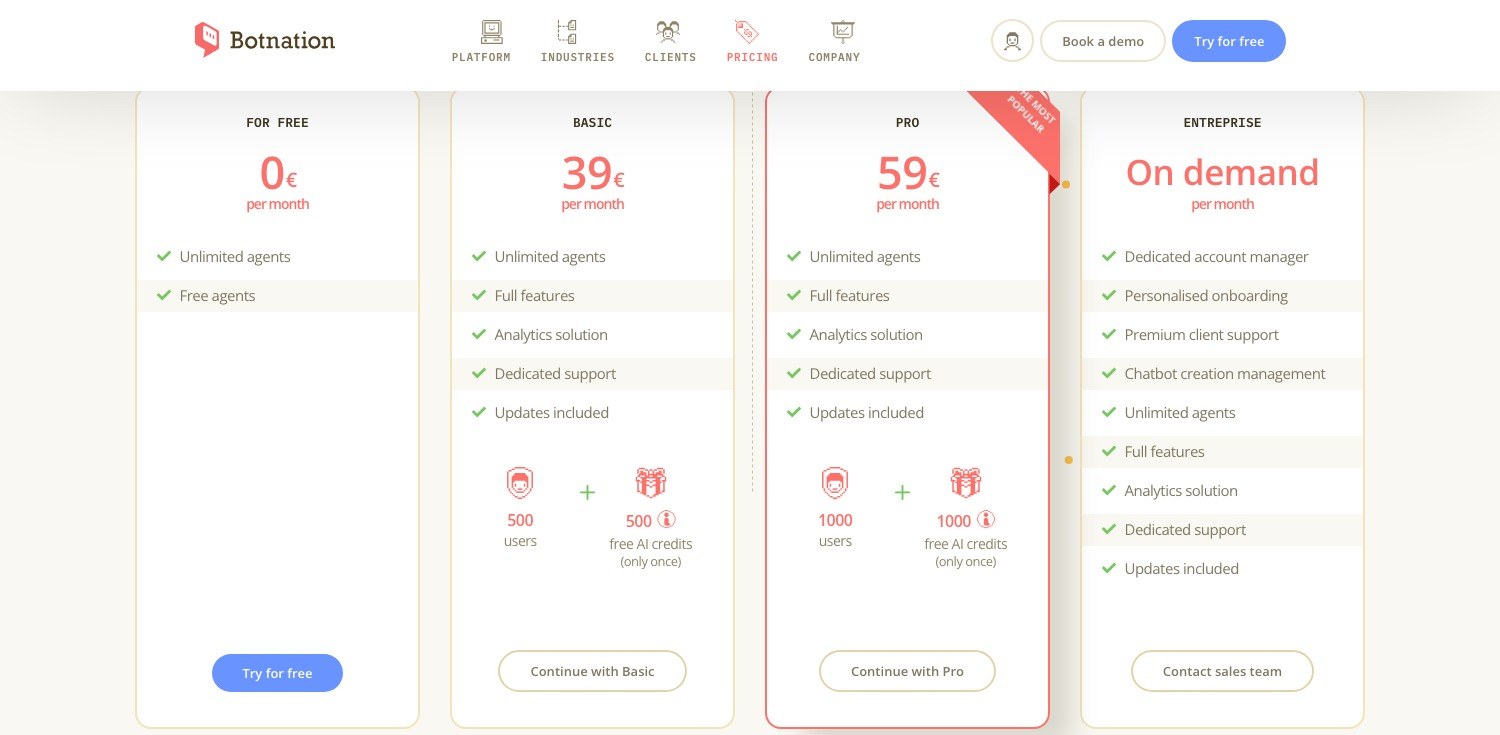
The ranges in the table are orders of magnitude observed at providers on this market: they are not Botnation prices. Our custom build service has no public price, it is quoted on request according to scope. Always compare the price quoted with the annual figure from the calculator: that is the only trade off that matters.
Two real deployments, with their numbers
Var Departmental Council: an HR adviser for 5,000 staff
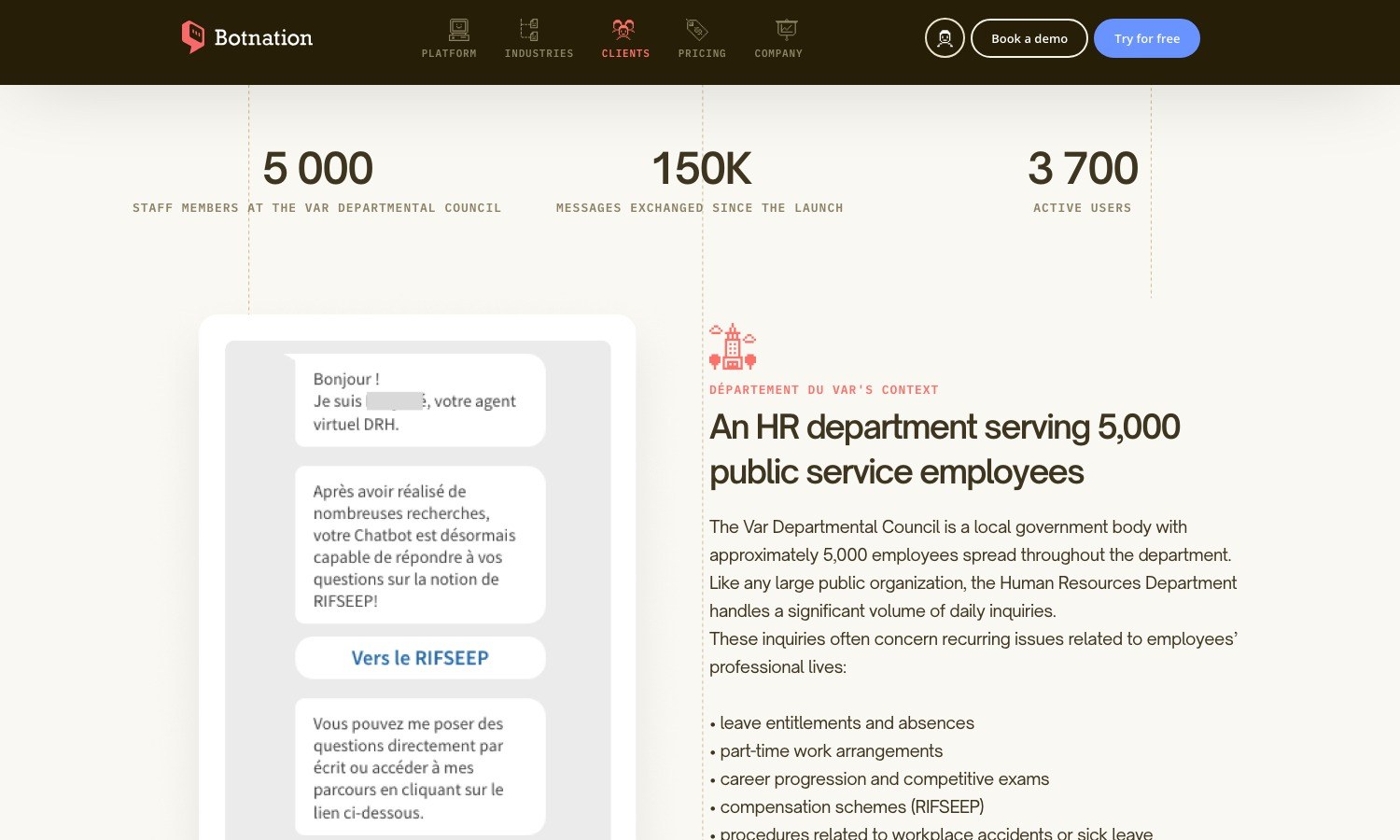
This French local authority employs around 5,000 people spread across the whole department. As in any large public organisation, HR was absorbing a heavy volume of recurring questions: leave, part time work, careers and competitive exams, allowance schemes, workplace accidents, retirement. Staff could not find the information on the intranet and wrote to HR for answers that already existed.
The Botnation conversational agent has been running on the intranet since 2019, built jointly by the HR department and the digital solutions department from the most frequently asked questions. Beyond simple answers, it offers guided paths by situation: new joiner, pregnancy, sick leave, workplace accident, part time, competitive exams, retirement, internal mobility. Figures published in the case study: 150,000 messages exchanged since launch and 3,700 active users.
Vincent Russo, project manager in the HR department, sums up the intended effect: the chatbot makes it much easier to find information on the department’s intranet, day or night, and it reduces the number of emails and phone calls HR staff receive. That is the expected benefit of an internal bot: not replacing HR, but giving it its time back. The full case study details the setup.
AutoEasy: 80% of network questions handled without head office
AutoEasy runs a network of franchisees in France. Each one has documented processes, but they were contacting head office heavily by email and phone for questions that were already written down. The classic result: delays, overloaded central teams, frustration on the network side.
The virtual assistant became the single entry point for administrative, HR and operational questions: a smart FAQ, centralised access to documentation, information on training and leave, and automatic escalation to head office when a human has to step in. 65 franchisees rolled out in one week, more than 500 messages exchanged in the first few days.
Didier Aubert, founder and director, describes what he did: he internalised the knowledge of his whole management team, founders, network coordinators and network assistants, and made it available around the clock in an AI chatbot. According to his testimonial the agent answers 80% of franchisees’ recurring questions, which has sharply reduced emails and calls. See the AutoEasy case study.
These figures are results reported by our customers on bounded scopes, not market averages. They show what an internal bot reaches when the knowledge has genuinely been gathered beforehand. They do not predict your result.
How to build an internal chatbot, step by step
The technical part is no longer the issue: on a no-code platform, building the bot takes a few days. What takes time is the organisational work that comes first. Here is the order that works.
- Pick one scope and one audience. One department, one type of question, one group. A bot that claims to cover IT, HR and procurement on launch day fails: no team feels responsible for the result.
- Collect the real questions, not the ones you imagine. Ticket reasons from the last twelve months, emails to the generic HR mailbox, fruitless searches on the intranet. That list is your specification.
- Sort what has an official answer from what does not. Every question without an approved answer is a decision to be taken internally, not a tooling problem. This is often where the project creates the most value.
- Have the answers written by the people who own them. HR writes the HR answers, IT the technical ones. An answer written on their behalf will be defended by nobody the day it is challenged.
- Decide what stays human, and how you get there. The bot must be able to say it does not know and hand over cleanly, by creating a ticket or switching to live chat. With no visible exit, the employee gives up and never comes back.
- Put it where people already work. In the intranet, the HR portal or the business tool, not in one more application to open. A web widget is enough in the large majority of cases.
- Name an owner and a maintenance routine. A monthly review of unanswered conversations, an update whenever a procedure changes. It is this point, not the technology, that separates a bot still alive after two years from one dead after six months.
To frame the project before committing a budget, France Num, the French government’s digital transition programme, runs a short course in French, Mettre en place un chatbot interne, decider en confiance. And our article on the most common chatbot creation mistakes covers the general traps.

Create your in-house chatbot with Botnation AI
Do you think building an internal chatbot is out of reach, or that it will cost a fortune? Here is how we approach it.
Smart AI from Botnation
For organisations that want to set up an internal FAQ chatbot, Smart AI is the starting point. This technology we developed lets you create a working bot in 5 minutes: you upload your questions and answers file, the artificial intelligence analyses your data, and the assistant is generated.
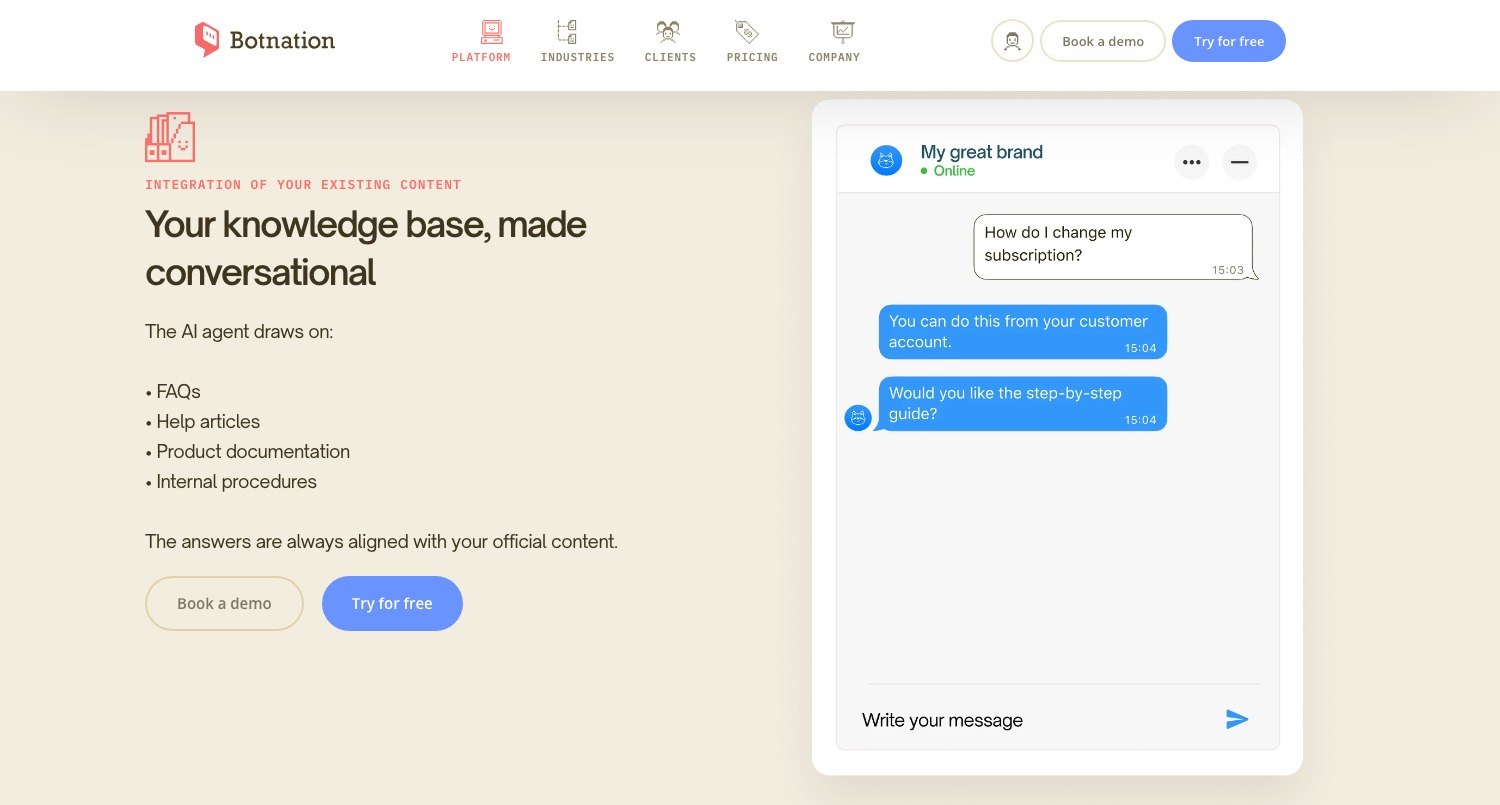
The AI then understands the nuances, the synonyms and the wording variants your staff use, typos and in-house acronyms included. It draws on your existing content: FAQs, help articles, product documentation and internal procedures. The answers stay aligned with your official documents, which is exactly what you want from an internal bot.
Evolution towards more complex chatbots
If your needs grow and you need more advanced features than a simple FAQ, the chatbot created with Smart AI can be extended without starting over. Botnation is an intuitive no-code interface that lets you customise it without writing a line of code: guided paths, connections to your software, ticket handling, appointment booking, surveys and conversation statistics.
Deployment follows the same logic. The web widget installs directly on a site, an intranet or an internal tool, and the same bot can also live on other channels if your field teams work on mobile.
Support and guidance
We have put together detailed support to guide you at every step, with tutorials and plenty of resources on the Botnation website.
And if you prefer to delegate, our team takes charge of building your internal chatbot and adapts it to your processes: that is the Enterprise plan, delivered by our chatbot creation experts. Because the team that builds is the team that publishes the platform, there is no middleman, no custom development to take over later, and the account stays yours after delivery. A third party agency is still a legitimate choice for a very specific business, or when an integrator is already in place with you: worth saying. Three ways in: compare the plans, request a quote, or contact us, where our experts are reachable online and on +33 9 74 59 58 72.
What the rules require of an internal chatbot
This is the part missing from every page on the subject, and yet the one that can stop a project. Three texts apply, and the timetable is tightening.
Article 50 of the EU Artificial Intelligence Act requires you to inform a person that they are interacting with an AI system, unless it is obvious to a reasonably well informed observer. This obligation applies from 2 August 2026, with no exception for internal uses: an employee is a natural person like any other. Under Article 99, a breach can be fined up to 15 million euros or 3% of annual worldwide turnover.
In practice it costs very little: a greeting line that clearly says you are talking to an automated assistant, and a visible way through to a human. It is also the best way to set expectations.
The high risk trap: recruitment and managing employees
The same regulation classifies, in Annex III point 4, two families of high risk uses that touch the workplace. First, systems intended for the recruitment or selection of natural persons, in particular to place targeted job ads, to analyse and filter applications or to evaluate candidates. Second, those used to take decisions on terms of employment, promotion or termination, to allocate tasks based on behaviour or personal traits, and to monitor or evaluate performance at work.
The consequence is simple. A chatbot that answers your employees’ questions or informs candidates does not fall into that category. A chatbot that pre screens applications, scores an interview or measures an employee’s performance does, and falls under a heavy regime: risk management, data quality, technical documentation, logging, human oversight. An exemption exists when the system only performs a narrow procedural or preparatory task, but it falls away as soon as there is profiling of natural persons. In other words: automate the information, not the decision.
French labour law: the works council and informing employees
Two articles apply in France. Article L2312-8 of the French Labour Code provides that the works council, the CSE, is informed and consulted on, among other things, “the introduction of new technologies, any significant change affecting health and safety conditions or working conditions”. A conversational assistant rolled out to all employees clearly falls within that scope: better to put the subject on the agenda early than to have to defend it after launch.
Article L1222-4 is even more direct: “No information concerning an employee personally may be collected by a device that has not been brought to their attention beforehand.” An internal chatbot records conversations, sometimes the identity of the person asking. Say what is kept, for how long and who can read it, add the processing to your register, and avoid the named dashboard: a bot used to monitor who asks what loses its users’ trust in a week. Finally, Article 4 of the EU regulation, applicable since 2 February 2025, already requires a sufficient level of AI literacy among the people who operate these systems on your behalf.
General information, current at 30 July 2026, which does not replace legal advice on your own situation.
The six mistakes that make an internal chatbot fail
- Opening on every subject at once. A broad scope dilutes responsibility, and the first bad answer is charged to the whole bot. Start small, widen on evidence.
- Feeding it the intranet as it stands. An intranet contains out of date pages, duplicates and contradictory documents. Injecting all of it produces a bot that answers wrong with confidence. Sorting is a prerequisite, not an option.
- Forgetting the way out. With no visible handover to a human, a blocked employee does not try again: they go back to email and stay there.
- Naming nobody to keep it up to date. A procedure changes every quarter. A bot with no owner becomes wrong within months, and a wrong bot does more harm than no bot at all.
- Ignoring access rights. If the bot reads documents that not everyone may open, it becomes a confidentiality breach. Rights must be replicated inside the bot, question by question.
- Telling employees nothing. Neither that they are talking to an AI, nor what is being recorded. It is now a regulatory risk, and it was already a social one.
Where the French market actually stands
One figure to place the subject, published by Insee, the French national statistics institute, on 21 July 2026: in 2025, 18% of companies based in France with 10 employees or more report using at least one artificial intelligence technology, against 10% in 2024 and 6% in 2023. Usage has therefore tripled in two years, while staying just below the European Union average of 20%. Size changes everything: 15% from 10 to 49 employees, 31% from 50 to 249, and 58% from 250 employees upwards.
Two findings in that survey speak directly to internal chatbots. Automatic text mining is the most reported technology, at 56% of the companies using AI: that is exactly the engine of a bot that understands a badly worded question. And the second most cited purpose in 2025 is the organisation of the company’s administrative processes, up 21 points in a year, now ahead of research and innovation.
The survey also lists three barriers, and they match what we see in the field: among companies already using AI, 53% cite a lack of expertise, 43% concerns about data protection and 42% a lack of legal clarity. That is the trio an internal chatbot project has to defuse before talking about tools.
Frequently asked questions
What is the difference between an internal chatbot and a customer chatbot?
The technology is the same, the use is not. An internal chatbot talks to identified employees, uses the company’s vocabulary and is measured in requests avoided. A customer chatbot talks to anonymous visitors and is measured in conversions. Reusing a public bot internally as it stands nearly always disappoints.
How much does an internal chatbot cost?
On a no-code platform, from 0 to about sixty euros a month: at Botnation, a For Free plan at 0 euro, Basic at 39 euros and Pro at 59 euros a month, excluding VAT, prices checked on 30 July 2026. Handed to a provider, the set up runs into thousands of euros depending on how many connections to your information system are needed. Our Enterprise plan is quoted on request.
Do you need generative AI for an internal chatbot?
Not always. For step by step procedures, a script with buttons is more reliable: it never gets a cap or a deadline wrong. Generative AI becomes useful when the questions are too varied to be written in advance, provided it is plugged into your own documents. Internally, an invented answer costs more than no answer at all.
Where do you install an internal chatbot?
Where your staff already work: the intranet, the HR portal, a business tool, a network space. A web widget on the intranet covers most cases, with nothing to deploy on workstations. For field teams, the same bot can be served on a mobile channel.
Do you have to tell employees they are talking to an AI?
Yes. Article 50 of the EU Artificial Intelligence Act requires you to inform the person that they are interacting with an AI system, unless it is obvious, from 2 August 2026, with no exception for internal uses. An explicit greeting line is enough.
Must the works council be consulted before rolling out an internal chatbot?
In French companies with at least fifty employees, Article L2312-8 of the Labour Code provides that the CSE is informed and consulted on the introduction of new technologies and on any significant change affecting working conditions. An assistant intended for all employees falls within that framework: put the subject on the agenda early.
Can an internal chatbot access payslips or HR data?
Technically yes, by connecting to the HR information system, and several organisations do it to display a leave balance. But it changes the nature of the project: strong authentication, replicated access rights, data minimisation, informing employees as French labour law requires, entry in the processing register. Open the bot on general information first, connect personal data afterwards.
How long does it take to put an internal chatbot live?
A first internal FAQ bot is built in a few hours on a no-code platform, and Smart AI generates an assistant in 5 minutes from a questions and answers file. What takes time is gathering the real questions and getting the answers approved. Allow two to four weeks for a first clean, tested scope.
Does an internal chatbot replace the intranet?
No, and a project that promises it ends badly. The intranet stays the source, the bot is its front door: it serves the answer and points to the official document. A frequent side effect is that it makes documentary disorder visible, which is good news even if it is uncomfortable.
Create your internal chatbot, for free
Upload your questions and answers, get a working assistant, put it on your intranet. No code and no credit card. Our chatbot creation experts can also build it with you.
Sources for the figures quoted: Insee, “Information and communication technologies in companies in 2025”, Insee Premiere no. 2120, July 2026; Regulation (EU) 2024/1689 on artificial intelligence, Articles 4, 50 and 99 and Annex III point 4; Articles L2312-8 and L1222-4 of the French Labour Code; Departement du Var and AutoEasy case studies, and the pricing page, checked on botnation.ai on 30 July 2026.