TL;DR: a « Discord chatbot » is a third-party application added to a Discord server to moderate, entertain, answer or converse. The platform reports more than 90 million daily active users (internal data, fourth quarter of 2025) and its API has been open since 2016: the mechanics are well documented (application in the developer portal, secret token, permissions, « intents », some of which are privileged). The real question is not « how to build one », but « is it the right channel »: Discord is a community space, not a purchasing channel. This article explains how it really works, the hidden costs, offers an interactive arbiter between a Discord bot and a multichannel chatbot, and states our position honestly: Botnation does not deploy on Discord.
Type « discord chatbot » into a search engine and you get a queue of look-alike tutorials: they all explain how to create the bot, and none asks whether you actually need one. We took a snapshot of the results page on September 1, 2026: eight organic results, all devoted to the « how » (ready-made tools, bot directories, setup guides), and not a single one that prices maintenance or discusses the choice of channel. This guide does the opposite: first the real mechanics (token, permissions, privileged intents), then the costs tutorials forget, then an interactive arbiter to decide between a native Discord bot, a chatbot on your customer channels, or both. Every figure is sourced and dated, and when we talk about Botnation, we also say what the platform does not do.
What exactly is a « Discord chatbot »?
Discord is a text, voice and video chat platform launched in May 2015 as a chat application for gamers, according to the timeline published on the company’s official page (consulted on September 1, 2026). It today claims more than 90 million active users every day (Discord internal data, fourth quarter of 2025) and an API open to third-party applications since 2016, with « hundreds of thousands of apps » claimed to be built on it. A Discord « bot » is one of those applications: an automated account invited into a server (a community’s chat space), which reacts to messages, commands or events. When that bot carries language understanding, it becomes a chatbot in the true sense, and can then be told apart from a simple automation, as we detail in our article on the types of chatbots.

Behind the single phrase « Discord chatbot » hide in fact four very different families of projects, with neither the same cost nor the same requirements. Confusing them is the first source of unpleasant surprises: a music bot and an assistant that answers your community’s questions have literally nothing in common, neither in development nor in maintenance.
| Bot family | What it actually does | What it really requires |
|---|---|---|
| Moderation | Filters banned language, applies sanctions, assigns roles on entry. | Rules written in advance, regular human monitoring, and the right to read messages (hence a privileged « intent », see below). |
| Community and engagement | Polls, events, games, welcome messages, interest-based roles. | A team that genuinely runs the server every day: technically the simplest bot, the most demanding on humans. |
| Utility | Support tickets, scheduled announcements, connections to external tools. | A developer comfortable with an API, hosting that runs 24/7, and maintained documentation. |
| Conversational (AI) | Answers questions in natural language, from a knowledge base or a language model. | All the utility bot’s technique, plus a clean answer base: we detail that project in our guide to creating a chatbot with ChatGPT. |
How a Discord bot works under the hood
Tutorials summarize everything in three clicks; the official developer documentation (consulted on September 1, 2026) describes a more honest mechanics, in four steps. Everything starts in the developer portal: you create an application, and the application carries a « bot » user. This bot is authorized by a token, a secret key that the documentation literally says is used « to authorize API requests and carry your app’s permissions », that it is « highly sensitive », that you should « never share your token or check it into any kind of version control », and that becomes invisible once created unless regenerated. Concretely: whoever holds the token owns your bot.
Next come permissions and the invitation. You choose the OAuth2 scopes (the bot scope to act in the server, the applications.commands scope for slash commands), then fine-grained permissions (send messages, manage roles, kick members). The application is added to a server through an install link, by whoever holds the « manage server » right. Finally, the bot stays connected: it listens to server events over a persistent connection (the « gateway »), and it is that connection which triggers its real-time reactions.
Even before permissions, a design choice looms: will your bot answer slash commands or free text? Commands (« /help », « /status ») offer a structured entry: no ambiguity to resolve, a list visible to the user, and a scope you control. Free text, on the other hand, converses, but it assumes understanding whole sentences, with all the edge cases that implies. The two approaches combine very well: commands for clear actions, conversation for everything else. That choice drives the volume of work, and it frames the intents question below.
Where it gets complicated: privileged intents
For several years now, Discord no longer grants every application the right to see everything. « Intents » are declarations of intent: they state which events the bot wants to receive. Three of them are privileged, including the « message content intent »: without it, the bot receives empty fields where message text should be. The developer documentation (« Gateway » page, consulted on September 1, 2026) frames its use with three precise rules: an application with fewer than 10,000 users simply enables it in the developer portal; an application present in more than 100 servers must go through a verification process and have the intent approved; and approved applications are « notified annually to reapply for continued access ». In other words, a chatbot that must read conversations is an audited bot, not a throwaway script.
| Step | What you handle | The typical pitfall |
|---|---|---|
| 1. Create the application | The developer portal, the application name | Confusing application and bot: the bot is a tab of the application, enabled by default on new apps |
| 2. Handle the token | The secret token on the « Bot » tab | Pasting it into shared code or a repository: the documentation explicitly forbids versioning it |
| 3. Invite the bot | The OAuth2 scopes and permissions, the install link | Asking for too many permissions « just in case »: every granted right must be justified |
| 4. Listen and reply | The « gateway » connection, intents, commands | Enabling the message content intent without planning for verification: beyond 100 servers, the connection is refused |
What a Discord bot really costs
This is the point tutorials gloss over, because it does not fit in a subscription price. Discord publishes no price list for bots: the cost lives elsewhere, in four line items you should size up before starting.
- Development: the main item. Writing the scenarios, wiring language understanding, handling edge cases; that is developer time, in-house or contracted, and there is no public « standard » price to quote without checking.
- Hosting: the bot must run continuously to listen to the server. Always-on hosting, sized to your traffic, is paid monthly; it is one more subscription to manage, with its security updates.
- Maintenance: an API lives. Formats, permissions, intents: what works today will be re-tested after every platform change, and applications approved beyond 10,000 users must in addition pass an access review every year (developer documentation, consulted on September 1, 2026).
- Human community work and moderation: invisible in any technical cost calculation, yet decisive. A server without a regular human presence dies, with or without a bot.
Those four items explain a phenomenon every server owner knows: « weekend project » bots vanish within months. The subject is not the creation price, it is the cost of ownership over time.
Discord bot or chatbot on your own channels: the arbiter
All that remains is the question that should precede any line of code: does your project belong on Discord, elsewhere, or on both? The arbiter below rules with rules written in plain text, from four answers: your goal, your audience, your resources and the human time you can devote to community work. There are 72 possible combinations; each verdict is triggered by a precise rule, named in the result panel, and the table under the tool documents the six verdicts.
Native Discord bot, multichannel chatbot, or both?
Answer the four questions: the arbiter applies hard rules and names the one that decides (method detailed under the tool).
1. Your primary goal?
2. Where is your audience?
3. Your technical resources?
4. Human time for community work and moderation?
Your profile: customer support, multichannel customers and prospects, a developer comfortable with APIs, near-daily community time.
Your audience already lives on Discord and your goal is to engage it: this is the only case where the native bot is the right first choice. First step: create the application in the developer portal, keep the token secret, and test on a private server before any public opening.
Without proof that your world is on Discord, every bot is a bet. First step: two weeks of evidence, search for existing servers on your topic, Discord links in your analytics, the question asked to your customers; then run the arbiter again.
Support, sales and lead generation happen on the channels where your customers already are; Discord is a community space, not a purchasing channel. First step: list the channels people already use to reach you, and run your chatbot there; on the web, a no-code platform is enough.
Your community is on Discord and your customers are elsewhere: the answer base is designed once, then declined on every touchpoint. First step: write the shared knowledge base before choosing the technology; it is the base, and its maintenance, that costs money.
A native bot with nobody to build and maintain it stops at the first bug or the first API change. First step: publish a clear FAQ and a simple contact path; when the need is proven, a no-code platform or a provider will take over.
A living server requires a regular human presence; the bot supports the engagement, it does not replace it. First step: first secure the near-daily human time required, then come back and tick « Almost every day ».
| Verdict | The rule that triggers it | The first step it proposes |
|---|---|---|
| The native Discord bot is justified | A community already on Discord, an engagement goal, near-daily community time | Application in the portal, secret token, private server first |
| Measure the audience before coding | Audience to be confirmed | Two weeks of evidence, then run the arbiter again |
| Your customers are elsewhere | Customer and prospect audience, resources present | Survey the real contact channels, deploy the chatbot there |
| Hybrid: one brain, two doors | Community on Discord, another engagement goal, resources present | Write the shared knowledge base first |
| Start with an FAQ, not a bot | No technical resource available | Clear FAQ and simple contact path |
| Without daily engagement, the bot falls asleep | Community on Discord, engagement goal, but no regular human time | Secure the human time, then run the arbiter again |
When Discord is the right channel: the 5 real steps
If the arbiter returned the « native bot justified » verdict, here is the honest path, as described by the official developer guides (consulted on September 1, 2026). Five steps, with no fictional shortcut.
- Create the application in the developer portal. A name, a click, and the application exists; the « bot » user is enabled by default on new applications.
- Generate the token, and treat it like a password. It is what authorizes every request and carries the permissions. The documentation asks you to never share it or check it into version control: plan for an environment variable from day one.
- Choose the installation and the permissions. « Server » install (and possibly « user » install), bot and applications.commands scopes, minimal permissions: start with sending messages, add the rest when the need is real.
- Invite the bot to a private server. The install link provided by the portal does the job; test commands and reactions in a small circle before opening to the public.
- Enable message reading only knowingly. Without the message content intent, the bot answers commands but sees empty fields in ordinary messages; with it, you enter the privileged intents regime, with verification beyond 100 servers and an annual review beyond 10,000 users. For a business project, that decision is made in the light of your privacy policy, not casually.
One last field tip: write the bot’s « contract » before coding, meaning the exact list of what it does, what it refuses to do, and what stays human. A moderation bot that sanctions without written rules does more damage than it prevents.
And name an owner. A bot with nobody in charge of listening to it drifts: no one remembers why it answers that way, or who is allowed to change a rule. A one-hour monthly review, with screenshots of the contentious answers, is enough to stay in control; it is the same reflex as for any tool that talks to your audiences.
And if your customers are not on Discord?
For a brand that sells and supports, the decisive criterion is not fashion, it is where your customers are. Discord’s profile is clear: more than 90 % of its users say they play video games (2025 Discord user survey, quoted on the company’s official page, consulted on September 1, 2026). It is a remarkable community space, not a purchasing channel: nobody sends their order number there by reflex. Support, sales and lead generation happen on the website, WhatsApp, Messenger, Instagram or SMS, depending on your audiences.
The verification method takes three moves, with no expensive tool. First, survey one month of inbound contacts and sort them by channel: form, email, WhatsApp, social networks. Then weigh that volume by intent: a shipping question on WhatsApp does not « weigh » the same as a compliment on Instagram. Finally, ask about ten customers: « where would you have reached out to us spontaneously? ». If Discord shows up in none of the three surveys, you have your answer, and it is free.
Our own position must also be stated bluntly, since we are asked about channels: Botnation does not deploy on Discord. The platform’s channels page lists the website, WhatsApp, Instagram, Messenger, SMS, Meta, live chat, Facebook, the voicebot, the web widget and WordPress; Discord is not on the list (screenshot taken on September 1, 2026, below). We prefer to write it rather than let people believe a « Discord chatbot » could be built no-code with us: that would be false, and the reader would discover it at the worst possible moment.
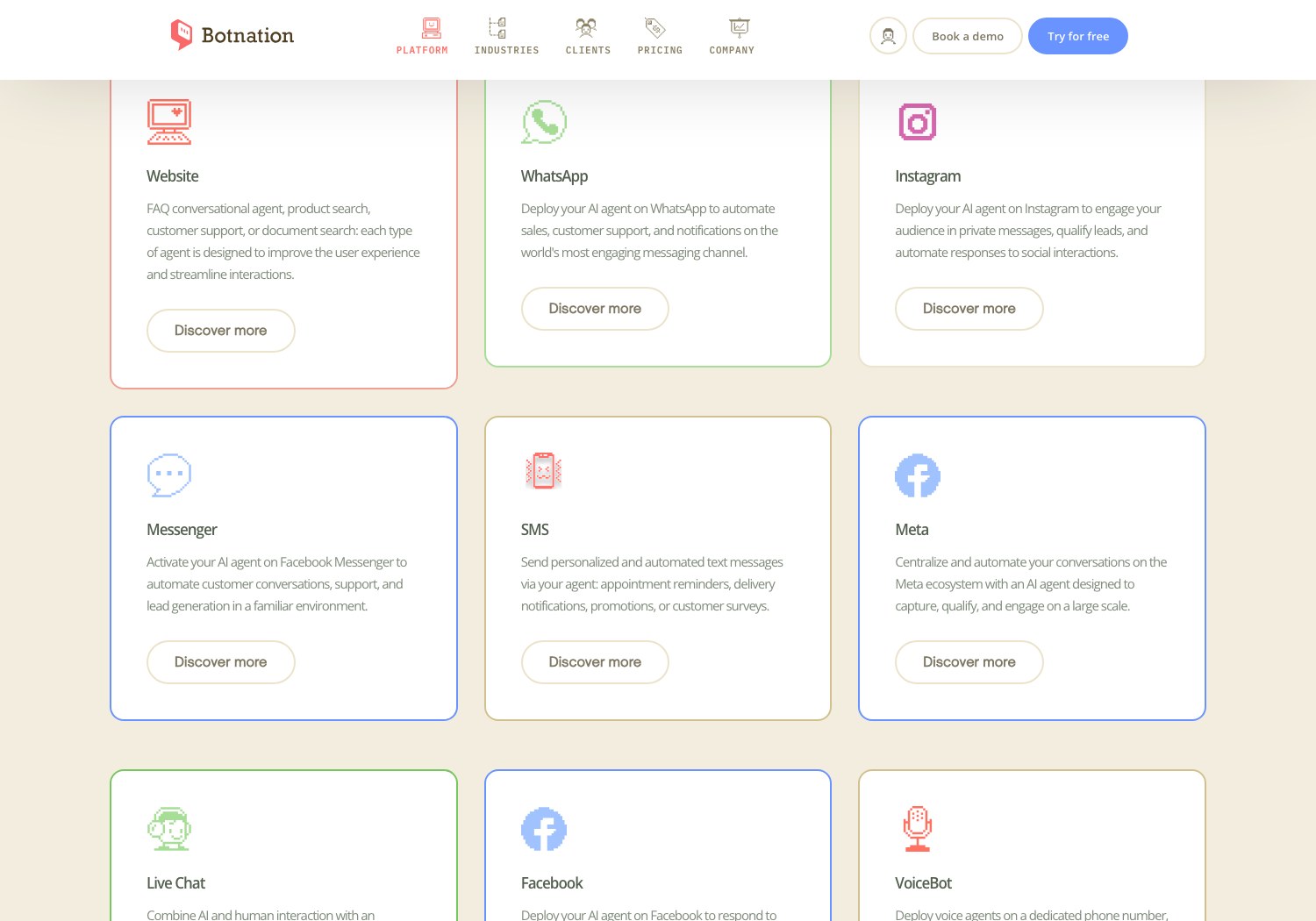
That choice draws the real complementarity. A native Discord bot is a technical product: token, hosting, intents, maintenance, everything rests on you. A support or sales chatbot on customer channels is built differently: scenarios and the answer base are designed in an editor, connections to your tools go through ready-made mechanisms, such as the webhook we detail in our article on the chatbot webhook, and hosting no longer concerns you. On the budget side, Botnation’s public price list (taken on August 26, 2026, prices excluding tax) runs from the free 0 € plan to the BASIC plan at 39 € per month and PRO at 59 € per month, with credit packs for traffic peaks; the Enterprise offer is quoted on demand, and our chatbot creation experts build the bot with you, then leave you in control in the editor. Prices change: take a fresh reading of the list before any decision.

And if your world genuinely straddles the two, meaning a community on Discord and customers on classic channels, then the arbiter’s « hybrid » rule applies: a single knowledge base, two doors. The native Discord bot will serve the community; the multichannel chatbot will serve the customers; and both will gain from sharing the same FAQ, the same tone and the same rules for handing over to a human.
That shared base, by the way, should be run like a product: one clearly owned master file, identified update triggers (a new offer, a price change, a recurring support incident), and a periodic review of the most-served answers. Bots do not age out because of technology; they age out through their base: that is what people let grow old, and it is in its name that the bot answers wrongly wi
The bottom line
« Discord chatbot » is a builder’s query, but it is a channel decision. The mechanics are accessible (application, token, permissions, intents), privileged intents make it a serious project as soon as the bot reads messages, and the real costs are those of ownership: development, hosting, maintenance, human community work. If your community lives on Discord, the native bot is justified and the five steps are enough to start cleanly. If your goal is support, sales or leads, your customers are elsewhere, and that is where your chatbot will pay off: on the web, WhatsApp, Messenger or Instagram. And if doubt remains, measure the audience before coding: it is the cheapest bet of all.
Your customers are on the web, WhatsApp or Messenger?
Tell us your volumes and your channels: our chatbot creation experts will answer, or start for free on the platform, and deploy your chatbot where your customers already are.
Sources and readings: Discord’s official company page consulted on September 1, 2026 (timeline, « 90M+ Daily Active Users » internal data for the fourth quarter of 2025, « 90 %+ play video games » 2025 user survey, API opened in 2016); official Discord developer documentation consulted on September 1, 2026 (quick-start guide: application creation, token, OAuth2 scopes, install link; « Gateway » page: privileged intents, 100-server and 10,000-user thresholds, annual review); the « discord chatbot » results page taken on September 1, 2026; Botnation’s « channels », « integrations » pages and webhook support documentation consulted on September 1, 2026; Botnation’s price list taken on August 26, 2026 (prices excluding tax, shown in euros). Third-party platform names are quoted in plain text, without links, per this article’s policy. Third-party figures change: take fresh readings before any decision.
FAQ: the questions everyone asks about Discord chatbots
Is creating a Discord chatbot free?
Discord publishes no price list for bots: the real cost lives in development, always-on hosting, maintenance and human community work (see the section « What a Discord bot really costs »). A zero budget does not really exist: at the very least, it is your time and that of hosting that runs continuously.
Can you build a Discord bot without coding?
There are third-party no-code tools for configuration bots (basic moderation, roles, welcome messages): they are named in plain text but we do not link to them here. For a conversational chatbot in your own image, those templates quickly reach their limits: the value lies in your answer base, and that is what a no-code platform lets you edit on your own channels.
Can a Discord bot read all messages?
No, not by default. Without the « message content intent », a privileged intent, the bot receives empty fields for the text of ordinary messages. Enabling it is done from the developer portal for small applications, but requires verification with approval beyond 100 servers, and an annual review beyond 10,000 users (developer documentation, consulted on September 1, 2026).
Can Botnation deploy a chatbot on Discord?
No, and the article owns it: Botnation’s channel list covers the website, WhatsApp, Instagram, Messenger, SMS, Meta, live chat, Facebook, the voicebot, the web widget and WordPress, with no Discord (screenshot taken on September 1, 2026 in the article). For a Discord project, the native mechanics described here are the way; for a support or sales chatbot, our channels cover most customer contacts.
What is the difference between a Discord bot and an AI chatbot?
The bot is the technical shell: an automated account invited into a server, which reacts to events. The AI chatbot is what you put inside it: the ability to understand a question in natural language and answer from a knowledge base. The same bot can therefore be a simple role automation or a true conversational assistant.
How long does it take to build a Discord bot?
It depends on the scope, and no serious public figure answers it in days. The five official steps are quick to walk through for a minimal bot that reacts to commands; real time is consumed by the answer base, edge cases, hosting and maintenance, exactly the items this article’s arbiter makes you consider before starting.